

An effective RFI does one thing: it asks a single, well-documented question and hands the reviewer a proposed fix, so there's nothing left to interpret. The one rule that matters most is this: one issue per RFI, tied to exact drawing sheets or spec sections. Follow that, and you get faster answers and a paper trail that protects your change-order rights.
TL;DR:
- RFIs should address only one issue per question, referencing exact drawings or spec sections to facilitate quick, clear responses.
- Submit RFIs when mistakes could cause significant delays, costs, or rework, such as conflicting plans, unclear scope, or unexpected field conditions, rather than for minor ambiguities.
- Include a proposed fix and impact estimate in your RFI to speed review and protect your change-order rights without assuming responsibility for costs.
- Organize and manage RFIs in a dedicated log with clear status updates, escalation steps, and response deadlines to prevent delays and ensure proper follow-up.
- Use software tools to track RFIs digitally, attach relevant plans or photos, and automate reminders, reducing response time and avoiding missed or forgotten questions.
Table of Contents
- What Is an RFI and Why Does It Matter on the Job?
- When Should You Actually Submit an RFI?
- Step-by-Step RFI Writing Checklist for Trade Subs
- Common RFI Mistakes That Slow Everyone Down
- RFI Templates You Can Copy Today
- Keeping an RFI Log So Nothing Ages Out
- How to Propose Fixes Without Giving Away Your Change-Order Rights
- Field-Tested RFI Habits That Cut Volume in Half
- Treat RFIs Like Schedule Insurance
- Speed Up Your RFI Closures With Subascent
- Sources
- FAQ
What Is an RFI and Why Does It Matter on the Job?
A Request for Information, or RFI, is a formal-written question you send to the architect, engineer, or owner's representative when the contract documents are unclear, conflicting, or missing something you need to build the work. It's not a phone call. It's not a text to the super. It's a dated, numbered document that becomes part of the project record, and that distinction matters more than most subs realize until they're in a dispute.
Informal conversations disappear. Someone remembers a hallway chat differently than you do, and six months later nobody can prove what was actually agreed to. An RFI creates a timestamp. It shows you flagged a problem, when you flagged it, and what answer you got. That record is often what separates a contractor who gets paid for extra work from one who eats the cost.
RFIs also connect directly to your change-order rights. Courts have long recognized, going back to the Spearin doctrine, that a contractor isn't responsible for defects in design documents it was required to follow. But that protection only works if you documented the conflict at the time, asked a clear question, and got a written response. An RFI is how you build that record as you go, not after the job's already lost money.
A well-built RFI typically covers three things at minimum:
- The exact drawing sheet, detail number, or spec section that's unclear or in conflict
- A single, specific question the reviewer can answer without guessing your intent
- Your proposed fix, along with any cost or schedule impact you can already see coming
Skip any of those three, and you've written a note, not an RFI.
When Should You Actually Submit an RFI?
Not every question deserves a formal RFI, and firing one off for every minor ambiguity clogs the log and slows down the questions that actually matter. Use this rule of thumb: if being wrong would cost real money, time, or rework, submit. If a two-minute conversation with the foreman resolves it, don't.
Here's how to decide in practice:
- Drawing conflicts. The electrical plan shows a panel location that collides with the structural plan's beam. That's a submit, every time, because guessing wrong means moving equipment after it's installed.
- Spec gaps. The spec calls out a fire-rated assembly but doesn't specify the sealant type at a penetration. Submit, because the wrong sealant can fail inspection.
- Unexpected field conditions. You open a wall and find plumbing where the drawings show none. Submit immediately, with photos, because this almost always leads to a change order.
- Genuine ambiguity in scope. The spec says "provide and install" but the drawings show existing equipment. Submit rather than assume.
Skip the RFI when the answer is already in the documents you haven't fully read, when it's a coordination question your own PM can resolve with the GC's super, or when the cost of guessing wrong is trivial. Submittals belong in the submittal process, not buried inside an RFI question.
Step-by-Step RFI Writing Checklist for Trade Subs
Every field on your RFI form exists to answer a question the reviewer will ask before they answer yours: what are you looking at, what's the problem, and what do you think should happen. Build the RFI in that order and you cut days off the response.
Start with the header fields. These sound obvious, but half the delay on a bad RFI comes from a reviewer having to hunt for basic facts:
- Project name and number
- RFI number (sequential, never reused, ideally tied to your trade prefix, like "ELE-014")
- Date submitted and date needed by
- Sender and recipient names, not just company names
- Spec section or drawing reference, cited exactly
Cite the exact document. Don't write "the electrical drawings are unclear." Write "Sheet E-302, Detail 4, conflicts with Sheet S-201 column grid at C.5." A precise reference to the drawing sheet, detail number, and spec section lets the reviewer pull up the exact page instead of paging through the whole set guessing at what you mean.
Ask one question. Bundling three issues into one RFI because you're "already writing it anyway" is the single most common way subs slow their own responses down. Reviewers answer the easy question first and stall on the hard one, and now your whole RFI sits open. The one-question-per-RFI habit alone will speed up your average turnaround more than any other change you can make.
Write background for someone who wasn't there. The architect reviewing your RFI didn't walk the site with you this morning. State what you found, where, and why it conflicts with the documents, in two or three sentences, no more.
Propose your fix. This is the field most subs skip, and it's the one that shortens review time the most. Instead of asking "how should we proceed," write "recommend relocating the panel 18 inches east to clear the beam; confirm or advise alternative." A yes/no question moves faster than an open-ended one.
Note the impact, even roughly. If the fix adds cost or time, say so in one line: "Estimated 2-day schedule impact if resolution isn't provided by [date]." This is not a change order yet. It's a flag.
Attach a marked-up plan. A photo with a red circle and a note beats three paragraphs of description every time.
Pro Tip: Tie your "needed-by" date to an actual schedule activity, not a round number like "5 business days." Write "needed by 3/10 to avoid delaying rough-in start" instead of "ASAP." Reviewers prioritize dates that are tied to consequences.
Common RFI Mistakes That Slow Everyone Down
Bad RFIs don't just delay one answer. They clog the whole log and train reviewers to deprioritize your submissions because they know they'll have to ask follow-up questions anyway.
Vague versus precise. Compare these two:
- Weak: "The HVAC drawings don't match the electrical drawings in the mechanical room. Please advise."
- Strong: "Sheet M-401 shows a 4-ton unit at Grid D.2; Sheet E-205 shows circuit sizing for a 3-ton unit at the same location. Confirm unit tonnage before we order equipment."
The second version tells the reviewer exactly where to look and exactly what decision they're making. The first makes them do your homework first.
Bundling unrelated questions. If you've got three separate conflicts, write three separate RFIs. Yes, it feels like more paperwork. It's actually less, because a bundled RFI sits open until every sub-question gets answered, while three clean ones can close independently as each gets resolved.
Adversarial tone. Skip phrases like "as previously stated" or "per our contract, you are obligated to." An RFI isn't the place to argue the contract. The goal is a technical answer, not a fight, and reviewers respond faster to a plain, professional ask than to one that reads like the opening move in a claim.
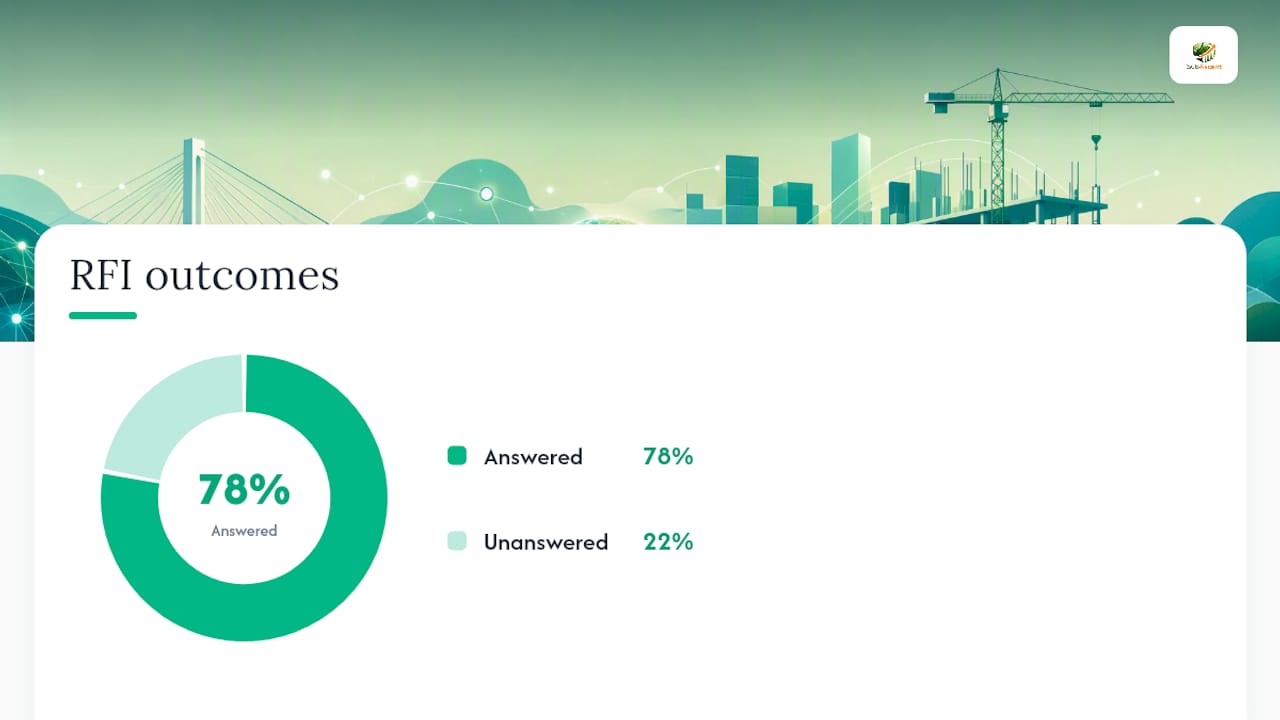
Median RFI response time across the industry sits around 9.7 days, and roughly 22% of RFIs never get a formal answer at all. Vague or bundled RFIs are disproportionately represented in that unanswered 22%, because reviewers deprioritize the ones that require the most follow-up work.
Before you hit send, run this quick check:
- Does it ask exactly one question?
- Does it cite an exact sheet, detail, or spec section?
- Does it propose a solution?
- Is the tone plain, not accusatory?
- Is there a real needed-by date?
For a longer breakdown of the habits that create these delays, Subascent has covered the most common RFI workflow mistakes subs run into on live jobs.
RFI Templates You Can Copy Today
You don't need to build this from scratch. A one-page RFI form, filled out in the right order, covers almost every situation a trade sub runs into.
Standard RFI form fields, in order:
- Project name and number
- RFI number and date
- Submitted by / submitted to
- Response needed by
- Reference (drawing sheet, detail, spec section)
- Question (one, specific)
- Contractor's proposed solution
- Cost/schedule impact (if known)
- Attachments
Many project teams still build on the AIA G716 form or a close variant of it, so using those field names keeps you consistent with what GCs and architects already expect.
Sample filled RFI, HVAC trade:
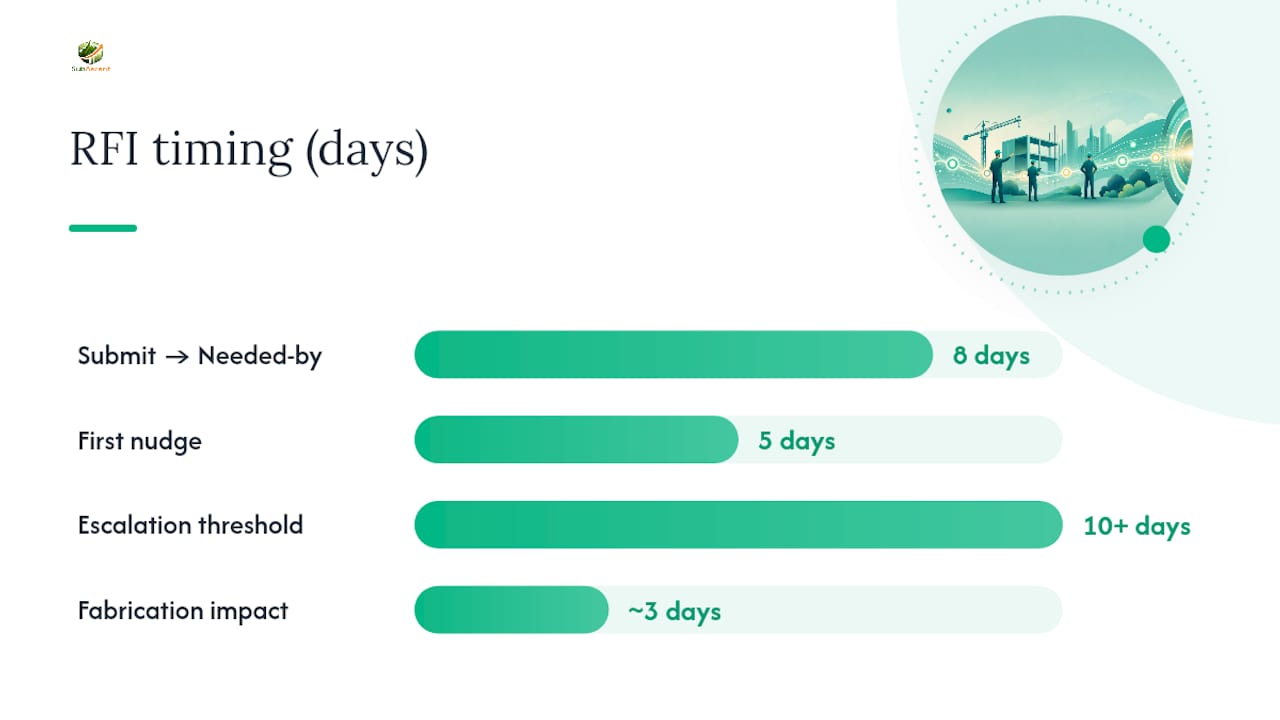
RFI #HVA-022 | Project: Riverside Medical Office Building Submitted to: ABC Architecture, Attn: J. Ramirez | Needed by: 3/18/2026 Reference: Sheet M-401, Detail 6; Sheet A-210 Question: Detail 6 shows a 26-inch supply duct routed through the ceiling cavity at Grid B.4, but Sheet A-210 shows a structural beam at the same location with only 18 inches of clearance. Please confirm routing. Proposed solution: Recommend rerouting duct to 22-inch flat oval to clear beam without ceiling height change. Confirm or advise alternative. Impact: If not resolved by 3/18, ductwork fabrication for this run will delay by approximately 3 business days.
Two follow-up email templates:
Subject line format: "RFI #[number] Follow-Up: [Project] — Response Needed by [Date]"
First nudge (day 5 of no response): "Following up on RFI #HVA-022, submitted 3/10. We need a response by 3/18 to keep ductwork fabrication on schedule. Let me know if you need anything else from us to close this out."
Escalation (day 10+): "RFI #HVA-022 is now 10 days past its needed-by date. This is starting to affect our rough-in schedule. Can we get a response today, or should I escalate to the GC's PM?"
For a field-level version foremen can use to submit RFIs directly from the jobsite, see the field RFI submittal process guide.
Keeping an RFI Log So Nothing Ages Out
An RFI you can't find is an RFI that's costing you money, so adopting an efficient workflow for managing multiple renovation bids can keep your RFIs organized and accessible. A log doesn't need to be fancy, but it needs to exist, and it needs to be checked weekly, not just when someone remembers.
| Log field | Purpose |
|---|---|
| RFI number | Unique, sequential, trade-prefixed |
| Date submitted | Starts the clock |
| Needed-by date | Tied to a real schedule activity |
| Status | Open, answered, overdue, escalated, closed |
| Days open | Calculated, flags aging items |
| Cost/schedule impact flagged | Yes/no, feeds change-order tracking |
| Response summary | One line, so the field doesn't need to dig for the PDF |
Set a realistic turnaround target rather than an aspirational one. Given that the industry median sits near 9.7 days for an actual response, a target of 5 to 7 business days is aggressive but workable if your RFIs are well-written. Anything sitting past 10 business days with no response should trigger an automatic escalation, not a "we'll get to it."
Build a simple escalation ladder:
- Day 5 past needed-by: polite email nudge to the original recipient
- Day 10 past needed-by: copy the GC's project manager
- Day 15 past needed-by: written notice referencing potential schedule impact
Once an answer comes back, get it to the crew the same day, not at the next weekly meeting. A resolved RFI sitting in a PM's inbox for four days before reaching the foreman defeats the entire point of asking fast. For more on cutting the aging problem specifically, see Subascent's guide to closing RFIs under 7 business days.
How to Propose Fixes Without Giving Away Your Change-Order Rights
The "proposed solution" field does double duty: it speeds up the reviewer's decision, and it puts your suggested fix on the record in case that fix turns into billable extra work later.
Phrase your proposed solution as a recommendation, not a commitment to eat the cost. "Recommend rerouting duct to clear beam; confirm or advise alternative" leaves the door open. "We will reroute the duct" does not, and can be read later as you volunteering to absorb the cost of a design error that wasn't yours.
When you flag cost or schedule impact, use tentative language backed by a number where you can: "Estimated 2 to 3 day schedule impact and possible material cost increase; formal change order to follow if directed." That sentence does three things. It puts the GC on notice, it doesn't lock you into a number you haven't priced yet, and it references the same document you'll need when the change order lands.
A few habits protect you here:
- Reference the RFI number directly in any change-order paperwork that follows: "Per RFI #HVA-022, response dated 3/19, contractor was directed to reroute ductwork."
- Never treat an RFI answer as authorization to proceed on added cost or scope. An answer that resolves a technical question is not the same as a signed change order, and plenty of subs have done extra work assuming otherwise, only to fight for payment later.
- Keep the RFI and its response attached to your change-order file from day one, not reconstructed after the fact.
Field-Tested RFI Habits That Cut Volume in Half
Most of the RFIs that slow a job down were preventable a week earlier. Running a 3-week look-ahead specifically for RFI risk, not just manpower and material, catches conflicts before they become field delays. Walk the drawings for the next three weeks of work and flag anything that looks like it'll generate a question, then submit it now instead of when the crew is standing there waiting.
On a typical trade crew, the split works best this way: the foreman drafts the raw question and photo from the field, the PM or estimator refines the reference citations and proposed fix, and the office admin logs it and owns the follow-up cadence. Nobody should be doing all three jobs alone if the crew is big enough to split it.
Number RFIs by trade prefix and sequence (ELE for electrical, MEC for mechanical) so a search for "ELE" pulls every electrical RFI on the job instantly. Two changes worth making this week: start the 3-week look-ahead review in your next crew meeting, and stop letting foremen text questions to the PM instead of submitting a numbered RFI, even an ugly one, which at least keeps preinstall issues visible and tracked instead of lost in a phone thread.
Pro Tip: Keep a running "RFI candidates" note during your 3-week look-ahead walk. Half of what you flag will resolve itself once you read the spec section again carefully; the other half becomes a clean, early RFI instead of a panicked one.
Treat RFIs Like Schedule Insurance
RFIs aren't paperwork overhead. They're what stands between you and eating a design error's cost. The subs who write tight, single-issue RFIs with a proposed fix get answers in days. The ones who write vague, bundled questions wait weeks, and often end up funding the delay themselves.
Your 7-day action plan: pick your three most active RFIs right now, check whether each asks one question with an exact reference, and rewrite any that don't before you send another one.
— Dave
Speed Up Your RFI Closures With Subascent
There are software platforms that let specialty trade subs log, attach, and track every RFI instead of chasing PDFs across email threads and shared drives.

Some platforms keep a live RFI log tied to the job, let users attach marked-up plans and photos directly to the record, and send automatic reminders when a response is aging past a target turnaround. That means fewer RFIs falling through the cracks and less time spent reconstructing a change-order timeline after the fact. It can work alongside estimating and job-tracking tools commonly used for electrical, HVAC, masonry, roofing, and other trades, so RFI history sits next to the budget and schedule it affects. If you're still tracking RFIs in email and spreadsheets, start a free trial at Subascent and get your next batch of open RFIs into a system built for how sub trades actually work.
Sources
- How to Write an RFI in Construction: Step by Step - LegalClarity
- Construction RFI template - Autodesk blog
- Request for Information (RFI) — HubSpot blog summary
FAQ
What are the most common RFI mistakes?
The biggest ones are asking vague questions instead of citing exact sheets or spec sections, bundling multiple unrelated issues into one RFI, and using adversarial language that invites a slower, more defensive response.
Is there a standard RFI template?
Yes. The AIA G716 form is the most widely referenced standard, and most project management platforms, including Subascent, build their RFI fields around the same core structure: reference, question, proposed solution, and impact.
What should an RFI checklist include?
At minimum: project and RFI numbers, dates, an exact document reference, one specific question, a proposed solution, noted cost or schedule impact, and any supporting attachments like marked-up plans or photos.
What does a good RFI example look like?
A strong RFI cites an exact drawing conflict, such as a duct routing detail clashing with a structural beam location, asks one clear question about how to resolve it, and proposes a specific fix for the reviewer to confirm or redirect, rather than leaving the decision entirely open-ended.