

Most foremen on electrical, plumbing, and framing crews are still logging hours by hand. That paper timesheet pinned to the job trailer door seems harmless enough until you get a payroll dispute, a wage claim, or a GC asking for certified payroll you cannot fully account for. Understanding how foremen track crew hours is the first step toward fixing a system that quietly costs trade businesses real money. This article covers every method from paper to GPS geofencing, with honest takes on what actually works for specialty trade crews of different sizes.
Table of Contents
- Key Takeaways
- How foremen track crew hours: manual methods and their limits
- Digital time clock apps for tracking crew hours
- Advanced tracking: GPS geofencing and biometric verification
- Choosing the right method for your crew size
- Best practices for accurate and compliant crew tracking
- My take on what actually makes crew tracking work
- Start tracking crew hours the easy way
- FAQ
Key Takeaways
| Point | Details |
|---|---|
| Manual methods carry real risk | Paper timesheets and spreadsheets have error rates of 1%–8% and create serious payroll fraud exposure. |
| Digital apps pay for themselves | Time clock apps at $2–8 per user per month eliminate double entry and reduce payroll errors by up to 80%. |
| Foreman-led entry works best | One foreman clocking in a crew by PIN is faster and more reliable than asking every worker to self-report. |
| Match method to crew size | Small crews under five can manage with spreadsheets, but teams of five or more need a digital solution. |
| Tracking data is profit data | Logging hours by task code gives you real-time budget vs. actual visibility before a job goes sideways. |
How foremen track crew hours: manual methods and their limits
Walk any active roofing, concrete, or drywall job site and you will find the same scene. A paper timesheet tacked to a clipboard, workers scribbling in their own hours at the end of the shift, and a foreman who trusts everyone is telling the truth. It is a system built on good faith, and good faith has a dollar amount attached to it.
The paper timesheet problem
Paper timesheets are cheap, require no technology, and take about ten seconds to set up. That is the entire case for them. On the downside, handwriting is illegible, sheets go missing, and there is zero audit trail if a worker disputes what they turned in. More seriously, buddy punching costs U.S. businesses an estimated $373 million annually. On a small insulation or low-voltage crew, that adds up faster than most owners realize.
The spreadsheet upgrade that is not much of an upgrade
Moving crew hours into a spreadsheet feels like progress. You get totals without a calculator, and you can email the file to the office. But someone still has to type every number in manually, and manual time tracking carries error rates between 1% and 8%. On a 10-person masonry crew earning $30 an hour, even a 2% error rate is a meaningful payroll discrepancy every single week.
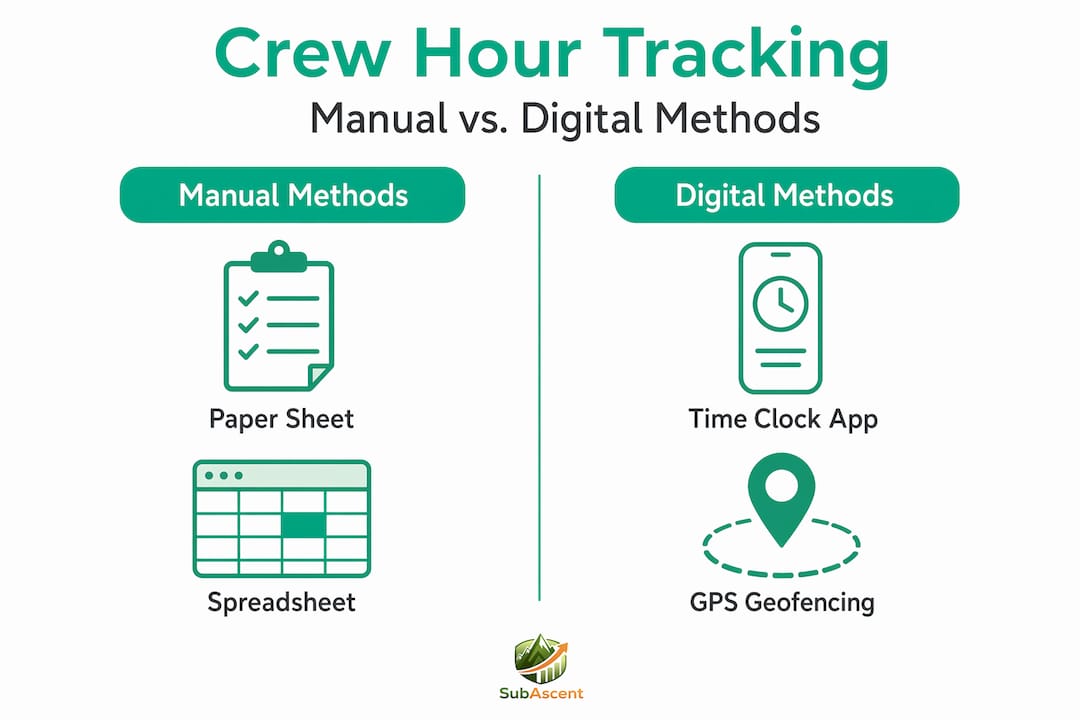
The other problem with spreadsheets is double entry. A foreman records hours in the field spreadsheet, then office staff re-enter that data into QuickBooks or whatever payroll system the company runs. Double-entry errors from this handoff cause synchronization problems and delays that ripple into invoicing and job costing. Manual overtime calculations are another trap. Miss a threshold, and you are looking at a wage violation.
Pro Tip: If you are still using paper or spreadsheets, at minimum require a foreman signature and a second crew member's signature on every timesheet. It will not eliminate fraud, but it gives you a defensible paper trail if a dispute goes to a labor board.
Scheduling conflicts tied to manual timesheets are a known downstream problem. When hours are tracked in a silo with no connection to scheduling, crews end up double-assigned or missing from jobs entirely. That connection between scheduling and timesheets is where manual systems break down hardest.
Digital time clock apps for tracking crew hours
A mobile time clock app is not a big software project. For most foremen, it is an app on a phone or tablet that replaces the clipboard. The difference in output is significant. Here is how digital tools change the day-to-day of tracking crew hours methods.
- Real-time data. When a worker clocks in, that timestamp lives in a cloud system. The office sees it immediately. No waiting on the foreman to email a spreadsheet Friday afternoon.
- GPS verification. The app records where the clock-in happened. If someone clocks in from their truck two miles from the job site, you see that. This is especially useful for roofing and painting crews working across multiple locations.
- Automatic overtime alerts. The system flags when a worker is approaching 40 hours or the daily overtime threshold in your state. You address it before it becomes a payroll problem, not after.
- Foreman-led entry. Many apps support a mode where the foreman holds the device and clocks in each crew member using a unique PIN. This matters on HVAC and fire protection crews where not every worker has a smartphone or reliable data. Foreman-led time entry is faster than individual clock-ins and keeps accountability at the right level.
- Payroll integration. Hours flow directly into your payroll or accounting system. Integrating time tracking with scheduling and payroll eliminates the manual reconciliation step that generates most payroll errors.
Cost is a common concern for small trade subs. Digital time clock apps typically run $2–$8 per user per month. On a crew of eight, that is $16–$64 per month. Compare that to one payroll error or one wage dispute and the math is easy.
On the privacy side, be upfront with your crew. Tell them what data is collected, when location tracking is active, and what it is used for. Workers who understand the system are far less resistant to it than workers who feel surveilled without explanation.
Pro Tip: Start with foreman-led entry if your crew is resistant to tracking apps. The foreman handles the device, workers clock in by PIN, and the friction drops to near zero.
Advanced tracking: GPS geofencing and biometric verification
For larger trade operations or jobs where fraud risk is higher, GPS geofencing and biometric clocks take tracking accuracy to another level.
| Method | How it works | Cost | Best for | Limitations |
|---|---|---|---|---|
| GPS geofencing | Clock-in is only allowed within a defined radius of the job site | $2–$6 per user/month | Mobile crews across multiple sites | Requires smartphone; GPS can drift indoors |
| Biometric clock | Fingerprint or face scan at a fixed terminal | $200–$1,500 per unit | Fixed locations like a fabrication shop | Hardware cost; not practical for field-only crews |
| PIN-based app | Foreman enters PIN for each worker | Included in most apps | Any crew size, especially mixed device access | Relies on foreman discipline |
GPS geofencing and biometric methods are more accurate than paper or spreadsheets and reduce fraud significantly. Geofencing eliminates the possibility of clocking in from home or from the truck. On a steel or rebar crew where workers rotate across a large commercial site, geofencing boundaries can be set to specific zones so labor cost is allocated to the right work area.
Biometric clocks make the most sense for a shop or warehouse setting, not a field crew moving from site to site every week. The hardware investment is real, and lugging a biometric terminal to a residential framing job is not practical.
What both of these methods deliver is audit defensibility. If a worker disputes their hours or a GC requests certified payroll, you have a timestamped, location-verified record that holds up. That is worth more than it sounds when a contract dispute turns legal.
Choosing the right method for your crew size
Not every HVAC crew or glazing team needs GPS geofencing. Matching the tracking method to your team size and job context is how you get adoption without overspending.
Small crews under five workers
At this size, a well-formatted spreadsheet with a consistent approval workflow is manageable. The key is discipline. Use a standard template, require foreman sign-off daily, and send it to the office the same day. Small teams of five or fewer can viably use paper or spreadsheet tracking before the overhead of digital tools pays off.
Medium crews from 5 to 15 workers
This is the range where manual tracking breaks down fastest. More workers means more chances for error, more overtime to calculate, and more payroll lines to reconcile. A basic time clock app solves most of these problems for under $100 per month.
Here is what you gain by going digital at this size:
- Foreman spends less time on paperwork and more time supervising work
- Office staff get hours automatically, not in a Friday afternoon email
- Overtime alerts prevent surprise payroll spikes
- Real-time labor data helps foremen manage helpers and trade workers more effectively across the site
Large and mobile crews over 15 workers
At this scale, GPS verification and integration with your project management system are not optional extras. They are how you stay in control. Compliance and payroll gaps from manual tracking grow exponentially with team size, and multi-site teams need real-time visibility that a clipboard simply cannot provide.
Subascent's CrewTrack App is designed as a free, practical starting point for foremen at any of these stages. It keeps setup simple and gives foremen the foreman-led clock-in method that works for crews with mixed device access.
Best practices for accurate and compliant crew tracking
Getting the technology right is half the job. The other half is how you run the process around it. These habits are what separate foremen with clean payroll records from foremen who spend Friday afternoons arguing about who worked what.
- Standardize your timesheet format. Whether digital or paper, every record should include start time, end time, job number, and a foreman signature. Standardized timesheets with signatures reduce disputes and provide legal defense against wage claims. This is your protection if a worker takes a complaint to the labor board.
- Communicate your tracking policy clearly. Tell your crew at the start of a job exactly how hours are recorded, when GPS is active, and what happens if someone misses a clock-in. Transparency eliminates resentment.
- Use real-time dashboards to catch overtime early. Do not wait until Thursday to realize someone hit 38 hours on Wednesday. Address it before the overtime clock starts, not after. Many apps notify you automatically.
- Log hours by task code, not just by day. This is the move that turns your timesheet into a job costing tool. When you know that your flooring crew spent 14 hours on substrate prep instead of the 8 hours budgeted, you can flag the budget overrun before it compounds. Logging task codes with hours enables real-time labor cost monitoring that helps control budgets proactively.
- Train foremen, not just owners. The foreman is the last line of accuracy before hours hit payroll. A 30-minute walkthrough of whatever system you use pays back every week.
Pro Tip: Accurate timekeeping improves crew satisfaction. Workers who trust they are being paid correctly for every hour they work are less likely to inflate their own records and less likely to leave. Fair pay from precise records is a retention tool, not just a compliance requirement.
My take on what actually makes crew tracking work
I have watched foremen on plumbing and electrical crews do heroic things on the job site and then completely fumble the timecard. Not because they are careless. Because at the end of a 10-hour day, filling out paperwork is the last thing anyone wants to do, and the system the company gave them makes it harder than it needs to be.
The biggest mistake I see is treating time tracking as a compliance checkbox instead of a management tool. If all you are doing is capturing hours for payroll, you are leaving half the value on the table. The foremen who use tracking data well are the ones checking budget vs. actual mid-week and adjusting crew allocation before a job bleeds out.
My strong opinion: foreman-led entry is the right model for most specialty trade crews. One person, one device, crew clocks in by PIN. It takes two minutes, the foreman controls the record, and you do not have to trust that every apprentice remembered to tap their phone before they drove home.
I also think crews resist tracking tools a lot less than owners expect. The resistance usually comes from how the rollout is handled, not from the technology itself. Be straight with your crew about what is tracked and why. Most workers want accurate paychecks. That shared interest makes adoption easier than the anxiety around it suggests.
Start simple. A free tool like Subascent's CrewTrack App gets you off paper without a big commitment. Once your crew is used to clocking in digitally, adding task codes or GPS verification is a small step, not a complete overhaul.
— Dave
Start tracking crew hours the easy way
Subascent built the CrewTrack App specifically for foremen and project managers at specialty trade subs who need a fast, no-friction way to log crew hours. It is free to use, runs on any mobile device, and supports the foreman-led clock-in model that works for electrical, HVAC, roofing, and concrete crews alike. No per-seat fee to get started. No lengthy setup. You can have your crew clocking in digitally on the next job.
CrewTrack connects to Subascent's broader job and bid management platform so your hours feed into job costing, scheduling, and reporting without a separate data entry step. If you are done watching payroll hours disappear into a clipboard, this is where to start.
FAQ
How do foremen track crew hours on small job sites?
On small crews of five or fewer, paper timesheets or spreadsheets with daily foreman sign-off are common. For better accuracy and less payroll friction, a free app like Subascent's CrewTrack handles clock-ins by PIN without requiring every worker to have a smartphone.
What is buddy punching and how do you stop it?
Buddy punching is when one worker clocks in for another who is not on site. It costs U.S. businesses an estimated $373 million annually. GPS geofencing and biometric verification both prevent it by requiring the actual worker to be physically present at the job site.
How accurate are digital time clock apps compared to paper?
Automated time tracking reduces payroll errors by up to 80% compared to manual methods. Paper and spreadsheet tracking carry error rates between 1% and 8%, which adds up to real payroll dollars on any crew over a handful of workers.
Do all crew members need smartphones to use a time tracking app?
No. The foreman-led entry model lets the foreman hold one device and clock in each crew member using a unique PIN. This approach works well on HVAC, masonry, and fire protection crews where not every worker carries a smartphone or has reliable data on site.
What data should a foreman capture on every timesheet?
At minimum: worker name, job number, start time, end time, and foreman signature. Adding task codes per the work performed turns timesheets into job costing data and gives you legal protection against wage claims if disputes arise.