

An AIA payment application is the standardized form set, usually G702 paired with G703, that a contractor or subcontractor submits to request progress or final payment on a job. For subs filing your own paperwork, that pair often becomes G702S and G703S, the versions built specifically for the contractor-subcontractor relationship. The bottom line: your numbers must match your continuation sheet exactly, because the architect certifies the amount before the owner pays and any mismatch stalls that certification.
Every pay app, no matter the trade, needs to show three things clearly:
- The total contract sum, including any approved change orders
- Work completed to date, broken out by line item
- The current amount due after retainage and previous payments are subtracted
Key Takeaways
A correctly filed AIA payment application depends on G703 line-item math matching the G702 summary exactly, before the architect will certify it for payment.
| Point | Details |
|---|---|
| Build G703 before G702 | Prepare the continuation sheet first so summary totals roll forward without mismatches. |
| Know your form variant | Use G702S/G703S when filing independently as a sub, or supply backup for the GC's master application. |
| Attach everything upfront | Include stored-material invoices, lien waivers, and change order documentation with every submission. |
| Watch retainage math | Confirm your withheld percentage matches the contract before totals go to the architect. |
| Automate the roll-forward | Tools like Subascent handle retainage, versioning, and attachment tracking for recurring monthly pay apps. |
Table of Contents
- What Are G702 and G703, and What Do the Subcontractor Versions Add?
- How Do You Fill Out a Payment Application Correctly?
- How Should Subcontractors Handle G702S and G703S?
- What Documents Support a Payment Application?
- What Mistakes Get Payment Applications Rejected?
- Quick Checklist and a Simple Example Before You Submit
- How Software Handles the Roll-Forward for You
- Frequently Asked Questions
- Sources
What Are G702 and G703, and What Do the Subcontractor Versions Add?
G702, the Application and Certificate for Payment, is the cover sheet. It summarizes the job's financial position: contract sum, total completed and stored to date, retainage, prior payments, and the amount currently due. The architect signs it to certify that amount for the owner.
G703, the Continuation Sheet, is the detail behind that summary. It lists every line item from your schedule of values, tracks percent complete, and calculates the dollar value of work finished plus materials stored on site. Those line-item totals roll straight up into the G702 numbers.
Two variants matter if you're a sub filing independently:
- G702S–2017 and G703S–2017 are built for the contractor-subcontractor relationship, letting a sub submit a pay app that mirrors the format the GC uses upstream.
- Standard AIA form sets are designed to plug into prime contracts like the A101, so your numbers need to speak the same language as the GC's master schedule of values.
Using the recognized format matters more than it sounds. Architects, owners, and lenders all expect this layout, and deviating from it is a common reason applications get bounced back for missing information or unfamiliar formatting.
How Do You Fill Out a Payment Application Correctly?
Start with G703, not G702. The continuation sheet is where the real math lives, and building it first prevents the summary sheet from drifting out of sync.
- List every contract line item on the continuation sheet with its scheduled value.
- Enter percent complete and dollar value completed for each line, plus any materials stored but not yet installed.
- Verify change orders are logged and reflected in the adjusted contract sum before you touch totals.
- Roll the G703 totals into G702: contract sum to date, total completed and stored, retainage withheld, previous payments, and current amount requested.
- Apply retainage correctly. Some contracts hold a flat percentage on every application; others use variable retainage that steps down once the job crosses substantial completion.
- Sign and notarize if your contract requires it, then attach your backup documentation.
- Submit according to the deadline in your contract, not whenever the paperwork happens to be ready.
The contractor completes G703 first and then transfers the summary figures onto G702, which is the sequence AIA's own instructions walk through for the standard 1992 form set.
Pro Tip: Build the continuation sheet before you touch the summary page. Every time we've seen a pay app bounce back for bad math, it traced to someone filling in G702 totals from memory instead of pulling them off a completed G703.
How Should Subcontractors Handle G702S and G703S?
Whether you file G702S/G703S yourself or just feed numbers to the GC's version depends on why subcontractor relationships win more bids and how the GC runs their process. Some GCs want subs submitting their own G702S package; others just want your backup rolled into their master schedule of values.
- File G702S/G703S directly when your subcontract requires it or the GC asks for a matching format for their own upstream submission.
- Provide supporting detail only when the GC consolidates everyone's numbers into one master pay app. Give them line-item backup, stored-material invoices, and signed lien waivers.
- Keep your schedule of values aligned with the GC's breakdown structure. Mismatched line items are one of the fastest ways to get a request kicked back for clarification.
Pro Tip: Treat your first pay application as the master template. Get the formatting and schedule-of-values structure right on application one, and every month after that becomes a roll-forward instead of a rebuild.
What Documents Support a Payment Application?
Every pay app needs backup, and the certification path runs contractor to architect to owner, with each step depending on the previous one being clean. The contractor prepares the application, the architect certifies it, and the owner pays based on that certification. Missing attachments break that chain.
Common attachments include:
- The completed continuation sheet with schedule-of-values detail
- Invoices for any stored materials you're claiming but haven't installed yet
- Conditional or unconditional lien waivers, sometimes using AIA's own G706A affidavit format
- Certified payroll records, if your contract or a public project requires them
Retainage typically sits at a fixed percentage until the job hits substantial completion, then it may step down or release in full. Your contract sets the submission deadline, and the architect usually has a review window (often 7 to 10 business days) before certifying. Owner payment follows on its own schedule after that. Understanding where your money sits in this chain helps you plan cash flow instead of guessing at it.
What Mistakes Get Payment Applications Rejected?
Math errors between G703 and G702 top the list. If your continuation sheet total doesn't match the summary figure, the architect sends it back before certifying anything.
Missing signatures, skipped notarization, or incomplete lien waivers cause nearly as many delays. So does submitting late, or missing a contractual notice deadline for a change order that should have adjusted your contract sum weeks earlier.
A payment application is a living document that tells the story of the job's finances. When percent complete jumps too fast, or a stored-material claim shows up without an invoice, that's exactly what makes an architect stop and ask questions before signing off.
Watch for these red flags before you submit:
- A sudden, unexplained jump in percent complete on any line item
- Large stored-material claims with no invoice attached
- Change orders reflected in your billing that haven't been formally approved yet
- Retainage math that doesn't match your contract's stated percentage
Quick Checklist and a Simple Example Before You Submit
Before you send anything, run through this:
- Continuation sheet totals match the G702 summary line for line.
- Every change order is logged and approved, not just billed.
- Stored-material invoices are attached for anything claimed but not installed.
- Signatures and notarization (if required) are complete.
- Lien waivers match the payment amount being requested.
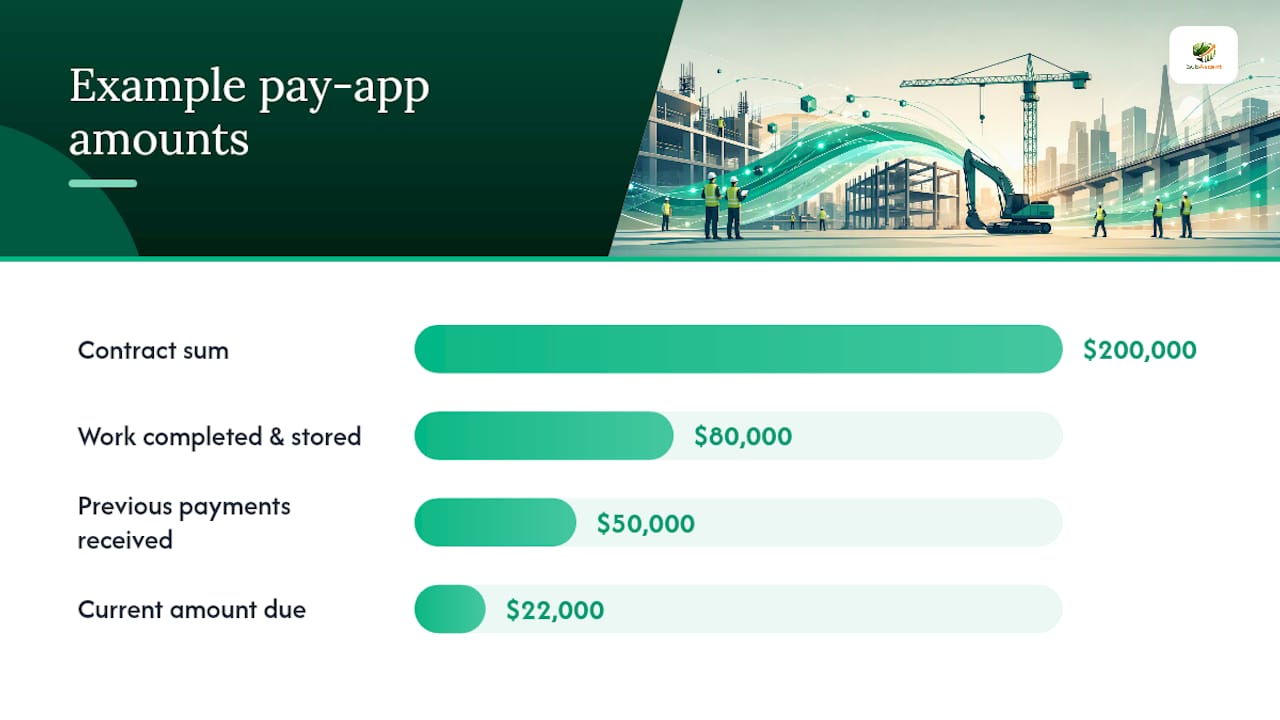
Here's a stripped-down example. Say your contract sum is $200,000. Work completed and stored to date comes to $80,000. If you've already received $50,000 in previous payments, your current amount due is $22,000. That's the whole roll-forward: completed value, minus retainage, minus what you've already collected.
Pro Tip: Email your backup documentation to the GC and architect the same day you submit the pay app. If a number gets questioned three weeks later, you want a paper trail showing exactly what you sent and when.
A practical note for trade subcontractors
Consistent templates save more headaches than any single form ever will. Get your first pay app right, format, schedule of values, attachments, and every one after that becomes a formality instead of a fight. Clean paperwork protects your cash flow more than any argument you'll ever win with a GC over the phone.

How Software Handles the Roll-Forward for You
Most of the pay app grind, retyping totals, checking retainage math, hunting down last month's numbers, is exactly the kind of repetitive work software handles better than a spreadsheet. Platforms built around AIA formats, including AIA's own Catina environment, can auto-populate G702 totals straight from your continuation sheet, roll previous values forward automatically, and apply your retainage percentage without you touching a calculator.

Subascent builds that same kind of automation into job and bid management made specifically for specialty trade subs, not general contractors. It tracks your schedule of values, keeps a version history of every pay app you've filed, and flags attachments before you submit instead of after the architect asks for them. If you're tired of rebuilding the same workbook every month, see how Subascent handles pay app workflows and start a trial to check it against your current process.
Frequently Asked Questions
What is an AIA payment application used for? It's the standardized request a contractor or subcontractor submits to get progress or final payment certified by the architect and paid by the owner.
What does AIA stand for in payments? AIA stands for the American Institute of Architects, which publishes the G702, G703, and related contract document templates used across the construction industry.
Do subcontractors need to use G702S and G703S specifically? Only if your subcontract or the GC's process requires an independent submission. Many subs simply supply backup data that feeds the GC's own G702/G703.
What's the most common reason a pay application gets rejected? Math that doesn't reconcile between the G703 continuation sheet and the G702 summary, usually from an unlogged change order or a stored-material claim missing its invoice.
Sources
For form-specific rules, start with AIA's own instructions on the G702 and G703 pair and the G702S subcontractor breakdown. AIA's store also carries supplemental templates like lien waiver forms for retainage releases.
- How to Complete the G702 Payment Application | AIA Contract Documents
- Instructions: G702®–1992, Application and Certificate for Payment
- G702/G703 forms: AIA billing and completing forms | Autodesk Construction Blog