

If you run an electrical, plumbing, or HVAC firm and you're closing jobs without knowing whether you actually made money, the problem usually isn't your crew. It's your cost tracking. Understanding what is job costing software and why it matters is the starting point for fixing that. When every dollar of labor, material, and overhead isn't attached to a specific job in real time, you're managing your business on guesswork. This guide explains how job costing software works, what it does for specialty trade subs, and how to put it to work from bid to final invoice.
Table of Contents
- Key takeaways
- What is job costing software and how does it work
- Key features and benefits for specialty trade subs
- Common job costing mistakes and how software prevents them
- Applying job costing software from bid to final invoice
- How to choose the best job costing software for your trade
- My take on job costing software after years in the trades
- See how Subascent handles job costing for specialty trades
- FAQ
Key takeaways
| Point | Details |
|---|---|
| Job costing tracks per-job costs | Allocating labor, materials, and overhead to each job shows exactly where money is made or lost. |
| Software automates cost capture | Real-time automation reduces missed expenses and manual data entry errors that hurt profitability. |
| Estimates vs. actuals drive decisions | Continuous budget-to-actual comparison lets you correct overruns before a job closes. |
| Historical data sharpens future bids | Stored job cost data improves estimate accuracy so each new bid is grounded in real numbers. |
| Trade-specific tools fit better | Software built for specialty subs handles their workflows without the complexity of GC-focused platforms. |
What is job costing software and how does it work
At its core, job costing is the practice of assigning every cost your company incurs to a specific job, rather than lumping expenses into general overhead. Job costing involves three core cost elements: direct materials, direct labor, and overhead. For a roofing sub, direct materials are the shingles and underlayment. Direct labor is the crew hours logged on that roof. Overhead covers things like vehicle depreciation, insurance, and your project manager's time.
Job costing software takes that concept and automates the tracking, allocation, and reporting of those costs at the job level. Job costing software centralizes expenses like labor, materials, equipment, and overhead to individual projects, giving you real-time visibility into profitability before a job closes. Instead of waiting until month-end to reconcile what a drywall job actually cost, you can see budget versus actual on any given Tuesday.
Here's how the three core cost elements break down for specialty trades:
| Cost Element | What It Includes | Trade Example |
|---|---|---|
| Direct materials | All materials purchased or used on a specific job | Conduit and wire for an electrical fit-out |
| Direct labor | Hours worked by field crew assigned to the job | Plumber hours on a commercial rough-in |
| Overhead | Shared costs allocated proportionally | Insurance, vehicle use, estimator time |
The software connects to your payroll system, your purchase orders, and your project management tools. When a framing crew clocks in against job #247, those hours post to that job automatically. When you buy lumber for the same job, that receipt attaches to the same cost code. Nothing falls through the cracks, and you're not chasing receipts at month-end.
Key features and benefits for specialty trade subs
The gap between a profitable masonry job and a break-even one often comes down to whether small costs were captured. Equipment rental for two extra days. The overtime your concrete crew worked on a Friday push. A change order that never got priced out. Good job costing software catches all of it.
Here's what to expect from a purpose-built job costing tool:
- Real-time cost tracking: Labor, materials, subcontractors, and equipment costs post as they happen, so your budget-to-actual reports reflect the current state of the job, not last week's picture.
- Integrated time tracking: Field crew hours log directly against job codes. Tracking crew hours on the job site through connected mobile tools removes the gap between what foremen scribble on paper and what actually hits your job cost report.
- Estimate-to-actual comparison: Your original bid becomes the baseline. Every cost entry is measured against it. You see the variance in dollars and percentage at any point during the job.
- Automated expense recording: Automation reduces errors and keeps data flowing consistently without someone manually keying every transaction.
- Historical cost reporting: Completed job data becomes a reference library for future bids. If your last three HVAC mechanical jobs ran 12% over on labor, your next estimate accounts for that.
- Integration with accounting tools: A solid job costing system connects to payroll and your accounting software so costs don't have to be entered twice.
Subascent builds simplified job costing directly into its platform, designed specifically for specialty trade subs. That means no bloated GC-focused interface to fight through. Just the cost tracking, reporting, and bid integration a plumbing or low-voltage firm actually needs.
Pro Tip: The most commonly missed cost category for specialty trade subs is equipment time. If a concrete crew uses a pump for three days and you don't assign that cost to the job, your materials look fine but your profitability is wrong. Build an equipment cost code into every job template before the work starts.
Common job costing mistakes and how software prevents them
The errors that kill job profitability rarely happen all at once. They accumulate. A few uncaptured labor hours here, a material purchase coded to the wrong job there, and by the time the job closes, you're looking at a number that doesn't match reality.
Common mistakes include missing indirect costs, incorrect resource allocation, and delayed data entry, and they show up across every trade. Here's where specialty trade subs most often go wrong:
- Coding costs to the wrong job. A purchase order for insulation gets coded to last month's job because the crew was still using old materials. Now two jobs have inaccurate costs.
- Not capturing change order costs. The GC approves a verbal change, the crew does the work, and no one logs the additional labor or materials until billing time. By then, the numbers are muddled.
- Late timecard entry. When foremen submit hours days after the fact, they often estimate. Those estimates are almost always low, which means labor costs are understated on every job.
- Missing equipment and tool costs. Specialty trades spend real money on equipment use that never makes it into the job cost because there's no system to track it.
- Overhead not allocated. Many subs track direct costs but forget to allocate a fair share of overhead to each job. The job looks profitable until you factor in what it actually cost to support it.
Assigning every cost accurately in real time is the only way to avoid the painful month-end reclassification exercise. Software enforces that discipline by requiring a job code at the point of entry.
Pro Tip: Set up your cost codes before the job starts and lock the list. If your glazing crew can assign costs to a generic "materials" bucket, they will. Specific cost codes like "glass stock" and "hardware" give you the data you need to bid the next similar job accurately.
Applying job costing software from bid to final invoice
The real power of a job costing system comes from using it at every stage of a project, not just when you're trying to explain why a job didn't make money.

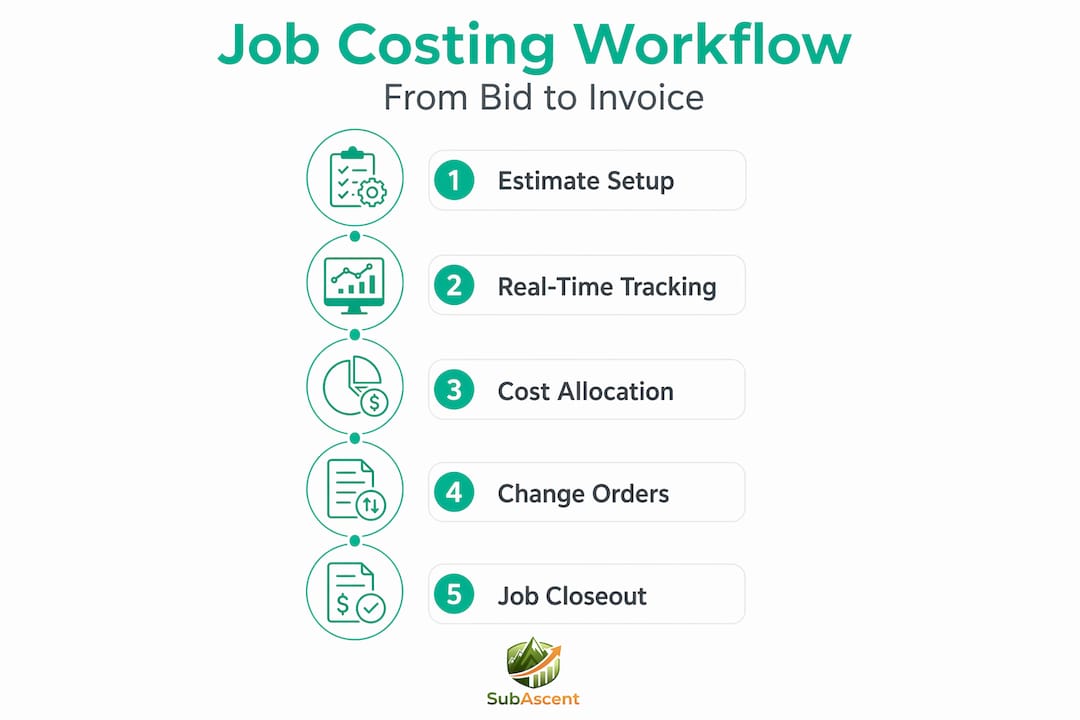
Here's what an effective workflow looks like for a specialty trade sub:
At bid time: Enter your estimate directly into the software, broken down by cost code. Labor hours by phase, material quantities, equipment allowances. This becomes your budget. Every actual cost gets measured against it from day one.
During the job: Field crew clock in and out against the job. Material deliveries attach to purchase orders that code to the right job automatically. Your PM reviews the budget-to-actual report weekly, not monthly. Real-time reporting lets project managers compare estimates to actuals throughout job progress, which means you have time to act before a cost overrun becomes a loss.
At change orders: Every approved change creates a new cost code bucket. The labor and materials tied to that change stay separate, so you can prove to the GC exactly what the change cost and bill accordingly.
At job close: The completed job becomes a reference point. What did labor actually run per unit? Where did materials come in over or under? Historical job data improves estimate accuracy for future bids, which means your next painting or flooring estimate is grounded in what jobs like it actually cost.
Here's how the manual approach compares to software-enabled job costing:
| Workflow Step | Manual Process | Software-Enabled Process |
|---|---|---|
| Estimate setup | Spreadsheet, rebuilt each job | Saved templates with cost codes |
| Labor tracking | Paper timecards, entered later | Mobile clock-in assigned to job |
| Material costs | Receipts batched at month-end | POs coded to job at entry |
| Budget vs. actual | Manual reconciliation | Automated real-time report |
| Historical bidding | Memory or old spreadsheets | Searchable completed job data |
How to choose the best job costing software for your trade
Not every job costing tool is built with specialty trade subs in mind. Most enterprise construction software is designed for general contractors managing multiple primes. For a fire protection or steel/rebar firm with ten people in the field, those platforms are expensive, complex, and built around workflows that don't match how subs actually operate.
When evaluating your options, prioritize these factors:
- Ease of use in the field. If your foreman won't use it, the data won't be accurate. Mobile access and a clean interface matter as much as feature depth.
- Cost tracking granularity. You need to track labor, materials, equipment, and subcontractor costs separately by job and by cost code, not just in aggregate.
- Integration with estimating tools. Estimating software for small subs that connects directly to your job costing system means your budget is live the moment you win a job, not after someone re-enters the bid numbers.
- Reporting flexibility. Budget-to-actual by cost code, by phase, and by job type. You should be able to see where you're losing money at a glance.
- Accounting integration. Your job costs need to flow to your accounting software without double entry. A clean QuickBooks sync is non-negotiable for most subs.
- Scalability. As you add jobs and crew, the software should handle the volume without becoming a system administration burden.
- Support and training. Choosing software that integrates payroll, project management, and estimating tools requires vendor support to set up correctly. Make sure it's accessible.
Subascent is built specifically for specialty trades. It handles job costing, bid management, and field tracking in one place without the overhead of a platform designed for someone else's workflow.
My take on job costing software after years in the trades
I've watched plenty of specialty trade owners close out a job, look at their bank account, and wonder where the margin went. Almost every time, the answer is cost tracking. Not a bad crew. Not bad pricing. Just costs that never got attached to the right job.
The biggest misconception I see is that job costing software is something you need once you're bigger. That's backwards. When you're running five to fifteen jobs at a time with a small office, you have less margin for error and less time to chase down variances. The software pays for itself the first time it catches a $4,000 labor overrun before the job closes instead of after.
The second thing I'd push back on is the idea that getting started requires a huge setup investment. Simplified solutions built for subs, like what Subascent offers, are designed to get you up and running without a six-month implementation project. You pick your cost codes, connect your payroll, and start tracking.
The hard part isn't the software. It's the discipline of entering costs consistently at the point of entry. Consistent cost entry and user training are what separate a job costing system that works from one that becomes shelfware. Get your foremen bought in, standardize your cost codes, and the software does the rest.
— Dave
See how Subascent handles job costing for specialty trades
Subascent builds job costing directly into its subcontractor platform, purpose-built for electrical, plumbing, HVAC, masonry, roofing, and other specialty trade firms. You get real-time budget-to-actual tracking, cost code management, and bid integration in one place without needing a full-time software administrator to keep it running.

The CrewTrack field time tracking integration means your crew's hours post directly to the right job the moment they're logged. No paper timecards. No re-entry. Just accurate labor costs attached to the right job in real time. If you're ready to stop guessing at job profitability, explore the Subascent platform and see how specialty trade subs are using it to close jobs with confidence.
FAQ
What is job costing in construction?
Job costing is the practice of tracking all labor, material, equipment, and overhead costs for each individual project. It lets specialty trade subs compare actual costs to their estimates and measure job profitability.
How does job costing software work for specialty trade subs?
The software assigns costs to specific jobs as they occur, connecting payroll, purchase orders, and field time tracking to a central reporting system. You see budget versus actual in real time rather than at month-end.
What are the main benefits of job costing software?
The core benefits are real-time cost visibility, reduced manual errors, faster identification of overruns, and historical data that sharpens future bids. Automated job costing also addresses scalability challenges as your firm grows.
What features should I look for in a job costing tool?
Prioritize mobile field access, cost code granularity, estimate-to-actual reporting, payroll integration, and accounting software sync. Trade-specific platforms built for subs are generally easier to adopt than GC-focused construction software.
How is job costing different from general accounting?
General accounting tracks company-wide income and expenses. Job costing breaks those figures down to the individual project level, so you know which jobs are profitable and which ones are draining your margins.