

If you run an electrical, plumbing, HVAC, or drywall firm and you're still lumping all your job costs into one account, you already know why subs need separate job accounts — you just haven't felt the full damage yet. The problem looks invisible until you close a job and the numbers don't add up. You thought you made money. The bank account disagrees. That gap between what you expected and what actually happened almost always traces back to the same root cause: no job-level accounting, no real visibility. This guide breaks down exactly how separate job accounts fix that.
Table of Contents
- Why subs need separate job accounts: the job costing basics
- Why isolating subcontractor costs by job improves profit visibility
- Committed costs and how separate job accounts catch budget overruns early
- How separate job accounts enhance estimating and bid accuracy
- Navigating complexity: why multi-job environments demand separate accounts
- The uncomfortable truth about job accounts most subs ignore
- Take control of job profitability with the right tools
- Frequently asked questions
Key Takeaways
| Point | Details |
|---|---|
| Separate job tracking | Using individual job accounts for each subcontract improves the accuracy of job cost tracking and profitability analysis. |
| Committed costs visibility | Capturing committed subcontract costs early allows spotting budget issues up to 60 days before invoice arrival. |
| Improved estimating | Job-level cost histories make future bids more accurate by comparing estimated and actual expenses clearly. |
| Avoid profitability blur | Separate accounts prevent financial data from multiple jobs blending and hiding true project performance. |
| Essential for multi-job environments | Managing multiple concurrent projects requires job-specific accounts to maintain financial clarity and control. |
Why subs need separate job accounts: the job costing basics
Job costing is the practice of tying every dollar of cost and every dollar of revenue directly to a specific project. Not to your company overall. Not to a trade category. To that one job. When you do this right, you can pull up any active project and see exactly how much you've spent, what's still committed, and whether you're on track to make money.
The foundation is simple. Track job costs in QuickBooks Desktop by creating a separate "Customer:Job" account for each project and assigning every bill, check, and timesheet line to the correct job. That's it. One account per job. Everything coded to that account.
Here's what a proper job account structure captures for a roofing or framing firm:
- Labor costs: hours logged by each worker, coded by job and cost code
- Material purchases: every invoice from your supplier, tied to the job that consumed the material
- Equipment and tool costs: rentals or depreciation allocated to the job
- Subcontracted work: any lower-tier trade you bring in
- Overhead allocation: your share of trucks, insurance, and office costs applied at the job level
Without this structure, your profit and loss statement tells you how the company is doing overall. It tells you nothing about whether that commercial repaint job made 18% margin or lost 6%.
Pro Tip: Set up your job accounts in QuickBooks before the first bill arrives. Retrofitting costs to the right job after the fact is painful and error-prone. If your estimator is already assigning cost codes during the bid, use those same codes in your accounting system so the comparison from bid to actual is automatic.
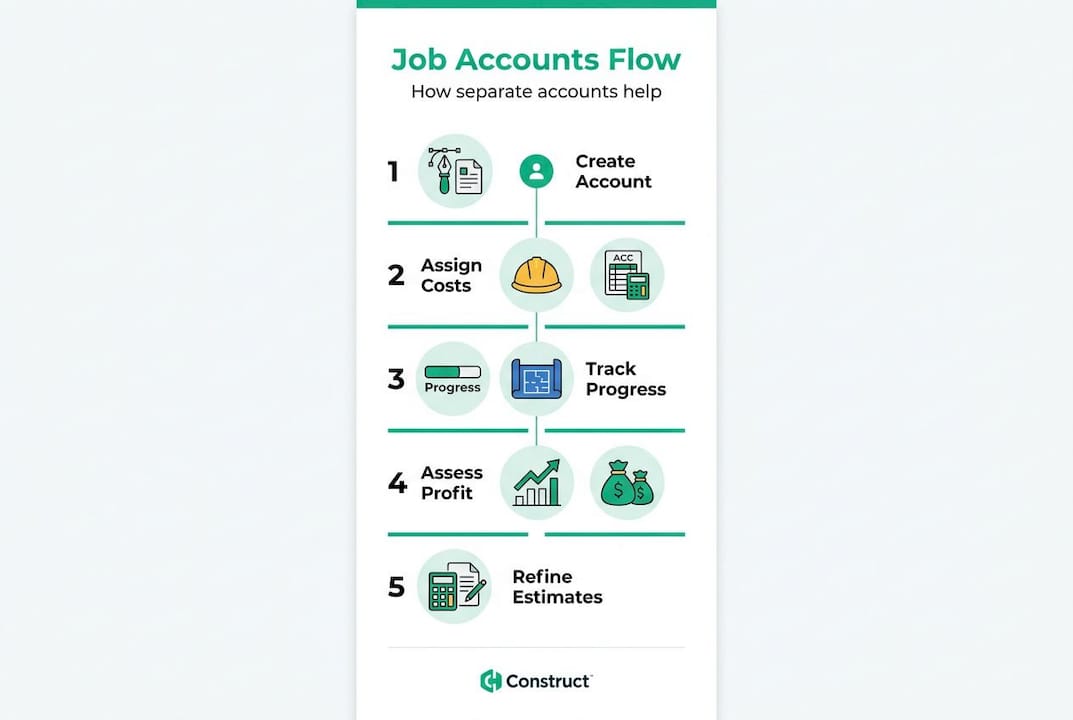
The importance of job accounts for subs becomes clear the moment you need to answer a simple question: "Did we make money on that job?" If you can't answer it within five minutes by pulling a report, your accounting structure is costing you money on every future bid.
Good subcontractor payment tracking starts here. If your job accounts aren't set up correctly, your AR and payment workflows are built on a shaky foundation.
Why isolating subcontractor costs by job improves profit visibility
For specialty trade subs, labor and materials often feel like the big numbers. But look at what happens when you bring in lower-tier trades or specialty crews. Subcontractor costs represent 60% to 75% of total project cost for many general contractors, and the same dynamic plays out in large mechanical, electrical, or fire protection jobs where you're pulling in helpers, insulators, or specialty welders.
When those costs aren't coded to the right job, your profitability reports are fiction.
Here's what committed cost tracking looks like when it's working correctly:
| Cost type | Recorded when | Example |
|---|---|---|
| Subcontract amount | Contract executed | You sign a $28,000 insulation sub deal |
| Approved change orders | Change order approved | GC adds $4,200 to insulation scope |
| Invoices received | Invoice posted | Insulation sub bills $15,000 draw |
| Payments made | Check issued | You pay the $15,000 draw |
| Retainage withheld | Per contract terms | 10% held = $2,800 retained |
Every one of those rows belongs in the job account for that specific project. Not in a general subcontractor expense account. Not in a catch-all "cost of goods sold" bucket.
"The best-practice reason to create a job-specific account is data integrity: assigning all expenses and time entries makes reports trustworthy." — QuickBooks job costing support
The benefits of separate job accounts compound over time. After twelve months of clean data, you have a library of actual costs by job type, project size, and customer. That library is worth more than any estimating software you can buy.
There's also a contractual angle. When a GC disputes a change order or questions your billing, your job account is your defense. Clean, job-level records showing exactly what was spent and when are far harder to argue against than a blended spreadsheet. Solid records help you avoid the most common subcontractor contract disputes before they escalate.
Pro Tip: When you set up a new job account, create a matching "committed costs" line for every subcontract you execute. Even before the first invoice arrives, your job account should already show the full liability. This prevents the classic surprise where you're 70% complete and suddenly realize a sub's remaining billings will blow your budget.
Committed costs and how separate job accounts catch budget overruns early
Most small to mid-size specialty trade firms track costs only when invoices hit accounts payable. That means you find out about a budget problem when it's already happened. By the time you see the overage in your accounting system, you've already paid for it.

Committed costs are different. A committed cost exists the moment you sign a subcontract or issue a purchase order, even if no invoice has arrived yet. Recording these commitments in a job-specific account gives you a forward-looking view of your exposure.
The math is straightforward. Here's how committed cost tracking compares to traditional invoice-based tracking:
| Tracking method | When you see the problem | Ability to intervene |
|---|---|---|
| Invoice-based (reactive) | After invoice is received and posted | Limited, cost is already incurred |
| Committed cost (proactive) | When contract or PO is executed | High, can renegotiate or replan scope |
Dedicated job-level structures that capture committed costs help contractors spot budget exposure approximately 60 days earlier than waiting for invoices. On a six-month concrete or steel job, 60 days is the difference between fixing the problem and absorbing the loss.
Here's how to set up committed cost tracking in your job accounts:
- Create the job account as soon as you're awarded the contract, before you mobilize
- Post the subcontract value as a committed cost the day you execute the agreement
- Record every approved change order as it's approved, not when it's billed
- Enter purchase orders for material at the time of issuance
- Compare committed plus actual costs against your original budget weekly, not monthly
That last step is where the real value lives. Weekly budget vs. committed cost reviews on active jobs give you enough lead time to act. Monthly reviews after invoice processing leave you reacting to history.
Waiting for invoices to tell you where you stand is like checking your rearview mirror to navigate traffic. Committed cost tracking puts the windshield back in front of you.
Proper account structure also helps when managing subcontractor scheduling conflicts because you can quickly see which jobs have the highest committed costs and prioritize resources accordingly.
How separate job accounts enhance estimating and bid accuracy
Here's the feedback loop that most electrical, masonry, and HVAC firms never fully build: accurate job accounts feed better estimates, which produce more accurate job accounts, which make future estimates even sharper. Breaking into that cycle at the accounting end is where most firms fall short.
Separate job accounts let you compare estimated vs. actual costs for each job, turning historical data into better bids and budgets. That's the core mechanic. When your estimate says $42 per linear foot for copper pipe installation and your job account from three similar projects says $51, you know your next bid needs to be recalibrated.
The reasons for separate accounts aren't just about current-job visibility. They're about building a cost database that makes every future bid more defensible:
- Labor productivity: know your actual crew hours per unit of work, not industry averages
- Material waste factors: see how much you're actually consuming versus what you spec'd
- Sub markup accuracy: track what lower-tier subs actually cost versus what you assumed
- Project type benchmarks: separate accounts let you isolate costs by job type (new construction vs. tenant improvement vs. service work)
That last point matters for flooring, painting, and glazing firms that mix commercial new construction with renovation or service work. Those project types have completely different cost structures. Blending them gives you averages that are wrong for every category.
Pro Tip: After closing each job, run an estimated vs. actual comparison report and file it by job type and scope size. After 15 to 20 jobs, you'll have a reference library that no industry average can match. Your estimators will stop guessing and start pricing with evidence.
Understanding the job account setup for subs isn't just an accounting exercise. It's how you build the institutional knowledge that keeps your margins consistent when labor markets shift or material prices spike.
Navigating complexity: why multi-job environments demand separate accounts
A two-person painting crew running one job at a time can get away with loose accounting for a while. Once you're managing eight to fifteen active jobs simultaneously — which is normal for a $3M to $8M specialty trade firm — the errors compound fast.
Construction firms often run a dozen or more active jobs at once, and without job-by-job accounting, multi-job environments blur profitability in ways that are nearly impossible to untangle after the fact.
Consider a drywall firm with ten active jobs. Without separate accounts:
- A material delivery gets coded to the wrong job because the invoice didn't reference a job number
- A crew works split days across two sites and timecards get rounded to whichever foreman calls in first
- An equipment rental spans three jobs and gets expensed entirely to one
- A sub working on two floors of the same building gets billed as one lump sum
None of these errors look catastrophic individually. Together, they mean you're closing jobs with cost data that's off by 10% to 20%. At a 12% gross margin, that's the difference between a profitable month and a loss.
The reasons for separate accounts in a multi-job environment go beyond accuracy. They include:
- Bonding and insurance audits: underwriters want job-level financials, not a company P&L
- WIP (work in progress) reporting: lenders and bonding companies require this; it requires clean job accounts
- Customer billing accuracy: time-and-material jobs billed to GCs require defensible job-level cost records
- Staff accountability: when project managers know each job has its own account, they take cost coding more seriously
The role of trade helpers and other field staff becomes easier to manage when time entries tie directly to job accounts. You can see labor costs by job in real time instead of waiting for payroll to process.
The uncomfortable truth about job accounts most subs ignore
Here's the honest take after working with specialty trade firms across a wide range of revenue sizes. The firms that resist setting up separate job accounts almost always give the same reason: it takes more time upfront. That's true. It does take more time.
What they don't calculate is the cost of not doing it. Estimating without historical job data is expensive. Underbidding a concrete or framing job by 8% because your cost averages included two unusually efficient projects costs far more than the 15 minutes it takes to set up a job account and code invoices correctly.
The other thing most articles won't tell you: the complexity of job account setup for subs scales with your trade. A roofing firm with straightforward labor and material costs needs a simpler structure than a fire protection firm with prefab, field labor, specialized inspections, and multiple lower-tier subs. The way to manage subs' job accounts effectively is to build your cost code structure around how you actually estimate, not around what your accounting software suggests by default.
One more thing. If your accounting and estimating systems don't talk to each other, separate job accounts solve only half the problem. The estimated cost has to flow in, and the actual cost has to flow back. When that loop closes, your profitability reports stop being historical documents and start being management tools.
Take control of job profitability with the right tools

If you're managing jobs for an electrical, plumbing, HVAC, or other specialty trade firm and you want job cost data that's actually useful, the structure matters as much as the software. SubAscent is built specifically for specialty trade subs — not general contractors, not homebuilders. It connects your estimates, job costs, and field data in one place so your job accounts reflect what's actually happening on site. See how SubAscent works for trade owners and project managers who need real numbers, not approximations.
Frequently asked questions
Why is it important to assign subcontractor expenses to separate job accounts?
Assigning sub expenses to separate job accounts gives you precise cost tracking for each project, which protects your margins and improves profitability analysis. Sub costs represent 60% to 75% of total project cost in many construction scenarios, so even small coding errors have a material impact on your numbers.
How do separate job accounts help with budget overruns?
They capture committed costs the moment you sign a subcontract or issue a purchase order, before any invoice arrives. Dedicated job-level structures help contractors spot budget exposure about 60 days earlier than waiting for invoices, giving you time to act instead of just absorb the loss.
Can separate job accounts improve future bid accuracy?
Yes, because clean job-level cost history gives you real numbers to work with. Separate accounts let you compare estimated vs. actual costs per job, which turns past performance into better future bids rather than relying on industry averages that may not match your crews or markets.
What risks come from mixing multiple jobs' costs in one account?
It hides which jobs are profitable and which are bleeding money, and it corrupts the cost history you need for accurate estimating. Multi-job environments blur profitability without job-by-job accounting, and by the time you realize a job lost money, it's too late to do anything about it.