

A WIP (work-in-progress) report is the monthly spreadsheet that shows whether your active jobs are generating cash or quietly burning it. It compares what you've earned against what you've billed, job by job. Run it every month, not just at tax time, and read five numbers first: net over/underbilling, percent complete versus percent billed, backlog remaining, gross profit versus estimated gross, and cost to complete.
TL;DR:
- The net over/underbilling figure indicates the amount of earned profit that remains un-invoiced, affecting cash flow and profitability.
- Consistent monthly WIP reviews, incorporating recent cost and billing data, help identify underbilled jobs and prevent cash shortages before year-end.
- Ignoring pending change orders and uninstalled materials can distort percent complete and gross profit estimates, leading to inaccurate financial assessments.
- Ownership should be centralized in a dedicated person to maintain the WIP schedule's accuracy and ensure timely corrective actions.
- Using specialized subcontractor software streamlines data collection, reducing reconciliation errors and providing real-time insights into job health.
Table of Contents
- What Is a WIP Report in Construction?
- What Goes Into a Construction WIP Report
- How Do You Calculate Percent Complete and Earned Revenue?
- How to Run Your Monthly WIP Close
- The Five Numbers to Read First on Every WIP
- Common WIP Report Mistakes Subs Make
- Why Ownership of the WIP Matters More Than the Format
- Building a WIP Worksheet That Actually Holds Up
- Why Subs Must Stop Treating WIP as a Tax-Year Chore
- Getting Your WIP Numbers Without the Spreadsheet Fight
- Where to Learn More About WIP Schedules and Revenue Recognition
- Sources
What Is a WIP Report in Construction?
A construction work-in-progress report ties your physical progress on a job to the revenue you're allowed to recognize for it, using percentage-of-completion accounting. Instead of waiting until a contract closes to count the profit, you calculate how much of the work is done and book that share of the revenue now. WIP accounting records costs and revenue as the work happens, capturing labor, materials, subcontracted work, and allocated overhead as they occur, not when the final invoice goes out.
For a specialty trade sub, this isn't an academic accounting exercise. Three groups care about your WIP schedule, and each reads it for a different reason:
- Your CPA uses it to recognize revenue correctly for your financial statements and tax return.
- Your surety reviews it before renewing or increasing your bonding line.
- Your bank or lender checks it before extending a line of credit or approving a loan.
- Your own project managers use it to catch a job going sideways before the final invoice proves it.
If you only look at your bank balance to judge how a job is doing, you're flying blind. A job can look profitable on paper and still be starving you of cash, or vice versa.
What Goes Into a Construction WIP Report
Every column on a solid work in progress schedule exists to answer one of two questions: how much have you earned, and how much have you collected for it. A typical WIP schedule includes contract value, estimated total cost, cost to date, percent complete, earned revenue, billed to date, and over/underbilling.
Here's what you need in each row, job by job:
- Original contract value, plus all approved change orders rolled into a revised contract total.
- Estimated total cost for the job as currently understood, updated with every change order.
- Cost to date, pulled straight from your job-cost ledger.
- Percent complete, calculated from cost to date against estimated total cost.
- Earned revenue, the dollar amount you're entitled to recognize based on that percent complete.
- Billed to date, the total you've actually invoiced the general contractor or owner.
- Over/underbilling, the gap between earned revenue and billed to date.
- Cost to complete, what's left to spend to finish the scope.
- Backlog, the remaining contract value not yet earned.
Two columns get skipped more often than they should: retainage held back on your invoices, and the value of materials purchased but not yet installed. Both distort percent complete if you ignore them. Add a notes column for every job with a pending change order, a disputed cost, or an assumption your PM had to make. Six months from now, neither you nor your CPA will remember why a number looked the way it did without that note.
How Do You Calculate Percent Complete and Earned Revenue?
The cost-to-cost method is the standard way to measure percent complete on a construction contract. The formula:
- Percent complete = Cost to date ÷ Estimated total cost
- Earned revenue = Percent complete × Revised contract value
- Over/underbilling = Billed to date minus earned revenue
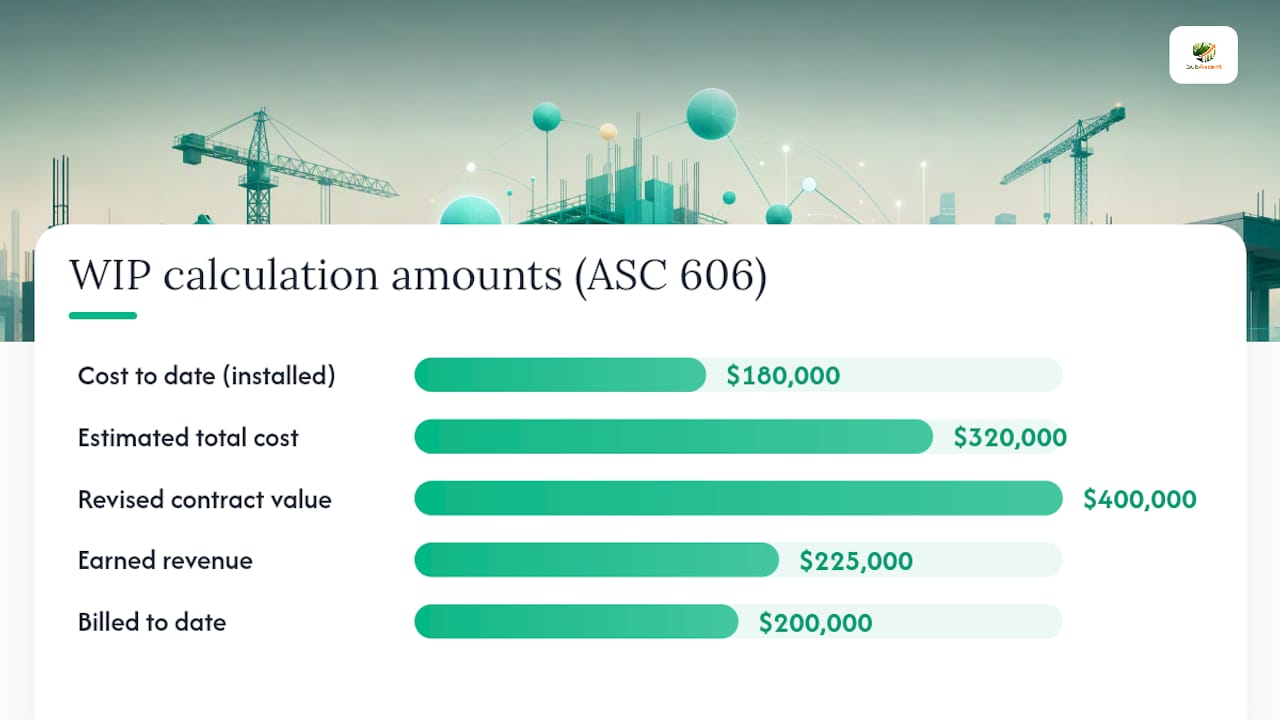
Say a drywall sub has a $400,000 contract, has spent $180,000 of an estimated $320,000 total cost, and has billed $200,000 so far. Percent complete comes to 56.25% ($180,000 ÷ $320,000). Earned revenue is $225,000 (56.25% × $400,000). Billed to date of $200,000 against earned revenue of $225,000 means the job is underbilled by $25,000. That's revenue already earned that hasn't hit an invoice yet.
Underbilling of $25,000 on a single job means $25,000 of earned profit is sitting uninvoiced. That's cash tied up in your own paperwork, not in the client's pocket.
Two adjustments matter here. Uninstalled materials sitting in a laydown yard shouldn't count as cost incurred for percent-complete purposes unless you've adjusted for them separately, since they inflate progress without reflecting installed work. Pending change orders should stay out of the revised contract value until approved, or you'll show earned revenue you can't actually bill yet. For U.S. contractors, the governing framework for when and how to recognize this revenue is ASC 606 under FASB, which most percentage-of-completion methods are built to satisfy.
How to Run Your Monthly WIP Close
A construction WIP schedule is only as good as the process behind it, and the best-run trade shops treat that process as a fixed monthly ritual, not a scramble at year-end. High-growth contractors treat the WIP schedule as a monthly diagnostic, running it on a set day with a reconciliation step built in.
Here's the four-phase version that works for a shop with five to fifty employees:
- Post all job costs and billings. Close out labor, material, and subcontract costs in your job-cost system, and reconcile them against your QuickBooks general ledger. Pull the AR aging and billing reports for the same period so billed-to-date figures match your invoicing system exactly.
- Collect PM and estimator input. Every project manager reports pending change orders, revised cost-to-complete estimates, and anything that changed scope or risk since last month. This step fails more WIP reports than any accounting error, because nobody asked the PM before the numbers got locked.
- Update the WIP sheet. Recalculate percent complete, earned revenue, and over/underbilling for every active job using the fresh cost and billing data.
- Review and reconcile. Tie the WIP totals back to your P&L and balance sheet, note any variance, and post the journal entries for over/underbilling as an asset or liability. Add notes explaining anything unusual before you close the book on the month.
Pro Tip: Assign one person to own the WIP calendar invite every month, even if the actual data entry gets split across your bookkeeper and PMs. A report with no single owner is the first one to slip to quarterly, and quarterly is too slow to catch a job going underwater.
Monthly is the baseline cadence for every job in the portfolio. For a large contract or one you already have concerns about, tighten that to weekly until the risk clears. A large job that is significantly underbilled needs eyes on it more than once a month.
The Five Numbers to Read First on Every WIP
Don't read a WIP schedule top to bottom like a novel. Scan five specific numbers first, because they tell you almost everything you need to know in under two minutes per job.
- Net over/underbilling across all jobs. A large net underbilling position means real cash is tied up that you haven't invoiced yet.
- Percent complete versus percent billed. When percent billed runs well ahead of percent complete, you're overbilled and effectively financed by the client, fine short term, risky if it means costs are running hot.
- Backlog remaining on each job and across the company. Thin backlog on your biggest jobs is an early warning to start bidding harder now, not next quarter.
- Gross profit versus estimated gross profit. Watch for profit fade, where actual margin keeps slipping below what you bid. That's the single biggest red flag sureties look for.
- Cost to complete. If it keeps climbing month over month on a job that hasn't grown in scope, your estimate was wrong or costs are running out of control.
Underbilling is profit you can't spend. It sits on your books as earned revenue, but until it's invoiced and collected, it does nothing for your bank balance. Read the net underbilling number first every time, then decide whether the fix is an AR push, a change order you haven't submitted, or a cost-to-complete you need to revise.
Common WIP Report Mistakes Subs Make
Most WIP problems aren't math errors. They're process failures that make an otherwise correct calculation useless.
- Stale cost-to-complete estimates. If your PM set the estimate at kickoff and nobody has touched it in eight months, your percent complete is fiction. Assign the estimator or PM, not just the bookkeeper, to refresh it every close.
- Inconsistent cadence. A WIP run in January, skipped in February, and rushed in March produces numbers nobody trusts, including you. Setting a fixed schedule and sticking to it is what separates a useful diagnostic from a compliance chore.
- Missing notes on pending change orders. If a $40,000 change order is verbally approved but not reflected anywhere, your earned revenue and backlog are both wrong.
- Mishandled retainage and doubtful AR. Retainage held by the GC still counts as billed, but if a receivable looks uncollectible, don't let it sit dressed up as healthy backlog.
Why Ownership of the WIP Matters More Than the Format
The owner or a dedicated bookkeeper should own the WIP schedule in a shop under 20 employees, not the PM running the job. PMs feed it accurate cost-to-complete numbers, but a PM grading their own job tends to underestimate what's left, out of optimism more than dishonesty.
Once the numbers are trustworthy, use them to steer, not just report. An underbilled electrical job usually means submit the change order backlog now, not next billing cycle. Sureties and lenders read the WIP before anything else in your financial package, and a consistent, reconciling monthly WIP increases both bonding capacity and lending confidence.
Pro Tip: An HVAC sub running three underbilled jobs at once should stop bidding new work until the AR team clears at least one. Adding backlog on top of uncollected earned revenue is how profitable companies still run out of cash.
Building a WIP Worksheet That Actually Holds Up
Keep the layout simple: one row per active job, one column per required input, contract value through backlog left to right. Lock the formula cells for percent complete, earned revenue, and over/underbilling so nobody accidentally overwrites a calculation with a typed number.
- Use consistent cost codes across every job so your QuickBooks job-cost exports drop straight into the sheet without remapping columns.
- Add a locked notes column next to every job for change-order status and assumptions.
- Keep a version history or a dated tab per month. Your future self, and your surety, will need to see the trend, not just the snapshot.
Why Subs Must Stop Treating WIP as a Tax-Year Chore
Most subs still pull the WIP once a year for the CPA and never look at it again. That's backward. The shops that treat it as a monthly habit catch a fading job three months before it would have shown up as a cash crisis. Pick a close day, assign an owner, and don't let it slide past that date. That single habit change does more for your margins than any new estimating technique.
— Dave
Getting Your WIP Numbers Without the Spreadsheet Fight
Building an accurate WIP schedule by hand every month means chasing job-cost exports, PM updates, and change-order approvals across three different tools before you can even open the spreadsheet. Specialty trade subcontractor software centralizes job costing, change orders, and billing data in one place, and may sync with QuickBooks to keep cost-to-date and billed-to-date numbers current when close day arrives.

That means less time reconciling exports and more time reading the five numbers that actually tell you whether a job is healthy. Project managers log change orders and cost-to-complete updates as they happen instead of dumping them on you at month end, so the report reflects what's real on the job site right now. If your WIP process is still a monthly scramble, try Subascent and see what a job-cost system built for trade subs, not general contractors, does for your next close.
Where to Learn More About WIP Schedules and Revenue Recognition
For the accounting rules behind percentage-of-completion, FASB's ASC 606 guidance is the primary U.S. standard governing when contractors can recognize revenue on long-term contracts. It's dense, but it's the source your CPA is ultimately working from.
For the practical mechanics of building and reading a WIP schedule, the Beancount guide to construction WIP schedules breaks down each column with worked examples, and Construction Cost Accounting's owner's guide lays out a full monthly close checklist you can adapt to a smaller shop. Both are worth bookmarking the next time your estimate-to-complete numbers need a sanity check.