

Crew productivity tracking is the process of measuring work output and attendance through real-time, activity-linked tools that give specialty trade subcontractors data they can actually use. Tracking hours alone tells you who showed up. It does not tell you how many linear feet of conduit got run, how many masonry units got laid, or whether your plumbing crew is on pace to hit the milestone your GC cares about. The industry term for this approach is activity-linked productivity measurement, and it is the standard that separates subs who know their job costs from those who find out too late. This guide covers the tools, methods, metrics, and implementation steps that owners, estimators, and project managers at electrical, masonry, HVAC, roofing, and other specialty trades need to get it right.
What tools enable crew productivity tracking on job sites?
Effective job site tracking in 2026 requires GPS and geofenced clock-ins paired with activity-based reporting to replace manual timesheets. GPS verifies that a crew member clocked in at the actual site, not from a truck parked two miles away. Geofencing adds a boundary so the system flags anyone who clocks in outside the designated work zone. Together, they create an audit trail tied to a specific location and time.
Activity-based reporting goes one step further. Instead of just logging hours, crew members record what they completed during that time. A masonry crew logs block count. A drywall crew logs square footage hung. A fire protection crew logs drops installed. That data connects labor hours to production units, which is the foundation of real job cost analysis.
Entry-level field apps built for small crews are available at accessible price points. Some specialized construction tools offer entry-level pricing around $5 per employee per month, with free plans for very small teams. That cost is negligible compared to the cost of a single job that runs over budget because no one caught the productivity gap in week two.
| Feature category | What to look for |
|---|---|
| Clock-in verification | GPS or geofenced check-in with photo confirmation |
| Activity reporting | Task-level logging tied to production units |
| Daily report output | Exportable summaries for GC submittals or internal review |
| Financial integration | Sync with QuickBooks or job costing tools |
| Mobile usability | Works on Android and iOS without a laptop |
Pro Tip: Choose a mobile-first app that a foreman can use with one hand on a job site. If it takes more than 60 seconds to log a task, your crew will stop using it within two weeks.
How to link crew attendance to specific task productivity
Activity-linked productivity tracking differs from simple hours tracking in one critical way. Hours tracking records presence. Activity tracking records contribution. Owners often confuse the two, and that confusion costs money when a job closes over budget with no clear explanation.
The methodology works in four steps.
- Define your production units before the job starts. For masonry, that is block count or square footage. For plumbing, it is rough-in completions or fixture connections. For framing, it is linear feet or panel count. Every trade has a natural unit of measure. Lock it in before day one.
- Build a structured daily production report. The foreman fills it out at the end of each shift. It captures crew size, hours worked, tasks completed, and production units achieved. Subascent's daily production report examples show exactly how masonry subs structure this for real jobs.
- Compare actual output to your estimate. Your bid assumed a production rate. If you estimated 200 block per crew day and you are hitting 140, you know by day three, not day thirty.
- Review weekly with your foreman. Not to police the crew, but to identify what is slowing them down. Material delays, design conflicts, and crew sizing issues all show up in the data before they blow the schedule.
A common mistake is tracking too many variables at once. Start with one or two production metrics per trade. Add more once the reporting habit is established.
Avoid these errors when linking time to tasks:
- Logging hours without a corresponding task code
- Using vague task descriptions like "general labor" instead of specific activities
- Skipping daily reports on short shifts or partial days
- Failing to reconcile reported output against physical site progress
- Letting foremen batch-enter data at the end of the week from memory
Pro Tip: Over-monitoring with invasive tracking tools is counterproductive. Require workers to log completed activities rather than tracking every movement. That approach gives you performance context without damaging trust.
Which metrics best reflect true crew performance?
Measuring only hours tracked creates a false sense of control. Real productivity includes five metrics that specialty trade subs should track on every job.
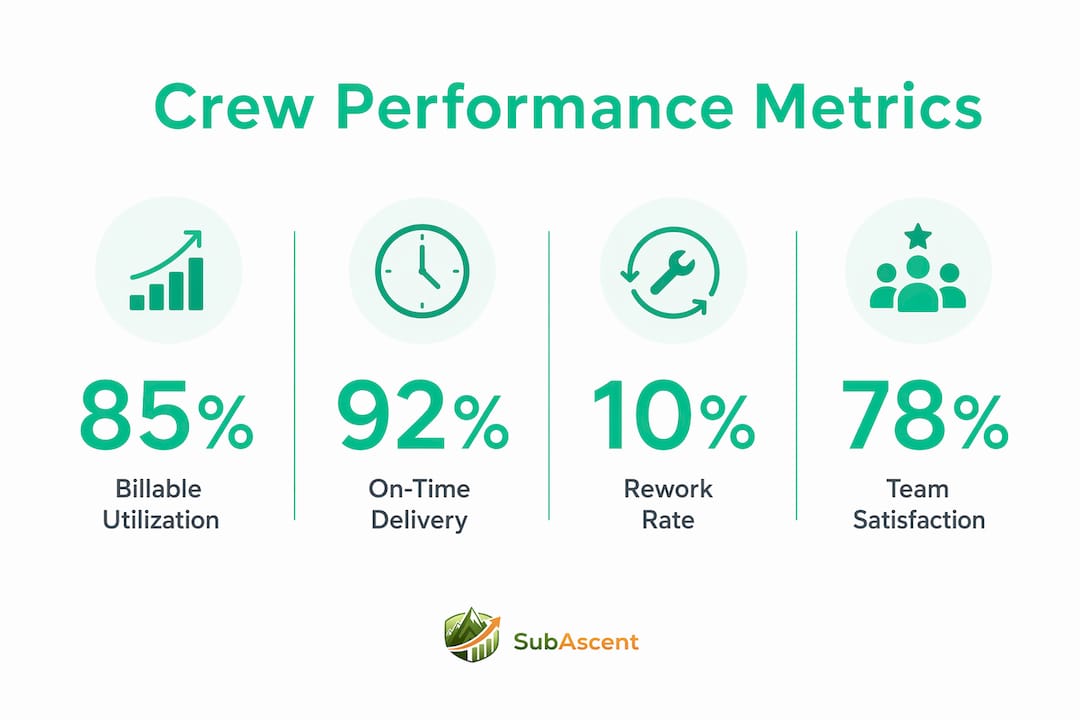
Billable utilization measures the percentage of paid hours that tie directly to billable work. If your electricians are on site for eight hours but only six hours connect to a billable task, your utilization rate is 75%. That gap matters when you are pricing the next job.
On-time delivery rate is the single metric that clients in specialty trades prioritize above almost everything else. Missing a milestone does not just cost you a relationship. It triggers GC back-charges, delays your own invoice, and compresses your crew's schedule on the back end of the job.
Project profitability compares your estimated labor cost to your actual labor cost at the task level. A roofing sub who finishes on time but runs 15% over on labor hours has a profitability problem that hours-only tracking would never surface.
Rework rate tracks how often your crew has to redo completed work. High rework rates signal quality problems, unclear scope, or inadequate supervision. One rework event on a glazing or tile job can erase an entire week of margin.
Team satisfaction is the metric most owners skip. Crews who feel tracked but not trusted report lower output and higher turnover. Tracking satisfaction through brief weekly check-ins gives you early warning before a morale problem becomes a staffing problem.
Only 21% of organizations have standardized productivity measurement. That gap is an opportunity. Specialty trade subs who build even a basic dashboard combining these five metrics operate with a significant advantage over competitors who run on gut feel.
Pro Tip: Excel dashboards combined with AI tools can automate data cleanup and reporting, so you spend time interpreting results rather than building spreadsheets. Start with a simple pivot table linking hours, tasks, and budget variance.
How to implement a crew tracking system that actually sticks
Most tracking systems fail not because of the technology but because of the rollout. Fragmented data across time tracking, project management, and reporting tools produces fragmented insights. The fix is integration, not more apps.
Follow this sequence for a clean implementation.
- Set clear goals before buying any tool. Define what you want to know. "Are we hitting our production rates?" is a better goal than "I want to track my crew."
- Get foreman buy-in first. Foremen are the data entry point. If they see the system as paperwork, it dies. Show them how the data protects them when a GC disputes progress.
- Train on the mobile app in person. Run a 20-minute walkthrough on site, not via email. Have the foreman log a test entry while you watch.
- Start with one job. Pilot the system on a single active job before rolling it out across your whole operation.
- Review data weekly for the first month. Catch reporting errors early. Correct them in real time so bad habits do not calcify.
Sustaining the discipline long-term requires a few non-negotiable habits:
- Tie daily report submission to the payroll approval process. No report, no timecard sign-off.
- Share production data with the crew monthly. When workers see the numbers, they engage with them.
- Connect tracking data to your scheduling conflict resolution process so productivity gaps trigger a scheduling review, not just a conversation.
- Revisit your production unit definitions at the start of each new job type. A concrete crew and a framing crew measure output differently.
Specialty trade contractors benefit most from metrics that link crew hours to project milestones and budget KPIs. That connection is what turns raw time data into a tool for proactive schedule and budget management.
Key Takeaways
Activity-linked crew productivity tracking is the most reliable method for specialty trade subs to control labor costs, hit milestones, and protect job profitability before a job closes.
| Point | Details |
|---|---|
| Track activity, not just hours | Log production units per shift to connect labor to real output. |
| Use GPS-verified clock-ins | Geofenced check-ins create an audit trail tied to location and task. |
| Measure five core metrics | Billable utilization, on-time delivery, profitability, rework rate, and team satisfaction. |
| Start small, then scale | Pilot on one job with foreman buy-in before rolling out across all projects. |
| Integrate your data | Connect time tracking, task reporting, and job costing in one place to avoid blind spots. |
The part most owners get wrong about tracking
Tracking crew productivity on a job site sounds like a management problem. Most owners treat it that way, buying a tool and telling the foreman to use it. That approach fails more often than it succeeds.
The real problem is that owners track the wrong thing. They track attendance because it is easy. They can see who clocked in and when. What they cannot see, without deliberate effort, is whether the work is moving at the rate the estimate assumed. I have seen electrical subs finish a job on time with every timecard accounted for and still lose money because no one caught that the rough-in rate was 20% below estimate for the first three weeks.
The crews are not the problem in those situations. The system is. When workers have no visibility into production targets, they cannot self-correct. When foremen are not given a clear reporting structure, they fill in timecards from memory at the end of the week. That data is useless for anything except payroll.
Trust-based tracking methods yield better data quality and better morale than surveillance-heavy approaches. The best implementations I have seen involve the crew in the process. The foreman knows the production target. The crew knows what "a good day" looks like in numbers. When the data is short, the conversation is about what got in the way, not who is to blame.
The tools matter less than the culture. A basic daily production report filled out honestly beats an expensive platform with incomplete data every time. Build the habit first. Then add technology to support it.
— Dave
How Subascent supports specialty trade crew tracking
Specialty trade subs need tools built for how they actually work, not platforms designed for general contractors that get forced down the chain.

Subascent is built specifically for electrical, masonry, plumbing, HVAC, roofing, and other specialty trade subcontractors with 1–50 employees. The platform connects crew hour tracking with job costing, daily reporting, and bid management in one place. Foremen log tasks from their phones. Owners and project managers see budget versus actual in real time. No spreadsheet juggling, no chasing timecards. If you are ready to move beyond attendance-only tracking, explore Subascent and see how it fits your trade.
FAQ
What is crew productivity tracking on a job site?
Crew productivity tracking is the process of measuring work output and attendance by linking crew hours to specific tasks and production units. It goes beyond simple clock-in records to show whether a crew is hitting the production rates assumed in the estimate.
How is activity-linked tracking different from standard time tracking?
Standard time tracking records when workers are on site. Activity-linked tracking records what they completed, such as block count for masonry or fixture connections for plumbing, giving managers data they can compare against the bid.
What metrics matter most for specialty trade subs?
Billable utilization, on-time delivery rate, project profitability, rework rate, and team satisfaction are the five metrics that give specialty trade subs a complete picture of crew performance beyond hours logged.
How do I get my foreman to use a tracking app consistently?
Show the foreman how the data protects them when a GC disputes progress, run an in-person training session on site, and tie daily report submission to the payroll approval process so the habit has a built-in consequence.
Can small specialty trade crews afford job site tracking tools?
Some specialized construction tools offer entry-level pricing around $5 per employee per month, with free plans for very small teams. The cost is minimal compared to the margin lost on a single job that runs over budget without early warning.