

Long lead tracking means logging every material or piece of equipment with a procurement cycle long enough that it has to be ordered before you'd normally think about it, then managing each one against your install date instead of just hoping it shows up. The single best move you can make this week: build (or open) a tracker that runs ROJ minus lead time to set the order date, and put one named person on every line. Skip that step and you're just watching a schedule slip in real time instead of preventing it.
TL;DR:
- Long-lead items typically have procurement times of four weeks or more and include materials like specialized steel, equipment, or custom panels, depending on trade requirements.
- Building a tracker that automatically adjusts order dates based on schedule shifts and assigning a single owner for each item prevents schedule slips and ensures accountability.
- Confirm delivery dates in writing and log them explicitly to catch delays early; supplier silence on delivery confirmations is often a warning sign.
- Integrating procurement data with the overall project schedule makes delays visible in real time and allows for immediate re-sequencing or escalation when float diminishes.
- Using procurement software that connects with your job management platform reduces manual work, provides centralized visibility, and improves reaction time for multiple projects or complex schedules.
Table of Contents
- What Counts as a Long Lead Item, and Why Tracking It Matters
- Quick Procurement Checklist for Long-Lead Items
- How to Build a Long-Lead Procurement Tracker
- Tying Procurement Dates to the Master Schedule
- Who Owns What: Roles, Reminders, and Escalation
- Tools and Automation That Actually Help
- Long-Lead Items by Trade: What to Watch
- What Actually Catches a Slipping Delivery Before It Wrecks the Schedule
- SubAscent Ties Your Procurement Dates to the Job, Not Just the Spreadsheet
- Sources
- FAQ
What Counts as a Long Lead Item, and Why Tracking It Matters
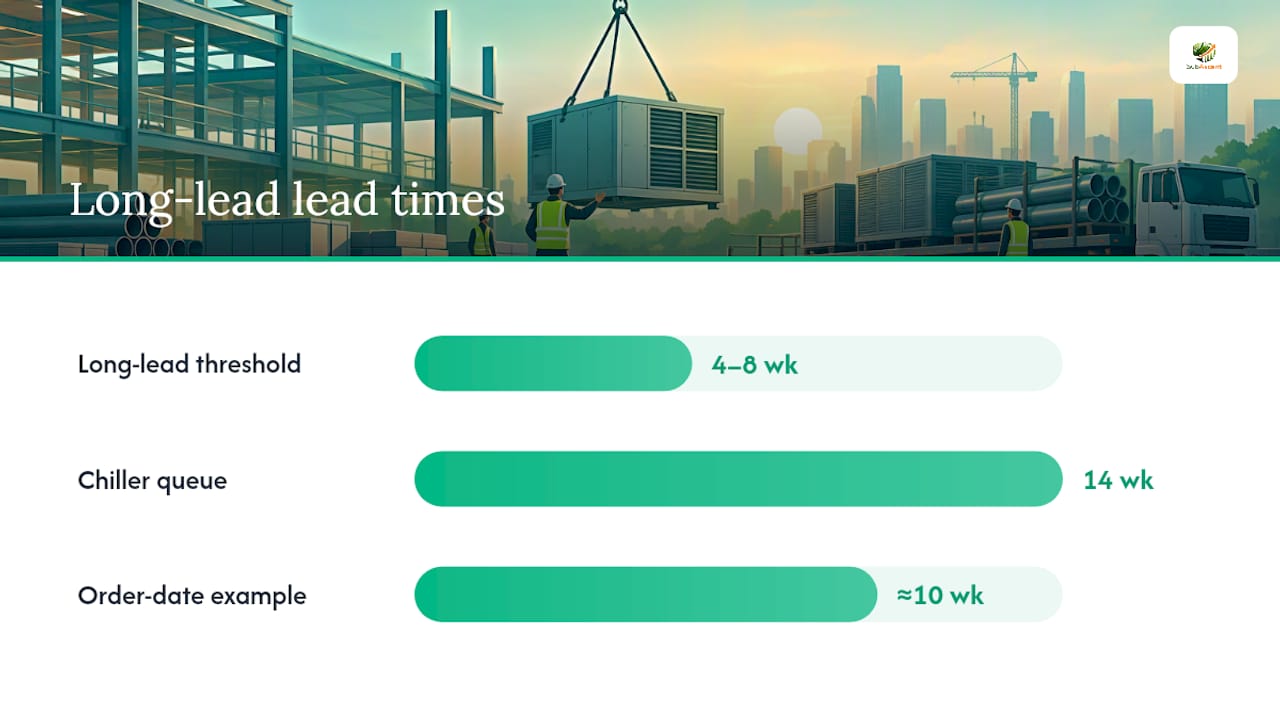
Most guidance flags anything with a procurement lead time of four to eight weeks or more as long-lead, though the threshold shifts by trade. A drywall sub might only worry about specialty acoustic panels. A mechanical contractor is watching chillers with 14-week factory queues. Switchgear, custom millwork, structural steel, and glazing units all tend to land in this category because they're built to order, not pulled off a shelf.
The reason tracking matters isn't philosophical. It's math. If your required-on-job (ROJ) date is May 1 and the item has a lead time of about ten weeks, your order date was already about ten weeks earlier. Miss that window and you don't lose a week, you lose the whole float you thought you had. Identifying these items during preconstruction, not after the crew shows up ready to install, is what separates jobs that finish on time from jobs that don't.
Quick Procurement Checklist for Long-Lead Items
Before you build anything elaborate, run this checklist against your current job list. It takes twenty minutes and it will surface the items already at risk.
- Pull every material and equipment line with a lead time at or above your trade's threshold (4 to 8+ weeks) and flag it.
- For each flagged item, record the ROJ date, install date, baseline lead time, latest safe order date, supplier name, and PO number.
- Assign one named owner to every item. Not a department, not "the office." A person.
- Set a weekly review cadence, ideally the same meeting where you review your lookahead schedule.
- Define escalation thresholds now, before anything slips, so nobody has to invent a response under pressure.
- Require a written delivery confirmation from the supplier on every PO for a long-lead item, not a verbal promise, to catch more schedule problems.
That last step catches more schedule problems than any software feature. A supplier who won't confirm a date in writing is telling you something.
How to Build a Long-Lead Procurement Tracker
A tracker is only as good as its fields. Whether you're running this in a spreadsheet or inside a procurement module, capture the same data every time:
- Item description and spec reference
- WBS or schedule activity ID it feeds
- ROJ / install date
- Baseline lead time (from the vendor quote or submittal)
- Calculated order date: ROJ minus lead time
- PO number and supplier contact
- Current status and date of last update
- Named owner
- Risk score (green, yellow, red based on float remaining)
Track the procurement milestone flow as the item moves: submittal approval, PO issuance, start of manufacture, factory acceptance testing (FAT) where applicable, dispatch, and delivery. Each stage should get a date stamp in the tracker, not a vague "in progress" note that means nothing three weeks later.
Procurement float is different from schedule float, and it deserves its own line. Float equals the forecast delivery date subtracted from the ROJ date. When that number shrinks week over week faster than the calendar is moving, you have a problem before the item is technically late.
Pro Tip: Build your order date as a formula tied to the ROJ cell, not a typed-in date. When the schedule shifts, the order date shifts with it automatically, and nobody has to remember to redo the math by hand.
Assign someone to update the tracker every week, same day, same time. A tracker that gets touched randomly is worse than no tracker, because it creates false confidence.
Tying Procurement Dates to the Master Schedule
A procurement tracker that lives separately from your schedule is a spreadsheet nobody checks. The fix is making delivery dates a hard predecessor to installation, not a side note.
- Set delivery milestones with a finish-to-start relationship into the install activity, so a slipping delivery date visibly pushes the install date in the schedule software.
- Put every long-lead item on your 3-week and 6-week lookaheads, tagged with a risk indicator so reviewers see it without digging.
- Feed schedule updates back into the procurement tracker every cycle. If the install date moves, the order date and float calculation need to move too, in both directions.
- When procurement float hits zero or goes negative, you have three real options: resequence the work to buy time elsewhere, pay for expedited freight or a faster fabrication slot, or escalate to the GC and owner before it becomes their problem to discover. Waiting rarely improves any of those three.
This is also where a tool built around construction software designed for subs earns its keep, since it can tie the procurement line item directly to the activity ID instead of forcing you to cross-reference two documents by hand.
Who Owns What: Roles, Reminders, and Escalation
Tracking a long-lead item without an owner is just documentation. Ownership is what makes tracking work.
- Assign one accountable person per item, along with the name and direct contact of the vendor's rep, not a general sales line.
- Put procurement status on the weekly PM lookahead meeting agenda as a standing line item, every single week, whether anything changed or not.
- Set automatic reminders tied to the calculated order date and the confirmed delivery date, so nobody has to remember to check.
- Define escalation thresholds by slip magnitude: a slip past 7 days goes to the PM, a slip past 14 days goes to the director or owner.
- Get delivery date confirmations in writing from every supplier and log them directly in the tracker next to the original commitment.
Pro Tip: Add a standard clause to your PO template requiring written confirmation of the delivery date within five business days of order placement. Suppliers who go quiet on that request are the ones most likely to blow the date.
Tools and Automation That Actually Help
A disciplined spreadsheet handles a single job with a handful of long-lead items just fine, especially if the order-date formula is built in and someone actually opens it weekly. The moment you're running multiple projects, or a single job has 20-plus long-lead items across several trades, the manual cross-referencing starts eating hours you don't have.
That's the point to move into a procurement module inside your job management platform, where the tracker lives next to your schedule, submittals, and change orders instead of in a separate file. Field-capture apps matter too, since a foreman photographing a delivery docket on-site closes the loop faster than an office call the next morning.

Simple automation carries real weight without replacing judgment: scheduled reminders before order-date deadlines, PO attachments stored against the tracker line, and email extraction that logs a vendor's updated ship date automatically. Automation should chase and flag. Humans should still decide on substitutions or cost tradeoffs.
Long-Lead Items by Trade: What to Watch
Every trade has its own list of items that quietly become the schedule's weak link.
- Electrical: Custom switchgear and panels routinely carry 12 to 20 week lead times. Book the factory acceptance test and freight slot early, and confirm interconnect details with the utility before the gear ships.
- HVAC/mechanical: Chillers and packaged rooftop units need factory test dates and freight booking locked in well ahead, since freight capacity for oversized equipment books up independently of manufacturing.
- Steel/rebar and engineered framing: Fabrication slots at the mill or shop matter as much as the delivery date. Track when fabrication actually starts, not just when the PO was cut.
- Doors, windows, glazing, and millwork: Sample and finish approvals can eat weeks before manufacturing even starts. Force early approval decisions and line up a backup supplier for anything with import exposure.
What Actually Catches a Slipping Delivery Before It Wrecks the Schedule
A switchgear order once looked fine on paper right up until the manufacturer quietly pushed the factory test date by three weeks. The only reason it didn't blow the install sequence was a named owner who ran the Monday tracker review, noticed the status field hadn't updated in two weeks, and called the vendor directly instead of waiting for an email.
That's the pattern worth stealing: a standard PO clause requiring written delivery confirmation, a 48 to 72 hour confirmation call before anything ships, and delivery photos tied directly to the PO number so there's no argument later about what showed up and when. None of this requires expensive software. It requires someone whose job it is to check, every week, without being asked.
— Dave
SubAscent Ties Your Procurement Dates to the Job, Not Just the Spreadsheet
Some job and bid management software treats procurement as part of the job record, not a side file. Submittals, POs, field delivery confirmations, and QuickBooks sync can connect back to the same job, so a slipping delivery can show up next to the budget it may affect.

This offers a practical benefit over a standalone tracker: less manual re-entry, centralized delivery confirmations, and procurement status connected to job cost to give earlier visibility on financial impact. If your current setup is a spreadsheet nobody updates and a GC asking why switchgear is late, visit the SubAscent landing page to see the platform or start a trial.
Sources
- How to Track Long-Lead Materials in Your Construction Schedule
- Managing Long-Lead Materials to Protect Project Schedules
- AI Procurement Risk in Construction: Long-Lead Item Tracker
- Construction Material Procurement: How to Stop Delays at the Source | Banamind
FAQ
What Is Long Lead Tracking in Construction?
Long lead tracking is the process of monitoring procurement dates for materials and equipment that take weeks to manufacture or ship, so they get ordered in time to arrive before the scheduled install date. It typically covers items with a lead time of four weeks or longer, tracked against a calculated order date rather than a guess.
How Do You Calculate the Order Date for a Long-Lead Item?
Order date equals the required-on-job date minus the item's lead time, a formula pulled directly from construction scheduling guidance. Building that formula into your tracker means the order date shifts automatically whenever the install date changes on the schedule.
What Should You Record When a Long-Lead Item Is Delivered?
Log the delivery docket number, invoice reference, quantity received against quantity ordered, condition of the material, and a photo of the delivery. Skipping delivery confirmation at the site is one of the most common reasons procurement trackers fall apart.
When Should a Trade Sub Move From a Spreadsheet to Procurement Software?
A spreadsheet works fine for a single job with a small number of long-lead items, especially with the order-date formula built in. Once you're managing multiple projects or a job has a large list of long-lead items across trades, a platform like SubAscent that ties procurement directly to the schedule and job cost saves real time over manual cross-referencing.
How Often Should You Review a Long-Lead Procurement Tracker?
Weekly, tied to the same meeting where you review your 3-week and 6-week lookaheads. A named owner should confirm status on every flagged item, since a tracker that only gets updated when something is already late defeats the purpose of tracking it in the first place.