

The fastest reliable way to run a plumbing takeoff from PDF plans is a PDF-capable takeoff tool with Auto Scale and Auto Count, or an AI-assisted first pass, followed by a manual check on risers and exports. Done right, it produces fixture counts, linear pipe footage by diameter, and a clean CSV or XLSX ready for pricing. Start now: confirm you have the current plan set, then upload the PDF to a takeoff tool or open it on-screen and set your scale.
TL;DR:
- Using a PDF takeoff tool with Auto Scale and Auto Count speeds up fixture and pipe measurements but requires manual verification of risers and schedules.
- Confirm the plan set's latest revision and correctly set the scale using two known dimensions to prevent measurement errors, especially on rotated or mirrored sheets.
- AI-assisted takeoff tools provide quick initial counts for large plans but still need human review to catch issues like missed risers or double counting.
- Cross-check fixture totals against schedules and build assemblies that automatically include riser lengths, fittings, and waste percentages to improve estimate accuracy.
- Export data as CSV or XLSX with sheet references, map it to standard assemblies, and verify before pricing to avoid costly errors in the final estimate.
Table of Contents
- Why Digital Plumbing Takeoff From PDF Beats Paper Counting
- How to Prepare and Scale a PDF Before You Measure
- Manual Tracing, Digitized Takeoff, or AI-Assisted First Pass?
- The Verification Checklist That Catches Costly Errors
- Turning Exported Quantities Into a Priced Estimate
- What to Look for in a Plumbing Takeoff Tool
- Dave's Practical, Copyable Workflow
- Buy the Tool or Outsource the Takeoff?
- How Subascent Fits Into Your Takeoff Workflow
- Sources
- FAQ
Why Digital Plumbing Takeoff From PDF Beats Paper Counting
Paper takeoffs work until a plan set hits more than a few sheets, then they fall apart. You lose track of which riser you already counted, a highlighter mark fades, and nobody can prove where a number came from six weeks later when a GC disputes a change order. Digital plumbing takeoff from PDF plans fixes the traceability problem: every count and measurement ties back to a sheet number, so when a project manager asks "where did this come from," you have an answer instead of a guess.
A plumbing quantity takeoff on a real job pulls several distinct data types, not just one master list:
- Fixture counts (sinks, water closets, floor drains, hose bibs)
- Linear pipe runs broken out by diameter and material
- Fittings and valves, counted separately from straight pipe
- Riser lengths between floors
- Cross-checks against the plumbing fixture schedule
Manual verification still matters even in a digital workflow. Ambiguous symbols, a missing fixture schedule, or a riser that jogs through three walls before it surfaces on the roof all need a human eye. No tool catches every judgment call.
How to Prepare and Scale a PDF Before You Measure
Get the setup wrong and everything downstream is wrong too. Before you trace a single pipe run, work through this:
- Confirm you're on the latest addendum. Check sheet numbers and revision dates against the transmittal or your GC's plan portal.
- Set the page scale using a known dimension on the sheet, like a door width or a labeled grid line, and cross-check it against the printed scale bar.
- Try Auto Scale if your tool supports it, but verify the result against a second known dimension before you trust it across the whole sheet.
- Skip rasterizing or resampling the PDF. That process can quietly shift the scale factor and throw off every measurement after it.
- Flatten layers only if they're causing display glitches, not as a default step.
- Sort your sheets into three groups before measuring: plan views, riser and elevation sheets, and schedules.
Pro Tip: Keep a screenshot of the scale bar and your calibration dimension pinned in your takeoff file. When a dispute comes up three weeks later, you'll have proof of exactly how you set scale instead of trying to remember.
Manual Tracing, Digitized Takeoff, or AI-Assisted First Pass?
Three workflows dominate plumbing takeoff from PDF drawings right now, and picking the wrong one for the job size wastes more time than it saves.
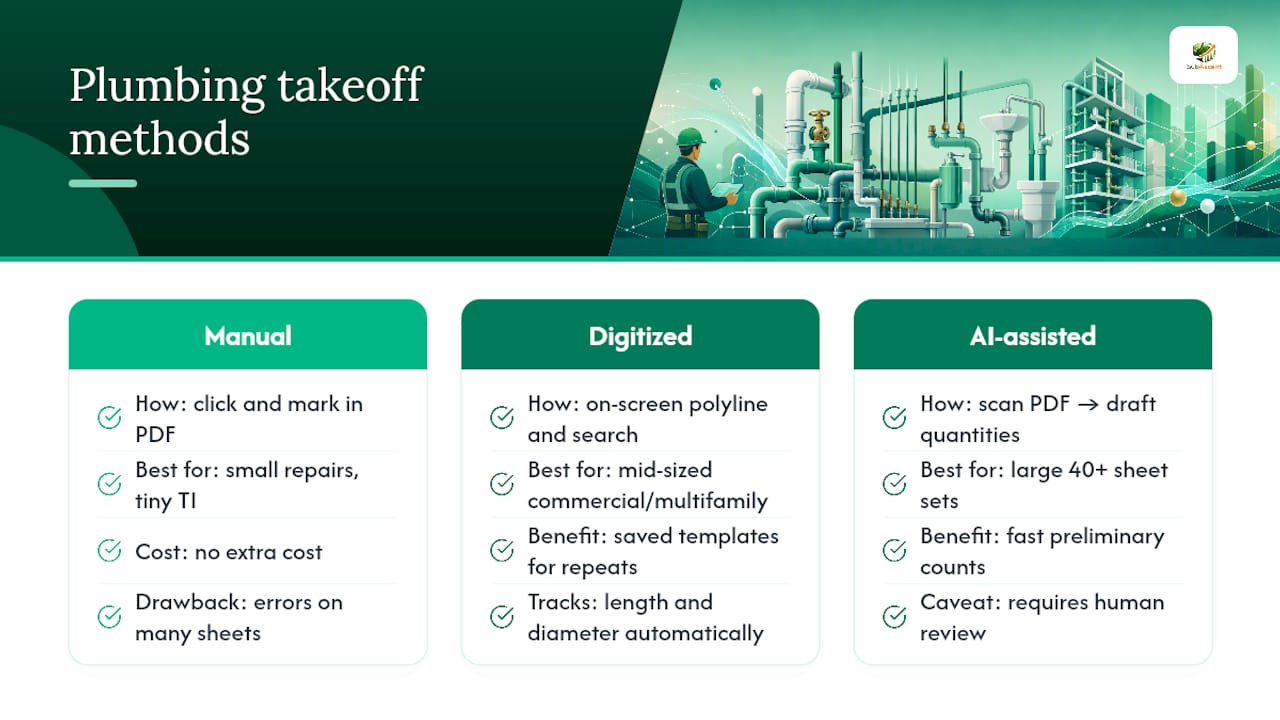
Manual tracing means clicking through a PDF viewer, marking symbols by eye, and totaling by hand or in a separate spreadsheet. It costs nothing extra and works fine for a one-fixture repair or a tiny tenant improvement. Push it past a handful of sheets and error rates climb fast, mostly from double-counted fixtures on overlapping detail blowups.
Digitized takeoff uses on-screen polyline tracing and symbol search inside a purpose-built tool. You draw the run once, the software tracks length and diameter, and repeated assemblies (a bank of three water closets, say) get counted with a saved template instead of redrawn every time. This is the sweet spot for most mid-sized commercial and multifamily jobs.
AI-assisted first pass tools scan the whole PDF and generate a draft quantity list in minutes, which is a real advantage on large, 40-plus sheet plan sets where manual tracing would eat a full day. PlanSwift's Auto Takeoff and Auto Count features work this way, producing a preliminary count that still needs a human review pass before it goes into a bid.
Match the method to the job: manual for small repairs, digitized for repeatable mid-size work, AI-assisted for volume and speed on big sets where you have time to verify.
The Verification Checklist That Catches Costly Errors
Most bad plumbing estimates don't fail because someone miscounted a sink. They fail because a riser got missed or a scale mismatch quietly doubled a quantity across sheets. Practitioner guidance flags ignoring vertical transitions as one of the most common and expensive mistakes in a 2D takeoff, since a floor-plan trace alone won't capture pipe that runs vertically between levels.
Run these checks before any quantity goes into a bid:
- Trace risers on elevation or riser sheets directly, never estimate them from the floor plan alone.
- Verify scale with two separate known dimensions, especially on rotated or mirrored sheets.
- Watch for overlapping plan sheets and detail blowups that can double-count the same fixture or run.
- Cross-check every fixture total against the fixture schedule and flag discrepancies before pricing.
Build assemblies that automatically add a riser length and a standard fitting set (tees, supports, isolation valves) whenever a riser is flagged, so multi-floor runs don't get missed in the first pass. Your quick QC pass before submission: scale check, fixture schedule match, riser cross-check, and a spot review of the exported sample rows.
Turning Exported Quantities Into a Priced Estimate
An export is only useful if it drops into your workbook without a rebuild. Here's the sequence that avoids that pain:
- Export as CSV or XLSX with sheet references and one itemized row per quantity. Check the column mapping before you import, since a mislabeled diameter column will price every run wrong.
- Map each count and length to a reusable assembly (pipe type, fittings, valves) that already includes your labor multipliers.
- Build waste percentages and unit conversions into the assembly template itself, not as manual adjustments on each job.
- Note any assumptions directly in the estimate, and keep one master assembly template so every estimator on the team prices the same fixture the same way.
Browser-based takeoff tools that measure fixtures and linear runs while feeding a live bill of quantities cut out the manual re-entry step entirely. Some plumbing estimating platforms go further and connect takeoff directly to a pricing database, so a measured run becomes a priced line item without a second spreadsheet in the middle. If your team also needs a clean format for the final client-facing document, a pre-built plumbing estimate template saves time over building one from scratch.
What to Look for in a Plumbing Takeoff Tool
Not every takeoff tool feature matters equally. Sort them into three tiers before you evaluate anything.
Essential: Auto Scale, Auto Count or symbol search, on-screen polyline measurement, and exports that carry sheet provenance with them.
Worth paying for: AI-assisted Auto Takeoff for a first pass, custom assemblies and formulas, supplier pricing integration, and a mobile view for field review. Mapping those exported quantities into consistent cost codes keeps your job costing clean once the estimate turns into an actual project.
Workflow controls that matter more than they look: customizable assembly templates, an audit trail on who changed what, user roles, cloud sync, and exports that open cleanly in Excel without reformatting.
Pro Tip: Don't roll a new tool out to your whole estimating team at once. Run one real job through it first, time the takeoff against your usual method, and count the corrections needed before you commit.
Dave's Practical, Copyable Workflow
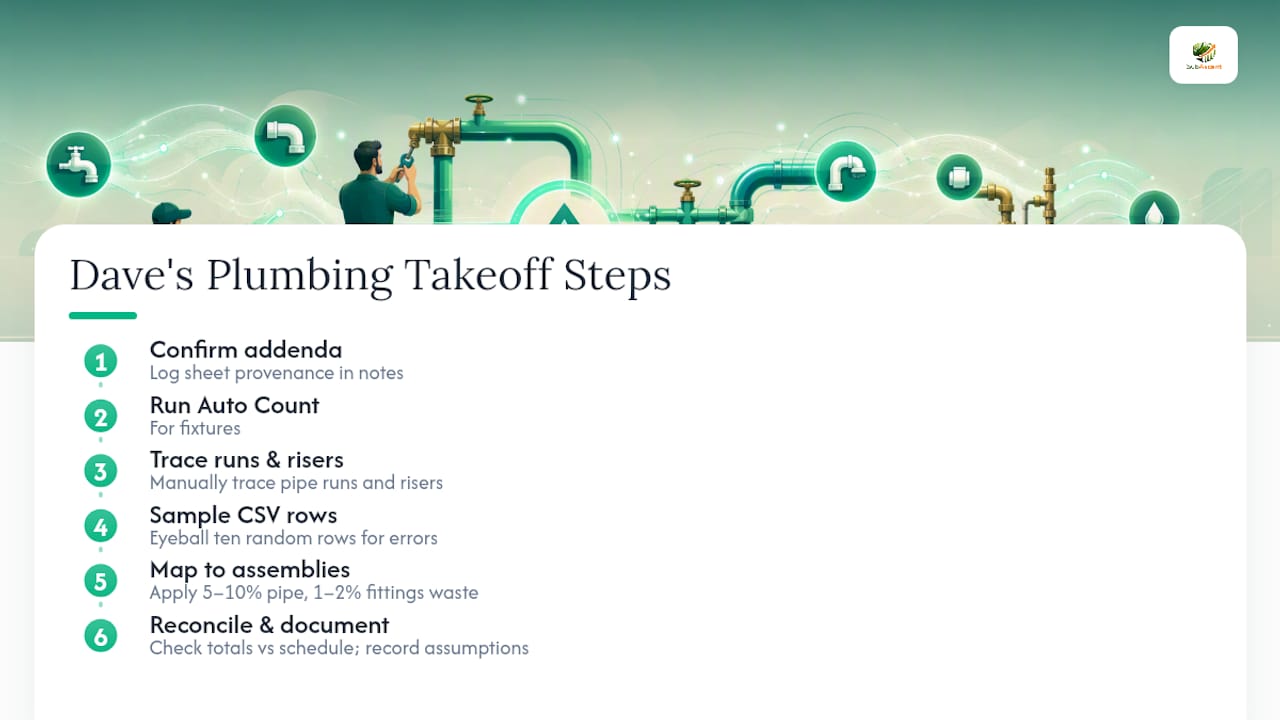
Here's the sequence Dave runs on every plumbing bid before it goes out. Confirm addenda first and log sheet provenance in your project notes so every number traces back to a source. Run Auto Count for fixtures, then trace pipe runs and risers by hand, and pull a CSV sample to eyeball ten random rows for errors. Map everything to assemblies (pipe type, fittings set, labor) and add 5 to 10 percent waste on piping, 1 to 2 percent on fittings, adjusted for project complexity. Final step: check fixture totals against the plumbing schedule and write any assumptions straight into the estimate comments.
Buy the Tool or Outsource the Takeoff?
A one-off repair or small remodel rarely justifies new software; a lightweight tool or manual tracing covers it. A 40-sheet multifamily project is a different math problem: the time saved on one bid usually covers the tool cost outright. Not sure which camp you're in? Pilot one mid-sized job first and clock the time and error difference before you commit either way.
— Dave
How Subascent Fits Into Your Takeoff Workflow
Some takeoff tools bundle bid and job management with PDF takeoff features, so measured fixture counts and linear pipe runs move straight into your estimate and, once you win the job, straight into job tracking without re-entry.

The honest advice is the same as anywhere else in this guide: pilot it on one real project first. Run a bid through Subascent, compare the time against your current method, and see whether the exported quantities save you the rebuild step you're doing now. You can start a trial and try a takeoff on your next bid before deciding if it earns a permanent spot in your workflow.
Sources
- Plumbing takeoff software that gives contractors faster, more accurate bids
- Free Plumbing Estimate Template (PDF, Excel, Sheets)
FAQ
What Is the Fastest Way to Do a Plumbing Takeoff From PDF Plans?
Use a PDF-capable takeoff tool with Auto Scale and Auto Count, or run an AI-assisted first pass, then manually verify risers and cross-check the export against the fixture schedule before pricing.
How Do I Avoid Doubled Quantities When Scaling a PDF?
Set scale using two known dimensions instead of one, watch for rotated or mirrored sheets, and never rasterize or resample the PDF, since that process can silently shift the scale factor.
Can AI-Assisted Takeoff Tools Replace Manual Verification?
No. Vendor documentation for tools like PlanSwift is explicit that AI-assisted Auto Takeoff produces a preliminary first pass that still needs a human review before it goes into a bid.
How Do I Handle Risers in a 2D Plumbing Takeoff?
Trace risers directly on elevation or riser sheets rather than estimating them from the floor plan, and build assemblies that automatically add riser length and a standard fitting set per riser.
What File Format Should I Export a Plumbing Takeoff Into?
CSV or XLSX with sheet references and one itemized row per quantity works best, since it maps cleanly into an estimating workbook without manual re-entry or column guesswork.