
For most U.S. plumbing subcontractors in 2026, the shortlist starts here: Subascent for integrated bid tracking and job management with a PDF takeoff add-on, FastPIPE (FastEST) for pipe-heavy commercial takeoff, STACK for cloud-based on-screen takeoff and team collaboration, and ServiceTitan or Jobber for service-first shops that need fast field quoting. Here is who should start trials first:
- Subascent — 1–50 employee plumbing subs who need bid tracking, PDF takeoff, QuickBooks sync, and crew-facing mobile in one flat-rate SaaS plan. Start with the PDF takeoff add-on on a real plan set.
- FastPIPE (FastEST) — commercial and mechanical plumbing subs bidding plan-and-spec work with complex pipe schedules. Test the pipe assembly library depth on a multi-drawing job.
- STACK — small-to-mid shops doing on-screen takeoff from PDFs and sharing counts across a distributed estimating team. Test multi-drawing auto-count first.
- ServiceTitan — service-heavy plumbing shops that dispatch technicians and need price-book quoting in the field. Test the price-book sync and dispatch integration.
- Jobber — solo operators and small residential service shops who want fast quotes and scheduling without a steep learning curve.
- McCormick Estimating — mid-market commercial subs who need a deep labor unit library and have the budget for a one-time license or annual subscription.
Pricing shapes range from flat SaaS (Subascent, STACK, Jobber) to per-user SaaS (ServiceTitan) to one-time desktop licenses (McCormick, FastPIPE). Implementation typically runs 1–3 days for flat SaaS tools, 1–6 weeks for small-team cloud takeoff or desktop tools, and 4–12+ weeks for mid-market or desktop specialty platforms.
Key Takeaways
The right plumbing estimating tool depends on your job mix, crew size, and whether you bid plan-and-spec commercial work, service calls, or both.
| Point | Details |
|---|---|
| Match tool to job mix | Service shops need FSM quoting; commercial subs need pipe takeoff depth. Hybrid shops often need both. |
| Test fixture library first | If the tool covers fewer than 80% of your standard rough-in types, it will not save time on real bids. |
| Confirm QuickBooks sync | Push a real estimate to QuickBooks during the trial. One-way or summary-only sync is not a true integration. |
| Budget for hidden costs | Library updates, per-seat fees, and training time routinely add $2,000–$8,000/year beyond the base price (live 2024 user reports confirm this range is typical when factoring in major software vendors). |
| Subascent for integrated bid management | Subascent covers bid tracking, PDF takeoff add-on, QuickBooks sync, and CrewTrack mobile in one flat-rate plan for plumbing subs. |
Table of Contents
- How do the top plumbing estimating tools compare in 2026?
- Quick picks: which product fits your shop?
- Profiles: what to expect from each category in a trial
- Why plumbing subs need trade-focused estimating software
- What does plumbing estimating software actually cost in 2026?
- How we compared these products
- How to choose: a 7–14 day pilot checklist
- What the field actually teaches you about estimating tools
- Subascent fits the way plumbing subs actually work
- Sources
How do the top plumbing estimating tools compare in 2026?
Independent roundups consistently show three distinct categories: specialty pipe/takeoff tools, cloud takeoff and collaboration platforms, and field-service estimating apps. Most mid-market shops run a hybrid of two.
Pricing signal: According to SoftwareConnect, low-tier annual costs run roughly $2,000–$15,000/year, mid-tier $15,000–$50,000/year, and enterprise spending climbs well above that. Takeoff modules commonly add several thousand dollars annually on top of base licensing.
Quick picks: which product fits your shop?
Buyer guides recommend on-screen takeoff for small contractors and specialty pipe tools for commercial work. Here is the one-sentence version for each type of shop:
- Subascent — the right starting point for any plumbing sub with 1–50 employees who needs bid tracking, PDF takeoff, and QuickBooks sync in one place; test the PDF takeoff add-on on a real bathroom-core plan set first.
- FastPIPE (FastEST) or QuoteSoft Pipe — commercial subs bidding pipe-heavy plan-and-spec work; test pipe assembly coverage and multi-drawing auto-count on a 3–5 drawing set.
- McCormick Estimating — mid-market subs who need deep labor unit libraries and can invest in a 6–12 week rollout; test labor unit accuracy against your own historical production rates.
- STACK or PataBid Quantify — distributed estimating teams doing cloud takeoff; test multi-drawing count accuracy and team sharing permissions.
- PlanSwift — small shops that want a one-time license for on-screen takeoff without a monthly bill; test assembly setup time and QuickBooks export.
- ServiceTitan — service-heavy shops dispatching technicians daily; test price-book sync and the field quoting flow on a real service call.
- Jobber or Housecall Pro — solo operators and small residential shops; test quote-to-invoice speed and the mobile experience.
- TurboBid — residential and light commercial subs who want a cloud tool with fixture assemblies and a price book; test fixture library coverage for your most common job types.
- Trimble AutoBid Mechanical or Trimble Estimation MEP — large mechanical and MEP contractors with complex BIM workflows; test CAD import accuracy and ERP integration.
- BuildVision AI — teams wanting AI-assisted PDF takeoff to speed counting; test AI count accuracy against a manual count on a known drawing.
- FieldEdge, ThermoGrid, or Commusoft — mid-size service shops that need dispatch, job costing, and field quoting together; test the dispatch-to-invoice workflow.
- Workiz, Service Fusion, FieldPulse, Markate, QuoteIQ, ServiceM8, or KaamCam — small service shops that need fast quoting and scheduling without complex takeoff; test quote creation speed and mobile usability.
- Wendes WenPipe / WenDuct — commercial mechanical subs with both pipe and duct scope; test the duct/pipe assembly library together on a combined mechanical drawing.
On hybrid stacks: many mid-market plumbing contractors run a specialty desktop takeoff tool for commercial bids alongside a field-service platform for service quoting and dispatch. If your shop does both, budget for two tools and plan integrations around QuickBooks as the common ledger.
Profiles: what to expect from each category in a trial
Subascent: integrated bid and job management for plumbing subs
Subascent is built specifically for specialty trade subcontractors, not general contractors. The core platform handles bid tracking, submittals, change orders, daily field reporting, and QuickBooks sync. The PDF takeoff add-on brings on-screen measurement directly into the bid workflow, so you are not toggling between a separate takeoff tool and a spreadsheet. The CrewTrack mobile app gives foremen a way to log time and field data without a separate login.
Pricing is flat-rate SaaS (Starter and Scale plans), which means no per-seat surprises as your estimating team grows. Implementation typically runs 1–3 days for a small team. For a trial, bring a real plan set and your current price book. Test three things: fixture template coverage for your most common job type, the PDF takeoff add-on on a multi-page drawing, and the QuickBooks sync against a recent invoice.
Pro Tip: Before your Subascent trial, export your last 10 bids from your current spreadsheet and use them as the benchmark. If the platform can replicate those bids faster and with fewer manual steps, the ROI case is already made.
Specialty pipe takeoff tools (FastPIPE, QuoteSoft Pipe, Wendes WenPipe, FastEST)
These are desktop Windows tools built for one job: counting pipe, fittings, fixtures, and hangers from construction drawings with high accuracy. FastPIPE (FastEST) is the most widely cited for commercial plumbing; QuoteSoft Pipe and Wendes WenPipe are strong alternatives with similar depth. All three support PDF automatic takeoff and CAD import.
The tradeoff is implementation time. Expect 4–8 weeks to configure assemblies, load your labor units, and train your estimators. Pricing is typically a one-time license plus annual maintenance, which can look attractive versus SaaS over a 3–5 year horizon but requires upfront capital. During a trial, test pipe assembly coverage for your most common pipe schedule (Schedule 40 PVC, Type L copper, or whatever dominates your bids), multi-drawing auto-count accuracy, and the QuickBooks material cost export.
Cloud takeoff platforms (STACK, PataBid Quantify, BuildVision AI)
STACK is the most commonly cited cloud takeoff tool for small-to-mid plumbing subs. It handles on-screen PDF takeoff, team sharing, and basic assemblies. PataBid Quantify adds pipe-specific counting for commercial work. BuildVision AI brings AI-assisted counting to speed up repetitive fixture and fitting counts.
All three are per-user SaaS, so costs scale with team size. Implementation runs 1–4 weeks. The key trial test: run a multi-drawing count on a real commercial bathroom core and compare accuracy against a manual count. Cloud tools shine for distributed teams; they tend to lag desktop specialty tools on deep pipe-schedule-level takeoff for large mechanical jobs.
Enterprise MEP platforms (Trimble AutoBid Mechanical, Trimble Estimation MEP)
These are the tools large mechanical contractors use for complex MEP work with BIM integration and ERP connectivity. Implementation runs 8–16 weeks and requires dedicated training. Per-user SaaS pricing at enterprise scale means total annual cost can exceed $50,000 for a mid-size mechanical department. Unless you are bidding $10M+ mechanical projects with a dedicated estimating team, the implementation burden outweighs the benefit.
Field-service estimating platforms (ServiceTitan, Jobber, Housecall Pro, FieldEdge, and others)
Aggregated platform comparisons show that integrated FSM platforms are common picks for service-heavy shops under $5M revenue. ServiceTitan is the most feature-complete for larger service operations; Jobber and Housecall Pro are faster to deploy for smaller shops. Field-service platforms with built-in estimating shorten time-to-quote and can improve close rates, but commercial takeoff depth often lags specialty tools.
FieldEdge, ThermoGrid, Commusoft, Workiz, Service Fusion, FieldPulse, Markate, QuoteIQ, ServiceM8, and KaamCam all occupy the same general space: cloud-based, mobile-first, QuickBooks-connected, and optimized for service quoting rather than plan-and-spec bidding. The differences between them are mostly in pricing model (per-user vs. flat), mobile platform (iOS-only vs. cross-platform), and depth of job costing. Commusoft stands out slightly for mid-size shops that need job costing alongside service dispatch. KaamCam adds photo-based visual quoting, which is useful for service calls where the scope is unclear until a tech is on-site.
Why plumbing subs need trade-focused estimating software
The BLS projects steady demand for plumbers, pipefitters, and steamfitters, which means sustained bid volume and pressure on estimating teams to turn around accurate numbers faster. A generic spreadsheet or a GC-built tool like Procore does not solve the core problem: plumbing bids fail on fixture miscounts, wrong pipe schedule assumptions, and labor phasing errors that compound across large commercial drawings.
Trade-focused estimating software addresses this directly. A fixture assembly library means you are not manually pricing every valve, fitting, and hanger on a toilet rough-in. A pipe schedule takeoff tool catches the difference between Schedule 40 and Schedule 80 before it hits your material cost. Multi-drawing auto-count eliminates the manual recount when a GC issues a plan revision on drawing 14 of 22.
PHCC resources emphasize trade-specific labor benchmarking as a core accuracy requirement. A tool without a plumbing labor unit library forces your estimator to build labor from scratch on every bid, which is where hours get lost and margins get guessed.
Must-have estimating capabilities for plumbing subs:
- Fixture and assembly libraries (toilet, lavatory, water heater, floor drain rough-ins)
- Pipe and fitting takeoff by schedule and material type
- Multi-drawing auto-count with revision tracking
- Labor unit library aligned to plumbing trade standards
- Price-book sync to current supplier pricing
- Report formats that match GC bid form requirements
- QuickBooks or accounting integration for cost-to-actual tracking
Pro Tip: Build one master estimating template for your three most common job types (residential remodel, light commercial bathroom core, and service replacement) before you go live on any new platform. Templates cut first-bid time by more than half and force you to standardize your labor assumptions before the pressure of a real deadline.
Estimating templates are one of the most underused accuracy tools in small plumbing shops. Most estimators rebuild the same bid structure from memory on every job.
What does plumbing estimating software actually cost in 2026?
SBA business guidance recommends treating software as a capital line item with a realistic total cost of ownership, not just a monthly subscription fee. Here is what the numbers actually look like:
| Pricing Tier | Model | Typical Annual Range | Who It Fits |
|---|---|---|---|
| Low tier | Flat SaaS or per-user SaaS | $2,000–$15,000/year | Solo operators, small service shops, 1–5 users |
| Mid tier | Per-user SaaS or one-time license + maintenance | $15,000–$50,000/year | Small-to-mid commercial subs, 5–20 users |
| Enterprise tier | Per-user SaaS or one-time license + ERP | $50,000+/year | Large mechanical/MEP contractors, 20+ users |
| Takeoff add-on | Module or add-on fee | $2,000–$15,000/year additional | Any tier needing PDF/CAD takeoff |
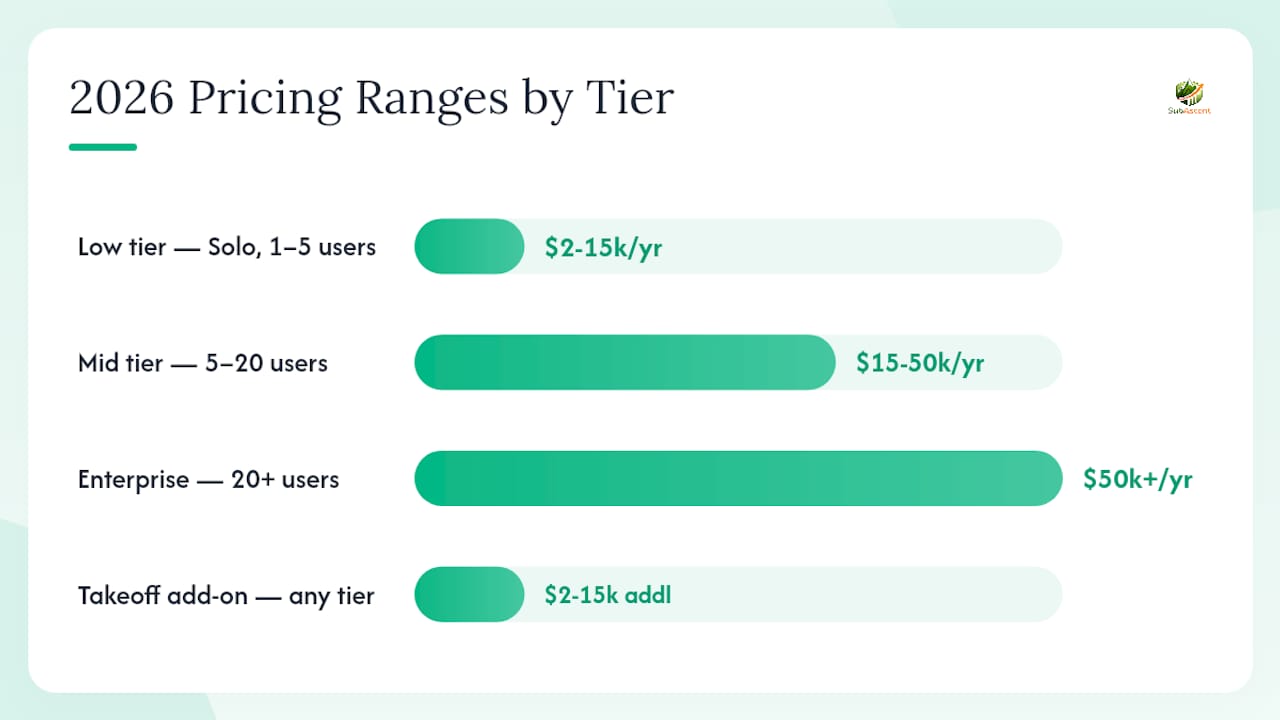
As of June 2024, typical live quotes for commonly used plumbing estimating platforms still fall within these ranges, though some vendors may price above or below depending on included modules and user count.
Ranges sourced from SoftwareConnect's 2026 buyer guide.
Implementation timeline by shop size:
- Quick-start (1–7 days): Flat SaaS tools like Subascent, Jobber, Housecall Pro, Workiz, and Markate. Minimal configuration, cloud-based, mobile-ready out of the box.
- Small-team rollout (1–6 weeks): STACK, PataBid Quantify, TurboBid, PlanSwift. Requires assembly setup and price-book loading.
- Mid-market commercial (6–12+ weeks): McCormick Estimating, FastPIPE, QuoteSoft Pipe, Wendes WenPipe, ServiceTitan. Requires library configuration, labor unit setup, and estimator training.
- Enterprise MEP (8–16+ weeks): Trimble AutoBid Mechanical, Trimble Estimation MEP. Full implementation with ERP integration and BIM workflow setup.
Hidden costs to budget for:
- Annual library and price-book update subscriptions (common with desktop specialty tools)
- Per-seat licensing for additional takeoff users beyond the base license
- Supplier price feed subscriptions (separate from the software license)
- Estimator training time (often 20–40 hours for specialty desktop tools)
- Integration consulting fees for ERP or custom accounting connections
- Data migration from existing spreadsheets or legacy systems
Common user complaints on review platforms center on unexpected per-seat fees and training time that was not scoped during the sales process. Ask vendors to itemize every cost before signing.
How we compared these products
Every product in this comparison was evaluated against a representative test job: a mixed residential bathroom remodel (8 fixtures, 3 drawings) plus a light commercial bathroom core-fit (22 fixtures, 6 drawings). That combination covers the two most common bid types for U.S. plumbing subcontractors and surfaces the gaps that matter most in practice.
Scoring axes:
- Takeoff accuracy and plumbing library depth (fixture assemblies, pipe schedules, labor units)
- Speed from drawing upload to priced estimate
- Mobile quoting capability and offline support
- QuickBooks and accounting integration quality
- Implementation effort and time-to-productive
- Price-to-value across the full cost of ownership
Data sources used:
- Vendor documentation and published feature lists
- G2 and Capterra user ratings for usability and onboarding signals
- WorkflowUnity and Guideflow independent roundups
- Software Advice aggregated comparisons
- PHCC trade standards for labor unit benchmarking
What this comparison did not test: enterprise contract negotiation, volume discount pricing, or vendor-specific implementation packages. Those vary by deal size and are best confirmed directly with vendors.
How to choose: a 7–14 day pilot checklist
Run a 7–14 day pilot that proves takeoff accuracy, price sync, and field-quote flow before buying. A trial that does not include a real plan set and your actual price book tells you almost nothing useful.
Decision checklist:
- Define your representative project. Pick one residential remodel and one light commercial job from your last 12 months. These are your benchmark bids.
- Prepare your data. Export your current price book (materials and labor rates) and your most common fixture assembly list before the trial starts.
- Set up the trial environment. Upload your benchmark plan sets. Configure at least three fixture assemblies. Load your price book.
- Run the takeoff. Count fixtures and pipe on both drawings. Compare accuracy against your manual count.
- Test price sync. Push the estimate to QuickBooks or your accounting system. Verify line items match.
- Test field quoting. Generate a quote on the mobile app. Confirm it can be sent to a GC contact from the field.
- Measure time-to-quote. Clock how long the full workflow takes from drawing upload to a GC-ready bid document.
- Go/no-go criteria. If fixture library coverage is below 80% of your common job types, the tool will not save time. If QuickBooks sync requires manual reconciliation, the integration is not real.
Questions to ask vendors during demos:
- How often is the fixture and labor library updated, and is that included in the base price?
- Does QuickBooks sync push line-item detail or just totals?
- Can estimators work offline on the mobile app and sync when back online?
- How does the tool handle multi-drawing auto-count when a GC issues a plan revision?
- Is there a service-to-project handoff workflow for shops that do both service and commercial work?
Red flags that should stop a purchase:
- Fixture library covers fewer than 50% of your standard rough-in types
- No test data export or sandbox environment during the trial
- QuickBooks integration is one-way or requires a third-party connector
- Per-seat charges are not disclosed until after the demo
- No free trial or pilot period available
Construction software gaps for specialty subs often show up exactly here: tools built for GCs or general service businesses lack the fixture depth and pipe-schedule specificity that plumbing estimators need.
What the field actually teaches you about estimating tools
The single most useful thing you can do before deploying any estimating platform is build one canonical price book and protect it. Every accuracy problem I have seen in plumbing estimating traces back to the same root: three estimators using three different versions of the labor rate for a water heater swap, or a material cost that was updated in one spreadsheet but not the other two. The software does not fix that. You fix it before you go live.
Short-term adoption is the other thing most shops underestimate. Estimators who have been building bids in Excel for ten years will find a reason to revert if the new tool is not faster on their first real bid. The answer is not a training mandate. It is a pilot on a job they already know cold, so the comparison is honest.
Bring a representative plan set and your current price book to every demo. Any vendor who cannot show you a live takeoff on your own drawings during the demo is selling you a feature list, not a workflow.
Subascent fits the way plumbing subs actually work
Subascent is a flat-rate SaaS platform built for specialty trade subcontractors, including plumbing subs, that covers the full bid-to-job workflow: bid tracking, PDF takeoff (add-on), submittals, change orders, daily field reporting, QuickBooks sync, and the CrewTrack mobile app for foremen.

Where most estimating tools force you to choose between takeoff depth and job management, Subascent connects both in one subscription. The PDF takeoff add-on handles on-screen measurement from plan sets. The CrewTrack app gets timecards and field data out of foremen's heads without a separate login. QuickBooks sync keeps your cost-to-actual numbers current without manual reconciliation.
For a pilot, bring your last commercial bathroom-core plan set and your current price book. Test the PDF takeoff add-on on a real drawing, run a fixture count, and push the estimate to QuickBooks. Most plumbing subs are productive within 1–3 days.
Start a trial at Subascent and bring a representative plan set. That is the fastest way to know if it fits your shop.
Sources
Pricing and features change frequently. Confirm all details directly with vendors during demos before making a purchase decision.
- Occupational Outlook: Plumbers, Pipefitters, and Steamfitters | BLS
- U.S. Small Business Administration — Business Guide
- Plumbing Estimating Software | WorkflowUnity
- 7 best plumbing estimating software for 2026 - Guideflow Blog
- Best Plumbing Estimating Software of 2026 | SoftwareConnect
- 22 Best Plumbing Software - 2026 Reviews & Pricing | Software Advice
- 5 Best Estimating Software for Plumbing Companies 2026 | US Tech Automations
- PHCC (Plumbing-Heating-Cooling Contractors) — resource site