

A progress claim is a formal pay application that documents percent complete and supporting evidence so a subcontractor gets paid for work finished during that billing period. The immediate action: submit a complete pay app by the GC's cutoff, with your Schedule of Values percentages updated, change orders itemized separately, and lien waivers attached, because a single missing waiver can stall the entire draw.
TL;DR:
- Subcontractors must submit a complete progress claim by the general contractor's cutoff date, including updated Schedule of Values percentages and attached lien waivers, to avoid delays.
- Accurate documentation such as photos, delivery tickets, and inspection sign-offs is essential to prevent rejection of pay applications, especially when claiming stored materials or change orders.
- Progress payments are calculated line by line based on percent complete, scheduled value, authorized change orders, stored materials, and minus retainage and previous billing amounts; miscalculations or unapproved change orders lead to disputes.
- Prompt payment depends heavily on meeting deadlines, properly claiming late payment interest, and escalating if the general contractor or owner delays beyond 30 to 45 days.
- Using specialized tools like SubAscent streamlines the process by centralizing the Schedule of Values, documentation, waiver requests, and synchronization with accounting systems, reducing billing headaches.
Table of Contents
- What Is a Progress Claim in Construction, and Why Does It Matter?
- How Do You Prepare and Submit a Pay Application That Gets Approved?
- Schedule of Values, AIA Forms, and Mapping to GC Portals
- How Does the Progress Payment Math Actually Work?
- When Does the Money Actually Show Up?
- What Happens When a Pay App Gets Rejected?
- Your Monthly Pay-App Checklist
- Field-Tested Practices From Dave and SubAscent
- What Should Each Trade Watch for on Pay Apps?
- How SubAscent Helps You Get Paid Faster
- Where to Go for the Original Rules and Templates
- Sources
- FAQ
What Is a Progress Claim in Construction, and Why Does It Matter?
A progress claim, sometimes called a draw request or pay application, does your formal ask for payment on work completed through a specific date. It's not the same as a standard invoice. A regular invoice bills for a finished, delivered product. A progress claim bills for partial completion of ongoing work, measured against a baseline your contract already agreed to.
That baseline is the Schedule of Values (SOV), a line-item breakdown of your contract price by task or cost code. Every month (or at defined milestones), you report what percentage of each SOV line is done, and the GC or owner pays you against that percentage, minus retainage.
Billing cadence depends on the contract. Most commercial jobs run monthly cycles tied to a set cutoff date. Some residential or smaller commercial jobs use milestone billing instead, where you get paid at defined checkpoints like "rough-in complete" or "trim-out complete" rather than a percentage estimate.
Retainage is the part of your earned payment the GC holds back until the job or your scope reaches substantial completion, often ranging from a small to moderate percentage per draw. It exists to give the owner leverage if punch list items or defects surface late. For subs, retainage means you're always financing part of the job out of your own pocket. A $200,000 contract with 10% retainage means $20,000 sits unpaid until closeout, which is why understanding progress payments and how they're structured matters as much as understanding the scope of work itself.
How Do You Prepare and Submit a Pay Application That Gets Approved?
Getting paid on time comes down to process, not luck. Follow the same sequence every cycle and you'll cut your rejection rate dramatically.
- Confirm the cutoff, the form, and your SOV baseline. Every GC has a billing date, usually the 20th to 25th of the month, and a required format, whether that's a proprietary portal or a standard AIA form. Pull last month's approved SOV so you're building on the actual approved baseline, not your original bid.
- Calculate percent complete per SOV line. Walk the job or talk to your foreman before you touch the numbers. Update each line honestly, add any approved change orders as separate line items, and include stored materials if your contract allows billing for delivered-but-uninstalled material.
- Gather your proof. Timestamped photos, delivery tickets, inspection sign-offs, and crew timecards all back up the percentages you're claiming. Missing or weak documentation is one of the most common reasons pay apps get rejected or delayed, so treat this step as non-negotiable, not optional.
- Collect lien waivers early. Request conditional waivers from your sub-tier vendors and suppliers as soon as you know your billing amount, not the night before submission. A single missing sub-tier waiver can stall an entire pay application, even when everything else is correct.
- Submit to the right contact and get a receipt. Email confirmation or a portal timestamp matters if you ever need to prove you billed on time. Calendar a follow-up for seven to ten days out so nothing goes quiet.
Pro Tip: Build a repeating calendar reminder five business days before the GC's cutoff. That buffer gives you time to chase a missing waiver or a foreman who hasn't turned in field notes, instead of scrambling the morning it's due.
Schedule of Values, AIA Forms, and Mapping to GC Portals
The Schedule of Values is the backbone of every progress claim. It breaks your contract into line items, usually by cost code or scope, each with a dollar value that adds up to your full contract sum. Percent complete gets applied line by line, not as one blended number, which is why an accurate SOV up front saves you arguments later.
AIA G702 and G703 are the most widely used standardized pay-app forms on commercial projects in the U.S. The G702 is the cover sheet: it summarizes your contract sum, total earned to date, retainage withheld, and the current amount due. The G703 is the continuation sheet, the detailed line-item breakdown showing scheduled value, previous billing, current billing, stored materials, and percent complete for every SOV line.
Plenty of GCs run their own portals instead of raw AIA forms, but almost all of them map to the same underlying fields. The most common mapping error subs make: entering a change order into the wrong SOV line instead of adding it as a distinct line item, which makes your percent-complete math impossible to audit later.
Before you submit anything, run this checklist:
- SOV percentages match your actual field progress, not last month's copy-paste
- Change orders appear as separate, clearly labeled lines
- Stored materials are documented with delivery tickets if your contract allows billing them
- Conditional lien waivers are signed and attached for the current billing period
- Sub-tier waivers are collected and match your billed amount
Our own breakdown of what an AIA payment application actually requires walks through each field if you're filling one out for the first time.
How Does the Progress Payment Math Actually Work?
The core formula per SOV line is simple: (percent complete × scheduled value) plus approved change orders plus allowed stored materials, minus retainage, minus previously billed amounts. That's your current payment due for that line.
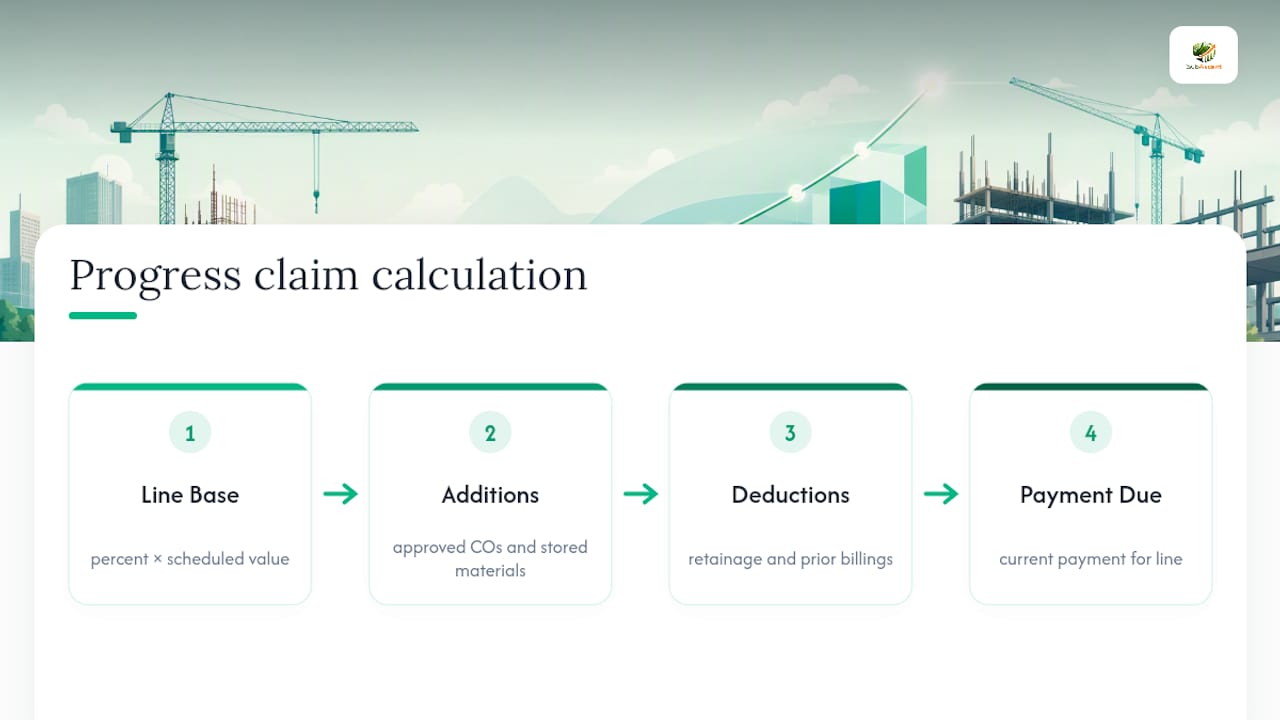
Retainage is typically a percentage withheld per draw, though state rules vary widely, and some states cut retainage after the job hits 50% completion, while many federal contracts eliminate it entirely. That withheld cash adds up fast on a large job, which is exactly why tracking retainage separately in your job costing matters as much as tracking the bill itself.
Change orders deserve their own line, always. Never bill extra work by folding it into an existing SOV percentage. If a GC hasn't formally approved a change order yet, don't bill it. Billing unapproved work invites a dispute, and billing ahead of actual field progress (overbilling) can trigger scrutiny or even a demand to true up on the next draw. Underbilling, meanwhile, just starves your own cash flow for no reason.
When Does the Money Actually Show Up?
Missing a GC's cutoff by even a day can push your payment a full billing cycle, often 30 days, because most GCs batch pay apps and won't reopen a cycle for a straggler.
Federal work has clearer rules than private work. FAR 52.232-27 requires prime contractors on federal construction contracts to pass down prompt-payment obligations, generally paying subs within 7 to 15 days after the prime receives payment from the government. That's a meaningfully faster cascade than most private commercial work sees.
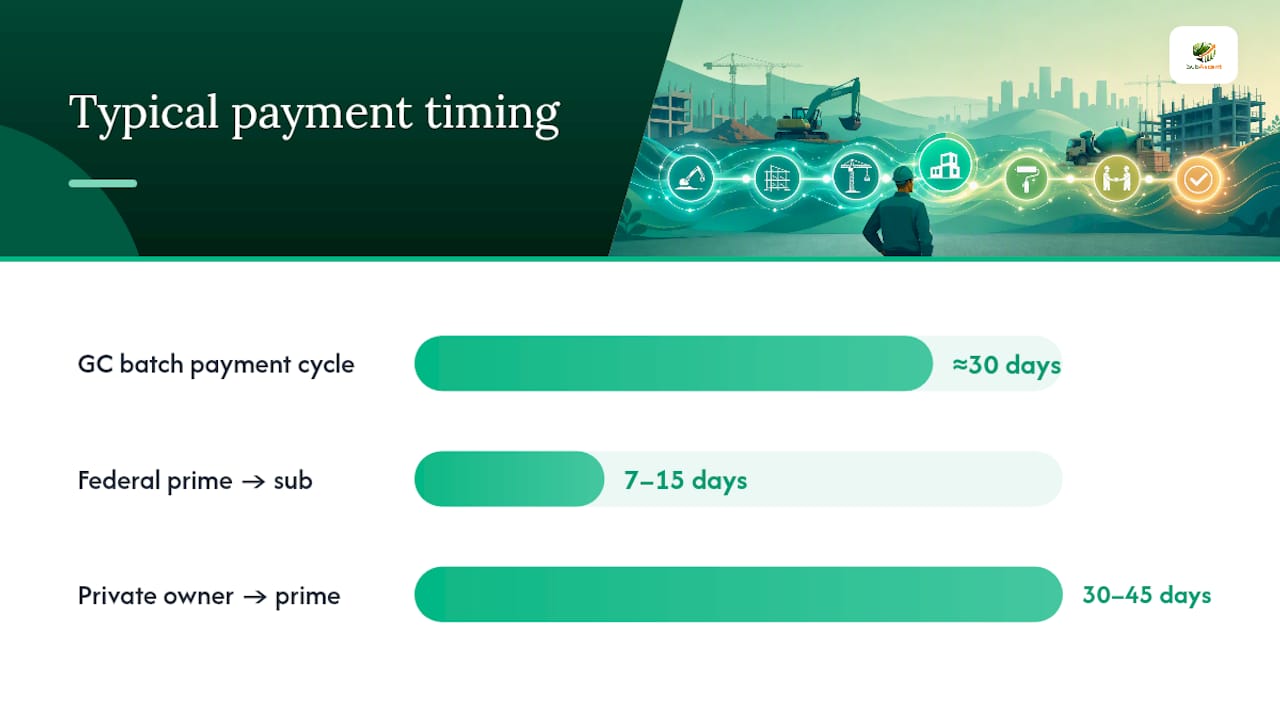
On private jobs, most state prompt-payment statutes require owners to pay primes within 30 to 45 days, and primes to pay subs within 7 to 15 days after they receive funds, with late-payment interest sometimes kicking in around 1% per month under certain state statutes.
If payment is late:
- Send written notice referencing your contract's payment terms, not just a phone call
- Calculate and formally claim any interest your state statute or contract allows
- Escalate to the GC's project executive if the PM goes quiet, then involve counsel if the delay stretches past 30 to 45 days
Our guide to a 30-minute AR follow-up routine covers the exact cadence for chasing payment before it turns into a 90-day problem.
What Happens When a Pay App Gets Rejected?
Most rejections trace back to a handful of repeat causes: mismatched SOV percentages, missing waivers, unapproved change orders billed anyway, or documentation that doesn't back up the claimed progress. Preempting each one with a clean paper trail solves most disputes before they start.
When a legitimate dispute won't resolve through normal channels, subs have real leverage:
- Contractual stop-work notice. Most subcontracts include a right to suspend work after a defined non-payment period, often 10 to 30 days past the due date. Using it forces a conversation.
- Mechanic's lien. Filing windows vary by state, often 60 to 120 days from last furnishing labor or materials, so track your state's deadline the day a job starts, not the day payment goes late.
- Miller Act bond claim. On federal projects, mechanic's liens don't apply to government property, so subs use a Miller Act payment bond claim instead, with its own notice and filing deadlines separate from state lien law.
- Legal counsel. Bring in a construction attorney once a dispute involves real dollars or a GC that's stonewalling, rather than after the statute of limitations is closing in.
Your Monthly Pay-App Checklist
Run the same rhythm every cycle and the process stops feeling like a scramble.
- Pre-close (one week out): Walk the job, confirm percent complete with your foreman, and flag any change orders that still need written approval.
- Week of billing: Update SOV lines, attach photos and delivery tickets, and send waiver requests to every sub-tier vendor tied to this draw.
- Submission day: Double-check the GC's required format, attach signed waivers, submit, and save a confirmation receipt.
- Post-submission: Calendar a check-in for seven to ten days out, and follow up in writing if you haven't heard back.
Pro Tip: Front-load your SOV carefully on early scope like mobilization or rough-in, since it improves early cash flow, but don't overdo it. A GC's PM will notice a line that's suspiciously ahead of the rest of the job, and it can trigger the exact scrutiny you're trying to avoid.
Field-Tested Practices From Dave and SubAscent
After years running a trade business, the rule that's saved more cash flow headaches than anything else: never perform extra work without a written, approved change order in hand first. Verbal promises from a PM don't survive a dispute. Get it in writing, then itemize it on the SOV as its own line so it never gets buried in your percent-complete math.
A few other habits worth building into your operation:
- Photograph every SOV line's progress the same day you update your percentages, timestamped and organized by cost code
- Request lien waivers the moment you know your billing number, not the week before submission
- Sync approved pay apps into QuickBooks immediately so your job cost reports and your AR aging match
Our posts on the lien waiver process for subcontractors and reading your construction WIP report go deeper on both of these if you want the full workflow.
— Dave
What Should Each Trade Watch for on Pay Apps?
Framing and drywall crews should track inspection sign-off cards closely. Missing rough-in or fire-taping documentation is a common gap. Concrete and masonry benefit from milestone billing tied to pour or lift completion rather than blended monthly percentages. Fire protection and low-voltage trades should hold rough-in and final test sign-offs as their key proof points. Electrical and plumbing crews often forget to attach panel or fixture delivery tickets when billing stored materials, which is an easy fix that prevents an easy rejection.
How SubAscent Helps You Get Paid Faster
There's no shortage of spreadsheets and generic project software out there, but most of it was built for general contractors, not for the sub actually filling out the SOV every month. Subascent is built specifically for specialty trade subcontractors who need their SOV, pay apps, and waivers living in one place instead of scattered across email threads and desktop folders.

Subascent centralizes your Schedule of Values so percent complete updates automatically feed into your pay app instead of getting re-typed each cycle. It stores your supporting documentation, photos, delivery tickets, and inspection sign-offs, tied directly to the SOV line they support. Waiver requests go out automatically when you hit a billing milestone, closing the exact gap that stalls so many draws. And because it syncs with QuickBooks, your approved pay app updates your books without a second data entry pass.
If missed cutoffs, mismatched SOVs, or chasing waivers is eating your billing week, start a trial with Subascent and see how much of that workflow runs itself. You can also browse plans built for specialty trades to see what fits your crew size.
Where to Go for the Original Rules and Templates
For the federal rule itself, read FAR 52.232-27 on Cornell's Legal Information Institute. For AIA form guidance, see our AIA payment application primer. For a dispute involving real money, talk to a construction attorney rather than relying on a blog post.
Sources
- 48 CFR § 52.232-27 – Prompt Payment for Construction Contracts
- Construction progress claims explained — Autodesk Blog
- Progress billing in construction: How it works — Built
FAQ
What Is a Progress Claim in Construction?
A progress claim, also called a pay application or draw request, is a formal request for payment covering work completed during a specific billing period, based on percent complete against your Schedule of Values.
How Do I Calculate WIP in Construction?
Work in progress (WIP) compares what you've billed against what you've actually earned based on percent complete, factoring in costs incurred and remaining budget for each job. Our WIP report guide breaks down the five numbers that matter most for trade subs tracking job profitability in real time.
How Do You Do Progress Billing in Construction?
Progress billing means updating your SOV each cycle with the current percent complete per line item, adding approved change orders and allowed stored materials, subtracting retainage, and submitting that total using an AIA G702/G703 form or your GC's portal equivalent.
What Compensation Can You Claim for Delayed Construction Payment?
Depending on your state and contract, you may be entitled to statutory interest on late payments, often around 1% per month under certain prompt-payment statutes, plus the right to suspend work or file a mechanic's lien if the delay continues past your contract's cure period.
What's the Difference Between a Progress Claim and a Final Payment?
A progress claim covers partial completion during an active billing cycle, while final payment releases the remaining contract balance and retainage once the scope reaches substantial completion and all closeout documents are accepted.