

An RFI log is one running list of every question you have sent a general contractor on a job: what you asked, when, who owes the answer, and whether it came back. Set it up on day one with sequential numbers, a due date on every line and a days-open count, and you stop chasing answers from memory. The log also becomes your paper trail when an answer turns into extra work. Below is the layout, the setup steps and the weekly routine, written for electrical, plumbing, HVAC, masonry, concrete, drywall and the other specialty trades.
TL;DR
- One log per job, one line per question, numbered in order and never reused.
- Every line needs a due date, a ball-in-court name, a status and a days-open count.
- Link each RFI to the sheet, revision and spec section so it can be checked a year later.
- Review the log weekly, chase anything past due, and flag every answer that might change scope.
- Keep RFIs, submittals and change orders in separate logs that point at each other.
Table of Contents
- What an RFI log does for a sub
- The columns every RFI log needs
- Number RFIs so they hold up
- Set up the log in six steps
- The weekly review
- When an answer changes your scope
- RFI log, submittal log or bid log
- What it looks like by trade
- Spreadsheet or software
- Mistakes that break the log
- Put the log inside your job system
- Our view
- FAQ
- Sources
What an RFI log does for a sub
An RFI is a written request for information. You found something in the drawings or specs that is unclear, conflicting or missing, and you ask the design team to resolve it. On most jobs your question goes through the GC, who passes it up and passes the answer back.
The standard AIA contract language makes this a formal step. Under A201-2017, the contractor reports errors, inconsistencies or omissions to the architect as an RFI, in the form the architect requires, as summarized in a 2017 industry session. That is why the question has to be written and tracked, not phoned in.
The log is the list of all of those questions. It earns its place for three reasons:
- Crews don't wait. An unanswered question about a embed, a sleeve location or a wall type is a crew standing around or building it wrong.
- Time costs money. The same session reports a Navigant finding that time spent reviewing and answering RFIs averaged $1,080 per RFI, and that 25 percent of RFIs in the United States never get a response. A log that shows what is still open is how you catch the quiet ones.
- Records win arguments. When a dispute comes, the dated log shows when you asked and how long the answer took.
The columns every RFI log needs
Keep it short enough that people fill it in. Here is the layout we recommend for a trade sub.
| Column | What goes in it | Why it matters |
|---|---|---|
| RFI # | Sequential number, never reused (RFI-001, RFI-002) | A gap in the numbers is a missing record |
| Subject | A short line, e.g. "Level 2 slab edge at grid C" | You can find it in ten seconds |
| Question | One question only | A three-part RFI usually comes back with one part answered |
| Sheet and revision | e.g. A-203 rev C, detail 4 | Checkable later; "the plans show" is not |
| Spec section | e.g. 03 30 00 Cast-in-Place Concrete | Ties the question to your scope |
| Proposed solution | What you think the answer is | The designer only has to confirm |
| Date sent | The day it left your office | Starts the clock |
| Response due | Per your contract or the GC's schedule | The date you chase from |
| Ball in court | Who owes the next move: you, GC, architect, engineer | Shows where it is stuck |
| Status | Open, Answered, Closed, Void | Filters the weekly review |
| Date answered | When the response came back | Ends the clock |
| Days open | Today minus date sent (or answered minus sent) | The number to show at the job meeting |
| Cost or schedule impact | "TBD" until the answer is known | Feeds the change order decision |
| Linked item | Related submittal, change order or photo | Connects the paper trail |
Two of these come straight from published guidance. The federal GSA RFI record requires a subject and a question, and carries a proposed solution and a response due date. The SMACNA guidance for mechanical contractors says to keep cost and schedule impact as TBD until the response is known. Both habits are cheap and save arguments.
Priority: add it only if you will use it
A priority column helps when you run many jobs. Keep the levels simple. "Critical" should mean the crew is idle or will be soon. Everything else is routine. If every line is marked urgent, none of them is.
Number RFIs so they hold up
Use one sequence per job. The electrical contractors' pre-construction planning manual published by the IAE tells contractors to develop a log with sequential numbering to track all RFIs, use a company standard form, and include a proposed solution on each one.
A few rules that keep the numbering clean:
- Never reuse or delete a number. If you withdraw an RFI, mark it Void and leave the line.
- Number it when you write it, not when it is sent. If the draft is dropped, void it.
- Match the GC's numbering if they require it. Keep your own number in a second column so both systems point to the same line.
- Don't prefix by trade on a single-trade job. On a multi-scope job (say, electrical and low-voltage), a prefix such as E- or LV- is fine.
Set up the log in six steps
1. Open the log when you get the notice to proceed
Don't wait for the first question. Create the log with the job number, the GC's contact for RFIs and the response period from the contract. Read the RFI section of your subcontract and note who can submit, what form the GC wants and how many days the design team has.
2. Name the people
Write down who in your office writes RFIs, who approves them before they go out, and who the foreman reports field questions to. Foremen find most of the problems. They should have a one-step way to hand a question to the office, with a photo of the spot. Our guide on the field RFI and submittal process for foremen covers that handoff.
3. Check the documents before you ask
Before you write an RFI, look through the drawings, specs and addenda for the answer. An RFI whose answer is on sheet S-301 wastes everyone's time and teaches the GC to ignore your questions. This is also where a takeoff on the PDF set helps: when you have measured the work, you know which dimension is actually missing.
4. Write one question per RFI
State the problem, cite the sheet and revision, and offer your proposed answer. Say what it affects: material on order, a pour date, a ceiling close-in. For wording and examples, see our guide to writing RFIs that get answered.
5. Log it the day you send it
Enter the line when the RFI goes out, not when the answer comes back. If you log after the fact, the due date and days-open count are guesses, and those are the numbers that count.
6. Set the follow-up rule
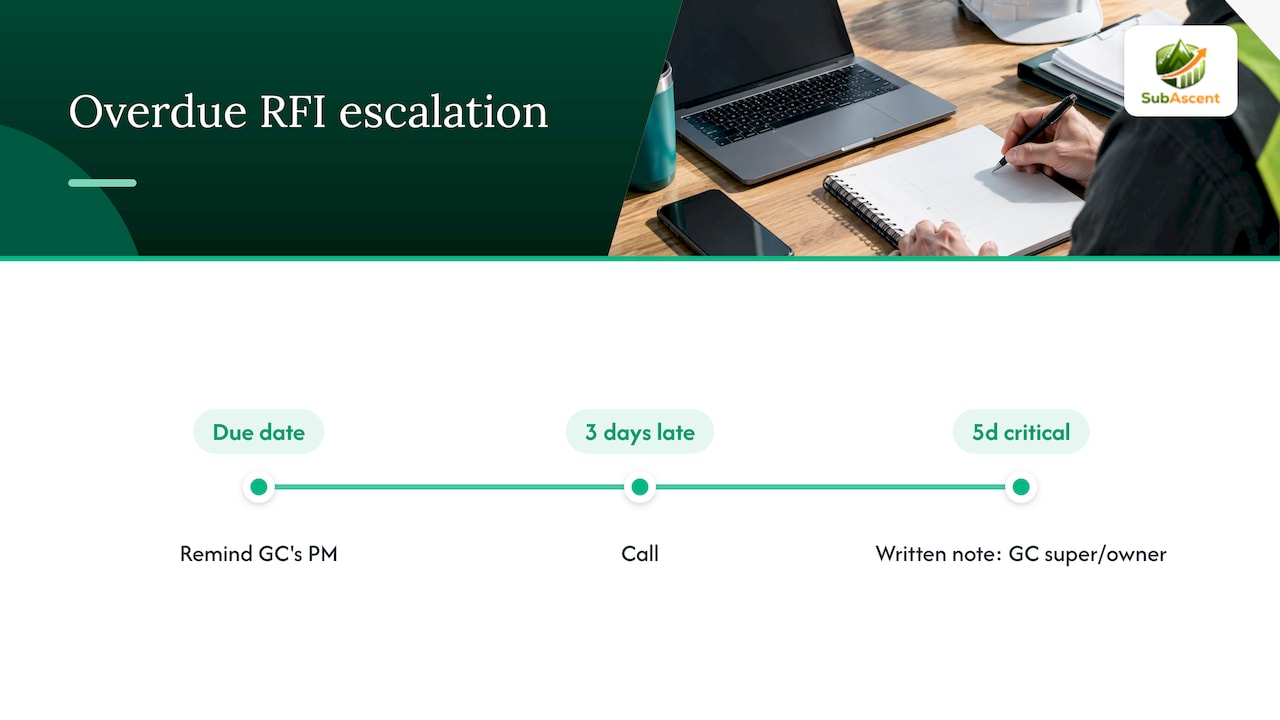
Decide in advance what happens when an answer is late. A workable rule: a reminder to the GC's PM at the due date, a call at three days past, and a written note to the GC's superintendent and your own owner at five days past if the work is on the schedule's critical path. SMACNA's guidance calls for a formal escalation process that defines who does what, and for treating overdue RFIs like a receivable. If you already chase invoices on a schedule, you already know how.
The weekly review
The log only works if someone reads it. Set a 15-minute review on the same day each week, before the GC's coordination meeting.
- Sort by status and pull every Open line.
- Look at days open. Anything past its due date gets a follow-up today.
- Check ball in court. If it is yours (a clarification the architect asked for), answer it first.
- Read each Answered line and ask one question: does this change what we priced? If yes, open a change order discussion now.
- Close lines where the work is built to the answer.
The days-open number is the one to bring to the job meeting. "RFI-014 has been open 17 days and the rebar is due on site Monday" gets a response. "We're still waiting on some stuff" does not.
When an answer changes your scope
An answer to an RFI is a clarification. It does not by itself approve extra cost or time. If the response adds a thicker slab, another run of conduit, a different fire rating on a wall or a heavier lintel, you need a change order under your contract. Put "CO potential" on the log line the day the answer comes in, and write the notice in the time your contract allows.
A simple habit: add the change order number to the RFI line. Then anyone can follow the question to the price. Our six-item GC change order checklist shows what to include so the change doesn't bounce back.
RFI log, submittal log or bid log
These get mixed up, and the mixing makes the RFI log useless. A Navigant review of one dispute, reported by an industry session, found that a large share of items logged as RFIs were something else? The takeaway is simple: keep each log to one job.
| Log | It records | Example |
|---|---|---|
| RFI log | Questions about the documents | "Detail 4 shows a 6" wall, the plan shows 8". Which governs?" |
| Submittal log | Products and shop drawings sent for review | Rebar shop drawings, panel schedules, CMU unit data |
| Change order log | Changes to scope, price or time | Added dowels after the answer to RFI-007 |
| Bid invitation log | Invitations and due dates before you win the job | A GC's invite with a due date and addenda |
If the item is a question, it goes in the RFI log. If it shows how you will build the work, it is a submittal; our submittals workflow guide covers that log, and the rebar shop drawings article covers a common concrete-sub example. Questions you ask before bid day are prebid RFIs and follow their own short routine, in the prebid RFI playbook.
What it looks like by trade
Masonry. RFI-003: "Wall type W4 on A-201 is shown as 8" CMU, structural S-102 shows 12" at the same location. Proposed: 12" CMU with grout at cells per S-102." Link it to the spec section for unit masonry and the shop drawing for reinforcing. Put the days-open count in front of the GC before the scaffold goes up.
Electrical. RFI-011: "Panel LP-2 location conflicts with the mechanical room layout on M-110 rev B. Proposed: move panel 4 ft east, keeping working clearance." Mark it Critical if rough-in on that wall is next week.
Concrete. RFI-006: "Slab edge at grid C is not dimensioned on S-201. Proposed: 12" thickened edge matching grid D." Mark cost impact TBD, then record the answer and the pour date.
Plumbing and HVAC. Most of your RFIs come from coordination: a duct and a pipe in the same space, a floor drain at a slab depression. Cite both sheets in the same line so the GC can see the conflict.
Spreadsheet or software
A spreadsheet with the columns above is a sound start for a one-job, one-office crew. The weak point is the human step: someone has to compute the days open, remember the due dates and copy changes across to the submittal and change order lists. As the job count grows, the log starts to drift from the real state of the work.
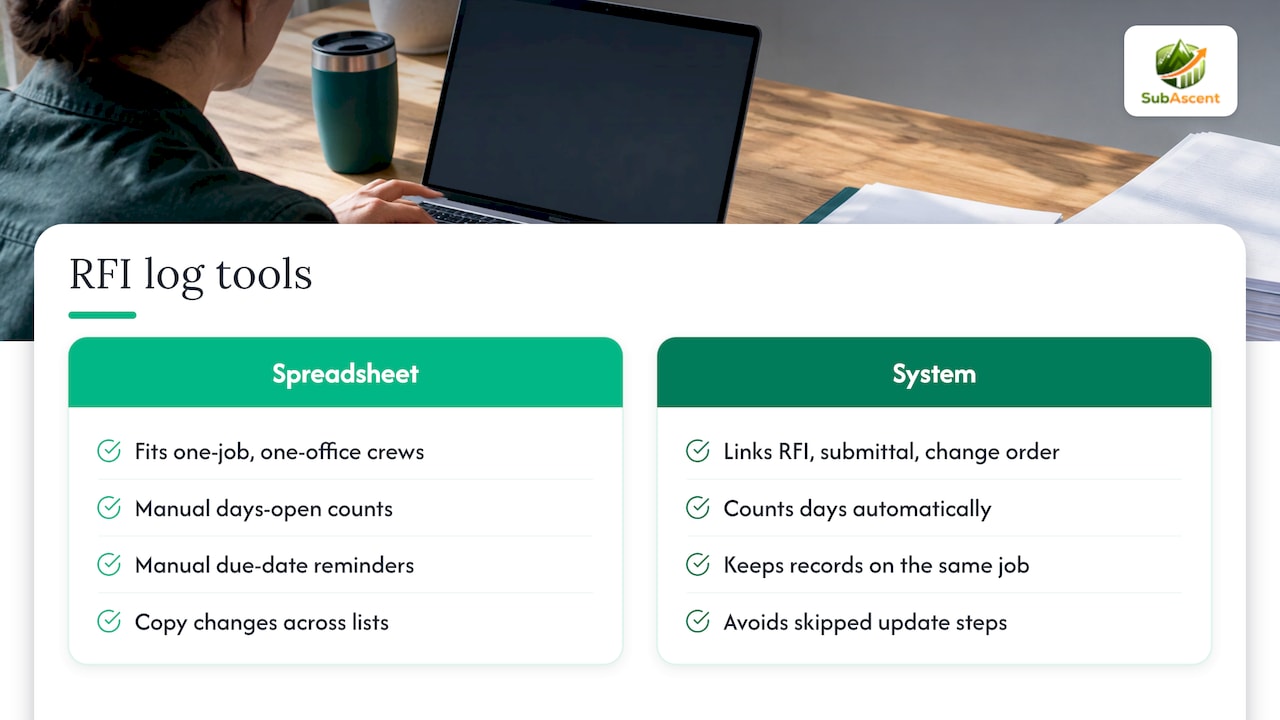
The records are only as good as the habit of keeping them. A system that holds the RFI, the submittal, the change order and the daily report on the same job, and counts the days for you, removes the steps that get skipped. That is how we built Subascent's RFI and submittal management, and it is why the log sits next to the rest of the job file instead of in a loose workbook.
Mistakes that break the log
- Logging the RFI when the answer arrives, so the clock never started.
- Bundling five questions in one RFI.
- No sheet or revision reference, so nobody can tell which drawing set it meant.
- Treating the answer as the end, with no scope check.
- Letting field questions live in text messages and photos on a foreman's phone.
- Calling submittals, substitutions and general emails RFIs.
More of these, with fixes, are in our article on RFI workflow mistakes subcontractors should avoid. For turnaround targets, see closing RFIs under 7 business days.
Put the log inside your job system
Subascent is job and bid management software for specialty trade subcontractors. It includes submittal and RFI management, change order workflows, daily field reporting, a free CrewTrack mobile app for foremen, QuickBooks sync and profit analytics, so the RFI log connects to the rest of the job instead of sitting by itself. Plans are published on our site: Starter at $49 per month or $490 per year, Scale at $99 per month or $990 per year, and Pro at $179 per month or $1,790 per year, plus a Takeoff plan at $99 per month. You can compare them on the plans page or start from subascent.com.

Our view
Every sub we know has the same story. The RFI went out, nobody wrote down the date, and three weeks later the foreman is asking why the wall isn't built.
The log is not paperwork for the GC. It is how a trade business protects its schedule and its money. An answered question that changes scope and never reaches a change order is work you do for free.
That is why we build for subs and not for general contractors. Software made for the GC tracks the whole project. A sub needs the opposite: its own questions, its own due dates, its own submittals and change orders, tied to the jobs it is actually earning money on. Our RFI, submittal and change order tools sit next to the daily reports and the profit numbers for that reason.
Start the log on the first day, keep one question per line, and read it every week.
Dave
FAQ
What should an RFI log template include?
At minimum: RFI number, subject, question, sheet and revision, spec section, date sent, response due date, ball in court, status, date answered, days open and cost or schedule impact. Add a proposed solution and a link to any related submittal or change order.
How do I number RFIs?
Use one sequence per job, in the order you write them, and never reuse a number. Mark withdrawn RFIs Void and leave the line in place. If the GC assigns its own numbers, keep both in separate columns.
Who is responsible for the RFI log, the GC or the sub?
The GC usually keeps the master log for the project. You still need your own, because it shows your questions, your due dates and the effect of each answer on your scope. Your log is the one you will use to support a change order.
How often should I review the RFI log?
Weekly at the least, and daily on a job with many open questions. Chase anything past due, and check every new answer for changes to scope, cost or schedule.
What is the difference between an RFI and a submittal?
An RFI asks a question about the documents. A submittal shows the product or shop drawing you plan to use for review. Keep them in separate logs and link them where one affects the other.
Sources
- 2017 Open Integration, Construction Progress
- Request for information, GSA
- Making RFIs More Effective, SMACNA
- Electrical Pre-Construction Planning Implementation Manual, IAE