

A submittals workflow with general contractors is the structured process by which specialty trade subcontractors prepare, submit, track, and receive approval on construction documents before work begins. For electrical, HVAC, plumbing, fire protection, and drywall subs, this process directly controls whether materials get ordered on time and whether field crews stay on schedule. A broken submittal process means rejected packages, delayed approvals, and change orders that eat your margin. This guide covers every stage of the construction submittals process, from building compliant packages to tracking approvals with digital tools, so your team stops chasing the GC and starts protecting the schedule.
What does the submittals workflow with general contractors look like?
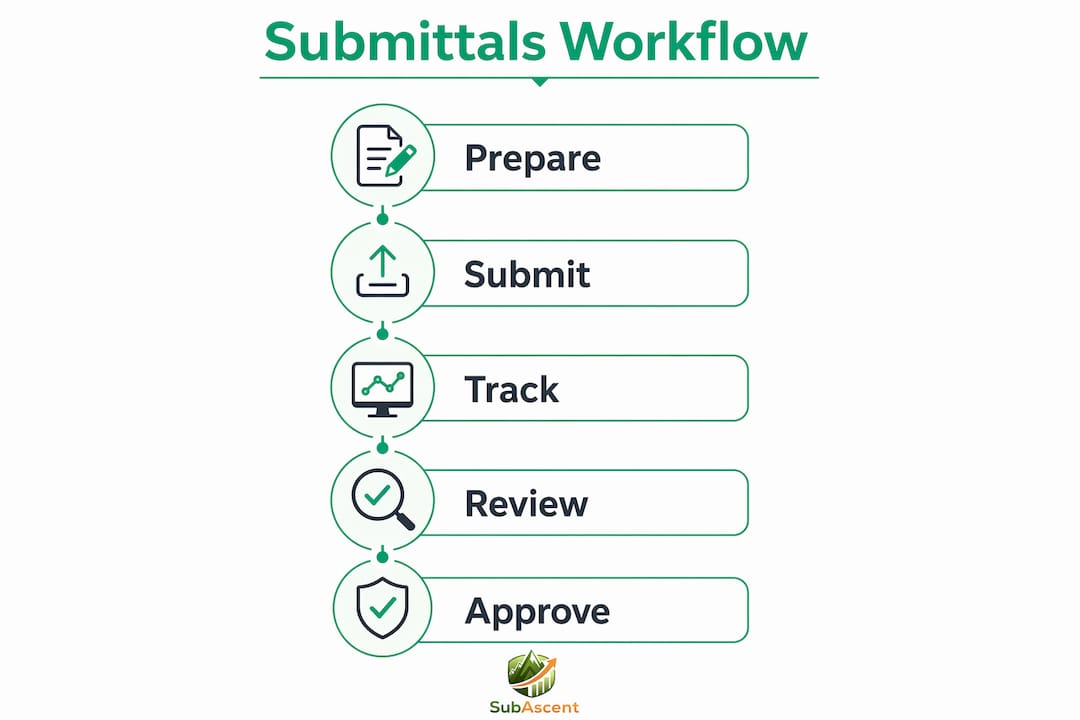
The construction submittals process follows a defined lifecycle with distinct stages and clear stakeholder responsibilities. Submittals include shop drawings, product data, and samples, all managed through logs that capture the full approval history. Understanding who owns each stage prevents the most common source of delays: nobody knowing whose court the ball is in.
Here is the standard sequence for specialty trade subs:
- Identify required submittals. Pull the project spec book and flag every section that triggers a submittal requirement. For an HVAC sub, that means equipment schedules, controls sequences, and insulation product data. For a fire protection sub, it means sprinkler head data sheets, hydraulic calculations, and hanger details.
- Prepare the submittal package. Assemble shop drawings, product data sheets, and samples into a package organized by spec section. Include a transmittal that maps each document to its specification reference.
- Submit to the GC. The GC receives the package, logs it, and forwards it to the architect or engineer of record for design review. Submittal schedules and logs are created from the project spec book and include prioritization and responsibility assignments.
- GC and design team review. The architect or engineer stamps the submittal with one of four statuses: approved, approved as noted, revise and resubmit, or rejected. The GC tracks this in the submittal log.
- Resubmission if required. If the package comes back as "revise and resubmit," the sub corrects the deficiency and resubmits. Every cycle adds days or weeks to the approval timeline.
- Approval and release for construction. Once approved, the GC releases the submittal. No work covered by that submittal can proceed until this step is complete.
One contractual point every PM at a specialty trade firm needs to understand: architect approval does not relieve contractors from responsibility for errors unless deviations are explicitly approved. Approval means the design team reviewed for general conformance, not that they caught every field dimension or code compliance issue. Your liability stays with you.
How to create and manage an effective submittal log

The submittal register and the submittal log are not the same document, and confusing the two causes real workflow problems. The register is the baseline list of all required submittals, typically generated at project kickoff from the spec book. The log is the live working document that tracks every revision, approval status, and reviewer comment as the project moves forward.
A well-built submittal log for a masonry or glazing sub should include these fields at minimum:
| Field | Purpose |
|---|---|
| Spec section number | Links each submittal to its contract requirement |
| Responsible party | Identifies whether the sub, supplier, or GC owns the next action |
| Submitted date | Starts the review clock and protects the sub if delays occur |
| Required return date | Flags when a response is overdue |
| Current status | Approved, under review, revise and resubmit, or rejected |
| Related RFIs | Connects submittals to open questions that may affect approval |
| Procurement lead time | Ensures approval timing aligns with material ordering windows |
Active submittal logs track submission dates, review times, and approval statuses to protect schedules and assign accountability. That last column, procurement lead time, is the one most subs skip. If your roofing membrane has a 14-week lead time and the submittal is still under review at week 10, you have a problem that no amount of phone calls will fix.
For software, Procore and Autodesk Construction Cloud both offer built-in submittal log modules with automated status tracking. Smaller subs running one or two projects at a time can manage effectively with a well-structured spreadsheet, provided someone owns it and updates it weekly.
Pro Tip: Link your submittal log to your project meeting agenda. Review open items every week with the GC's project manager. Subs who bring a current log to OAC meetings get faster responses than those who send emails after the fact.
How to build submittal packages that pass the first review
First-round submittal rejections are almost always the sub's fault, and they are almost always preventable. Running compliance checks before submission is critical because incomplete or disorganized packages are the leading cause of rejection. A fire protection sub who submits a sprinkler head data sheet without the required listing certifications will get it bounced back within days.
Follow these practices before every package leaves your office:
- Start with the spec section as your checklist. Read Division 21 for fire protection, Division 23 for HVAC, or Division 26 for electrical. Every paragraph that says "submit" or "provide" is a line item on your package checklist.
- Verify product data against exact spec requirements. Check voltage ratings, certifications (UL, FM, NEMA), model numbers, and finish codes. A low-voltage sub submitting a cable with the wrong plenum rating will get rejected even if everything else is correct.
- Organize with a clear transmittal. The transmittal is the cover sheet that maps every document in the package to its spec section. GC project managers use it to run a completeness check before forwarding to the design team. Make their job easy and they will process your package faster.
- Flag substitutions explicitly. If you are submitting a product that is not the specified basis of design, say so on the transmittal. Submitting a substitution without disclosure is the fastest way to get a rejection and damage your relationship with the GC.
- Do a pre-submission review internally. Have your PM or foreman check the package against the spec before it goes out. Building submittal packages around spec triggers and compliance characteristics specific to your trade improves review speed and reduces rejections.
Pro Tip: For electrical and low-voltage subs, create a trade-specific submittal checklist template for each common spec section (Division 26, 27, 28). Reuse it on every project. The 30 minutes you spend building the template saves hours on every future job.
You can also reduce common subcontractor contract disputes by documenting every substitution request and deviation in writing before the submittal goes to the GC.
How do digital tools improve the submittals process?
Technology changes what is possible in submittal tracking, but only if you choose tools that match how your business actually operates. Procore centralizes submittals and tracks detailed timelines and statuses with in-app markup and stamping features that give every stakeholder visibility into where a package stands. Autodesk Construction Cloud offers similar functionality with stronger integration into design file management.
The practical benefits for a specialty trade sub using digital submittal platforms include:
- Automated log generation. Procore can scan a spec book and generate a draft submittal register, saving a PM several hours at project kickoff.
- Centralized document storage. Every version of every submittal lives in one place with a full revision history. No more emailing PDFs back and forth and losing track of which version the GC has.
- Timestamp and audit trail. Every submission, review, and response is date-stamped. If a GC claims you submitted late, the platform proves otherwise.
- Real-time status notifications. When the architect returns a stamped submittal, your PM gets notified immediately instead of finding out at the next OAC meeting.
- Parallel review capability. Some platforms allow the GC and design team to review simultaneously rather than sequentially, cutting total review time significantly.
Centralized digital platforms reduce ambiguity by providing status visibility and documented timelines, which prevents missed follow-ups. For a plumbing or insulation sub managing 40 to 80 open submittals on a commercial project, that visibility is the difference between a controlled process and a reactive one.
If Procore's pricing is out of range for your volume, look at alternatives built for smaller trade subs that offer submittal tracking without the full GC-oriented feature set.
Common challenges in submittals workflow and how to fix them
Even experienced PMs at framing, concrete, and steel/rebar firms run into the same recurring problems. Knowing what to watch for lets you get ahead of delays before they hit the schedule.
The most common issues and their fixes:
- Skipping the self-compliance check. Packages go out without being verified against the spec. Fix: make the internal review a non-negotiable step before submission, not an optional one.
- Incomplete packages. Missing a single data sheet or certification can bounce an entire package. Fix: use a spec-based checklist for every submittal, not memory.
- No tracking after submission. The package goes out and nobody follows up until the GC calls. Fix: set a calendar reminder for the contractual review period (typically 14 to 21 days) and follow up proactively if no response arrives.
- Resubmission delays. When a package comes back as "revise and resubmit," it sits in someone's inbox for a week. Fix: assign a specific person to own resubmissions and set a 48-hour turnaround target.
- Disconnected submittals and procurement. Approval happens but nobody tells purchasing, so materials get ordered late. Fix: link your submittal log to your procurement tracker.
Linking submittals to procurement lead times, schedule dependencies, and related RFIs allows earlier decisions and prevents cascade delays. The most useful submittal logs include spec sections, reviewers, related RFIs, and procurement lead times and recommend weekly status check-ins.
"The subs who protect their schedules are the ones who treat the submittal log as a live project management tool, not a filing system."
Reviewing open submittals at every project meeting, not just when something goes wrong, is the single habit that separates subs who control their timelines from those who react to them. For more on avoiding process errors that create downstream problems, the RFI workflow mistakes guide covers the same discipline applied to the RFI process.
Key takeaways
A well-run submittals workflow with general contractors requires a live log, compliant packages, and consistent follow-through at every stage of the approval cycle.
| Point | Details |
|---|---|
| Register vs. log | The register is your baseline list; the log is the live document tracking every status change. |
| Spec-based checklists | Build every submittal package from the relevant spec section to prevent first-round rejections. |
| Flag substitutions | Always disclose substitutions on the transmittal to avoid rejection and protect your relationship with the GC. |
| Link to procurement | Connect approval status to material ordering windows so approvals actually trigger purchasing. |
| Weekly log reviews | Review open submittals at every OAC meeting to catch delays before they hit the field. |
What I've learned about submittals after years in the trades
Most specialty trade subs treat submittals as paperwork. The ones who win treat them as quality assurance. There is a real difference between those two mindsets, and it shows up in the schedule.
The subs I have seen protect their timelines most consistently are the ones who build their submittal log before the first OAC meeting, not after. They know which items have long lead times, they know which spec sections are likely to generate "revise and resubmit" responses, and they plan for that cycle time in their procurement schedule. That is not luck. That is discipline.
The other thing I will say plainly: the GC's submittal process was not designed with your business in mind. Procore and Autodesk are built for GC workflows. They are powerful, but they are not optimized for how a 12-person HVAC or fire protection firm actually operates. If you are spending more time navigating a platform than managing your submittals, the tool is working against you. The right technology for a specialty trade sub is one that fits your volume and your team, not one that impresses the GC at the kickoff meeting.
Embrace digital tracking. Build the log. Do the internal review before every submission. Those three habits will do more for your schedule and your relationships with GCs than any software subscription.
— Dave
How Subascent helps specialty trade subs manage submittals and jobs
Managing submittals, bids, and job communications from separate spreadsheets and email threads costs real time every week. Subascent is built specifically for specialty trade subcontractors, including electrical, plumbing, HVAC, masonry, and fire protection firms, to manage the full job lifecycle in one place.
The platform gives your PM a single location to track submittals, manage bid invitations, and stay on top of project communications without the overhead of GC-oriented software. If your team is ready to stop losing time to disconnected processes, explore Subascent's job and bid management tools built for the way specialty trades actually work.
FAQ
What is a submittals workflow with general contractors?
A submittals workflow with general contractors is the process by which specialty trade subs prepare, submit, and track construction documents for GC and design team approval before work proceeds. It covers shop drawings, product data, and samples managed through a submittal log.
What is the difference between a submittal register and a submittal log?
The submittal register is the initial list of all required submittals generated at project kickoff. The submittal log is the live document that tracks every submission date, review status, revision, and approval throughout the project.
How do I reduce first-round submittal rejections?
Build every package from the relevant spec section as a checklist, verify product data against exact spec requirements, and flag any substitutions explicitly on the transmittal before submission.
What should a submittal log include?
A submittal log should include the spec section number, responsible party, submission date, required return date, current approval status, related RFIs, and procurement lead times for each item.
Do I need Procore to manage submittals effectively?
No. Procore and Autodesk Construction Cloud offer strong submittal tracking features, but smaller specialty trade subs can manage effectively with a well-structured spreadsheet or purpose-built tools designed for sub-trade volume, provided someone owns the log and updates it weekly.