

Set one shared calendar record for every bid you're chasing, with the due date, submission method, an assigned owner, and internal deadlines that sit ahead of the real one. Do that consistently and you stop missing bids. Start today: pull up every active bid you're carrying right now and log it, even if the only thing you know is the due date and the GC's name.
TL;DR:
- Using a centralized bid tracking system with project, deadline, ownership, document, and status fields reduces missed bids caused by incomplete or disorganized records.
- Setting internal deadlines at least 7 to 10 days before the actual bid due date provides necessary buffers to accommodate last-minute addenda and review processes.
- Moving from spreadsheets to a shared calendar or dedicated bid management platform improves tracking beyond 15 active bids by automating reminders and document version control.
- Establishing clear owner responsibilities, regular pipeline reviews, and buffers for subcontractor quotes prevents overlooked addenda and last-minute deadline rushes.
- Bidding trade-specific software like Subascent streamlines bid tracking, improves dependency management, and adapts to subcontractor workflows more effectively than generic project calendars.
Table of Contents
- What Should a Bid Calendar Actually Track?
- How Do You Set Up a Bid Calendar Step by Step?
- What Operational Rules Prevent Missed Deadlines?
- Should You Use a Spreadsheet, a Shared Calendar, or a Bid Board?
- Practitioner Notes on Running a Calendar Day to Day
- Why Trade-Specific Calendar Rules Matter More Than the Software
- Put the Checklist Into a System Built for Subs
- Sources
- FAQ
What Should a Bid Calendar Actually Track?
A bid calendar isn't a to-do list with dates on it. It's a system of record, and it only works if every entry carries the same core fields, whether you're bidding a masonry package or a fire protection retrofit. Miss one field and you've built a calendar that looks organized but still lets bids fall through.
A centralized bid tracking system needs a status, a deadline, an owner, and a document home for every single opportunity, in one place, not split across email threads and a sticky note on someone's monitor. Here's what that looks like in practice:
- Project identifiers: project name, GC or owner, job location, and the project or bid number.
- Deadline data: bid due date, exact time, time zone (a 2:00 PM Eastern deadline reads very differently in Arizona), and submission method (portal upload, email, or hard copy delivery).
- Ownership and checkpoints: the estimator assigned, an internal quote deadline, and who owns the final review before submission.
- Document control: a link to the current plan set, a running list of addenda with dates issued, the RFI cutoff, and notes on which version is live.
- Status tracking: a status label (invited, bidding, submitted, won, lost, no-bid) with color coding, plus the date of your last communication with the GC.
Skip the addenda tracking field and you'll eventually submit pricing against superseded drawings. That single miss costs more than any deadline you'll ever hit late.
How Do You Set Up a Bid Calendar Step by Step?
Bid calendar setup follows a five-stage flow: intake, assign, schedule, review, submit. This mirrors the intake-to-follow-up workflow that replaces scattered spreadsheets and email chains, and it works whether you're running it in a spreadsheet or a dedicated bid tracking calendar.
Pro Tip: Log the bid invitation the moment it lands, even before you decide whether to bid. A "no-bid" entry with a reason attached is still useful data three months from now when the same GC invites you again.
- Capture everything at intake. The second a bid invitation arrives, log the required fields: due date, time zone, submission method, GC contact, and a link to the plan set. Don't wait until you've decided to bid.
- Assign one owner. Every bid gets a single estimator or PM responsible for it. Set the internal quote deadline and review deadline now, both earlier than the actual due date.
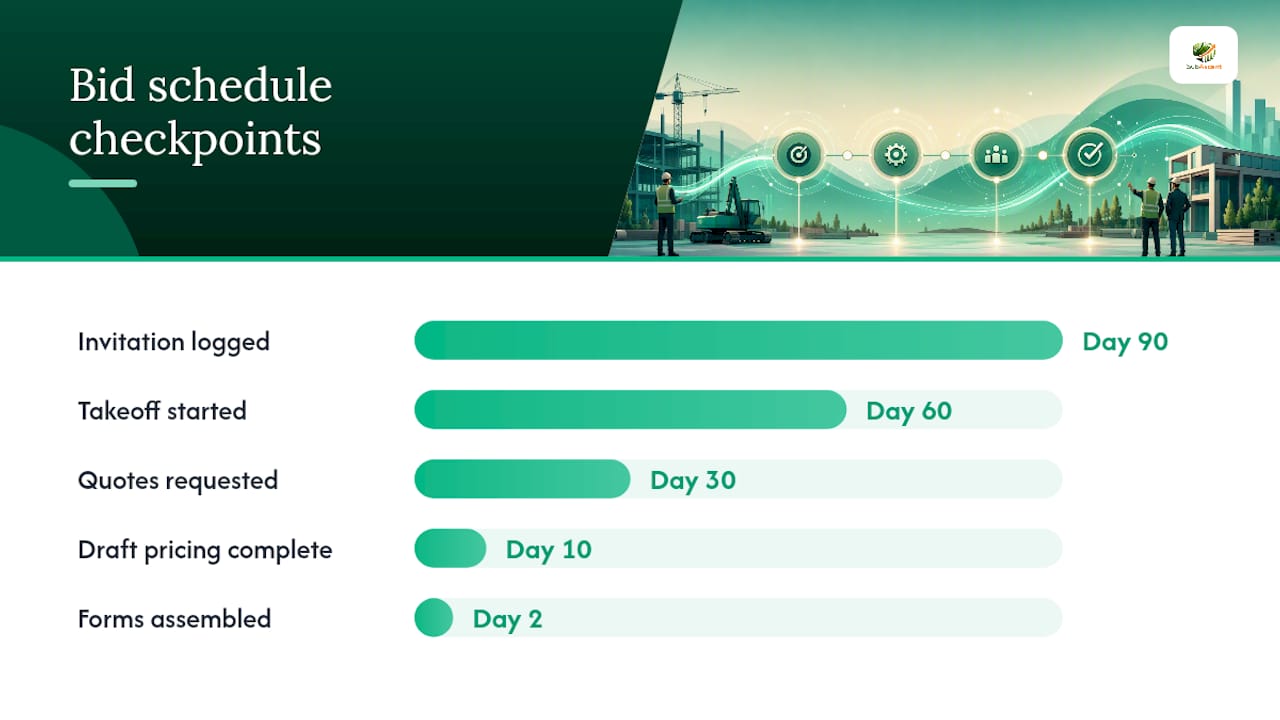
- Backward-plan the timeline. Work from the submission date backward. A 90-day tender calendar with explicit review gates and a built-in buffer of 10 to 20 percent forces realistic scheduling instead of a last-minute scramble:
- Day 90: Bid invitation logged, go/no-go decision made.
- Day 60: Takeoff started, plan set confirmed current.
- Day 30: Subcontractor and supplier quotes requested.
- Day 20: Sub quotes due back and normalized.
- Day 10: Draft pricing complete, internal estimator sign-off.
- Day 5: Final review with owner or PM.
- Day 2: Forms, bonds, and attachments assembled.
- Day 0: Submitted, with confirmation logged in the calendar.
- Run document control as you go. Attach the current plan set, tag every addendum with its date, log RFI answers against the cutoff, and note which version is active so nobody prices off a stale drawing.
- Layer in reminders. Automated alerts at 7 days, 48 hours, and 2 hours out catch most slips. A manual final check the morning of submission catches the rest, especially portal upload confirmations that silently fail.
One number worth remembering: contractors using a step-by-step bid schedule that assigns phase checkpoints for takeoff, pricing, and review consistently avoid the compressed, error-prone final 48 hours that sink otherwise solid bids.
What Operational Rules Prevent Missed Deadlines?
The calendar is only as good as the habits around it. Most missed bids aren't calendar failures. They're rule failures.
Give every bid exactly one owner. Shared ownership means nobody owns it, and that's when a Friday afternoon addendum gets missed. Run a short weekly pipeline review, fifteen minutes, standing agenda, where the team surfaces date conflicts and overlapping deadlines before they become emergencies.
- Set subcontractor quote deadlines and QA review dates earlier than your actual submission deadline, never on the same day.
- Record every no-bid decision and why you passed. That history sharpens your selection criteria on the next round of invitations.
- Build in a fixed buffer, 10 to 20 percent of your total bid duration or a flat day before submission, to absorb the inevitable last-minute addendum.
- Define who edits the calendar when a date changes or an addendum lands, and how the rest of the team gets notified within the hour, not at the next standup.
Pro Tip: When multiple subs feed into your number, set their quote deadline at least 7 to 10 days ahead of your own submission. That's the window you actually need to normalize scope differences between quotes, not just collect numbers.
Should You Use a Spreadsheet, a Shared Calendar, or a Bid Board?
The right tool depends entirely on how many bids you're juggling at once, not on what looks impressive in a sales demo.
A spreadsheet works fine below roughly 10 to 15 active bids. Beyond that, manual upkeep becomes the bottleneck rather than the solution, and you start losing track of which tab has the current version. If you're still in spreadsheet territory, build columns for project name, GC, bid date and time, status, assigned estimator, document link, and follow-up notes, then sync the due dates to Google Calendar or Outlook so reminders fire automatically instead of relying on someone remembering to check the sheet.
Past that threshold, move to a shared calendar paired with task tracking, or a dedicated bid board. Whatever format you land on, it needs these features:
- Document links with version history, so nobody bids off an old plan set.
- An owner filter so anyone can pull up "what's assigned to me" instantly.
- Import and export for bulk-loading invitations or pulling reports.
- Automated reminders tied to deadlines, not manual calendar entries.
- Mobile access, since half your estimating team is on a job site, not at a desk.
Think in categories rather than brand names here: entry-level field apps buy you mobile access and basic tracking; full bid-management platforms buy you document version control, owner assignment, and reporting across your whole pipeline at once. Combining pipeline visibility, document control, and deadline tracking in one system is what actually increases how many jobs you can bid without dropping something.
Practitioner Notes on Running a Calendar Day to Day
A few numbers make this concrete. For a typical month-long bid cycle, it's effective to set subcontractor quote cutoffs and final internal review checkpoints well ahead of the submission deadline to create a buffer that mitigates last-minute issues.
Protect estimator time by batching submission checks instead of checking constantly. Reserve two blocks of two hours each week, dedicated to nothing but reviewing upcoming deadlines and confirming document status. Before hitting submit on anything, run a fixed checklist:
- Bid forms signed and dated
- Bond or letter of credit attached, if required
- All addenda acknowledged and initialed
- Correct plan version referenced
- Pricing sheet matches final scope
- Subcontractor quotes reconciled
- Insurance certificates current
- Submission portal login tested in advance
- Time zone double-checked against the GC's stated deadline
A free business days calculator is worth bookmarking here. It's a fast way to count working days back from a due date when you're setting internal deadlines and don't want to count weekends by hand.
Why Trade-Specific Calendar Rules Matter More Than the Software
Generic project calendars miss the thing that actually breaks sub schedules: you're waiting on someone else's number before you can finish your own. A framing sub waiting on lumber pricing, an electrical sub waiting on a low-voltage quote to fold in, a fire protection sub waiting on a site walk before finalizing device counts. That dependency is why the float between your internal deadline and the GC's deadline matters more for subs than for the GC itself. Add in portal quirks and addenda that land at 4:45 PM on a Friday, and a calendar built for general contractor timelines just doesn't hold up. A calendar built around how subs actually receive bid invitations catches more, and lets you bid more without dropping something.
— Dave
Put the Checklist Into a System Built for Subs
There are software alternatives to running your bid pipeline in a spreadsheet you patch together every renewal season. Such tools can be built around the exact fields this article walks through: bid tracking with owner assignment, PDF takeoffs, automated deadline reminders, and QuickBooks sync, all in one record instead of five disconnected tools.

If you're bidding masonry, HVAC, electrical, or any specialty trade package and you're tired of rebuilding your tracking sheet every quarter, this maps directly to the checklist above without extra setup work. Visit the Subascent landing page to see templates, book a demo, and get onboarding help set up around your trade and your current bid load.
Sources
- How to Track Multiple Construction Bids Without Losing Your Mind
- Create a Tender Calendar That Works — Step-by-Step Guide | TenderFlow
- Construction Bid Scheduling for Estimators (2026)
FAQ
What Fields Should a Bid Calendar Template Include?
A bid calendar template needs the project name, GC, location, bid due date and time zone, submission method, assigned owner, internal quote deadline, document links, addenda list, and status label. Skipping any of these fields tends to be exactly where the missed deadlines start.
How Far in Advance Should I Set Internal Bid Deadlines?
Set your internal quote deadline and final review checkpoint several days ahead of the actual bid due date, never on the same day. When multiple subcontractor quotes feed your number, budget 7 to 10 days between the sub quote deadline and your own submission.
When Should I Switch From a Spreadsheet to a Bid Board?
A spreadsheet generally holds up fine below 10 to 15 active bids. Past that volume, manual upkeep becomes the bottleneck, and a shared calendar or dedicated bid board with automated reminders and document version control becomes worth the switch.
Does Subascent Handle Bid Calendar Setup for Trade Subs?
Yes. Subascent centralizes bid tracking, owner assignment, PDF takeoffs, and deadline reminders in one record built specifically for specialty trade workflows. Current pricing and plan details are listed on the Subascent landing page.
How Do I Handle Addenda and Date Changes in the Calendar?
Assign one person the authority to edit the calendar when an addendum or date change comes in, and set a rule that the rest of the team gets notified within the hour. Log the addendum date, summarize what changed, and update the affected internal deadlines immediately rather than waiting for the next review meeting.