

The fastest way to stop accounts receivable from creeping past 60 and 90 days is to run a fixed follow-up cadence, invoice on receipt, call on day 10, and escalate at day 30, backed by a 30-minute weekly AR review. Subs that do this consistently see clearer cash flow within a billing cycle or two, and far fewer invoices drifting into the 90-plus bucket. Expect to spend about two hours a week on it, most of it in one sitting.
TL;DR:
- Consistent follow-up cadence, including same-day invoicing, calls on day 10, and escalation at day 30, greatly reduces overdue accounts and improves cash flow.
- Using a written checklist with specific steps for each stage, from receipt confirmation to final escalation, ensures accountability and reduces delays.
- Including clear, detailed information and evidence in invoices, like signed change orders and photos, minimizes disputes and speeds up payments.
- Regularly reviewing aged receivables in 30-day buckets and assigning specific follow-up actions prevents issues from going unnoticed.
- Automating follow-up tasks and evidence attachments with specialized software streamlines the process and reduces manual effort.
Table of Contents
- What Should a Construction AR Follow-Up Checklist Look Like?
- How Often Should You Follow Up on Unpaid Construction Invoices?
- What Belongs on a Construction Invoice to Get Paid Faster?
- How Do You Track and Age Construction Receivables?
- What's the Right Way to Escalate an Unpaid Construction Invoice?
- Which Tools Actually Reduce Manual AR Follow-Up Work?
- How Do You Run a Weekly AR Meeting That Actually Works?
- What I've Learned Watching Subs Chase Their Own Money
- Automate the AR Playbook Instead of Running It by Hand
- Templates and Resources to Implement This Playbook
- Sources
What Should a Construction AR Follow-Up Checklist Look Like?
A written checklist beats a mental one, especially when three different people (the estimator, the office admin, and the owner) all touch the same invoice at different points. Print this, tape it to the wall by the AR desk, or drop it into your project management software as a recurring task.
Day 0-2: Confirm receipt
- Send the invoice same-day or next-day, never batched at month-end.
- Call or email to confirm the GC's AP department actually received it.
- Log the date sent, who confirmed receipt, and the invoice number in the job file.
Day 7: First follow-up
- Send a short email restating invoice number, amount, and due date.
- Ask one direct question: "Is there anything blocking approval on this one?"
- Note the response (or lack of one) in the file.
Day 10-14: Phone call
- Call the AP contact directly, not just email.
- Ask specifically where the invoice sits in their approval process.
- Record what they tell you. GCs remember what they promised less often than you'd think.
Day 30: Escalation trigger
- Send a firmer written notice referencing the contract's payment terms.
- Copy your PM or the GC's project executive if the AP contact has gone quiet.
- Flag the account for the weekly AR review regardless of what happens next.
Sample subject lines that work: "Invoice #4521 - Riverside HVAC - Payment Status?" Keep it under 50 characters and include the project name for better open rates.
How Often Should You Follow Up on Unpaid Construction Invoices?
There's a rhythm to this that most subs get wrong. They either go silent for six weeks hoping the GC remembers, or they email every three days and torch the relationship. Neither works.
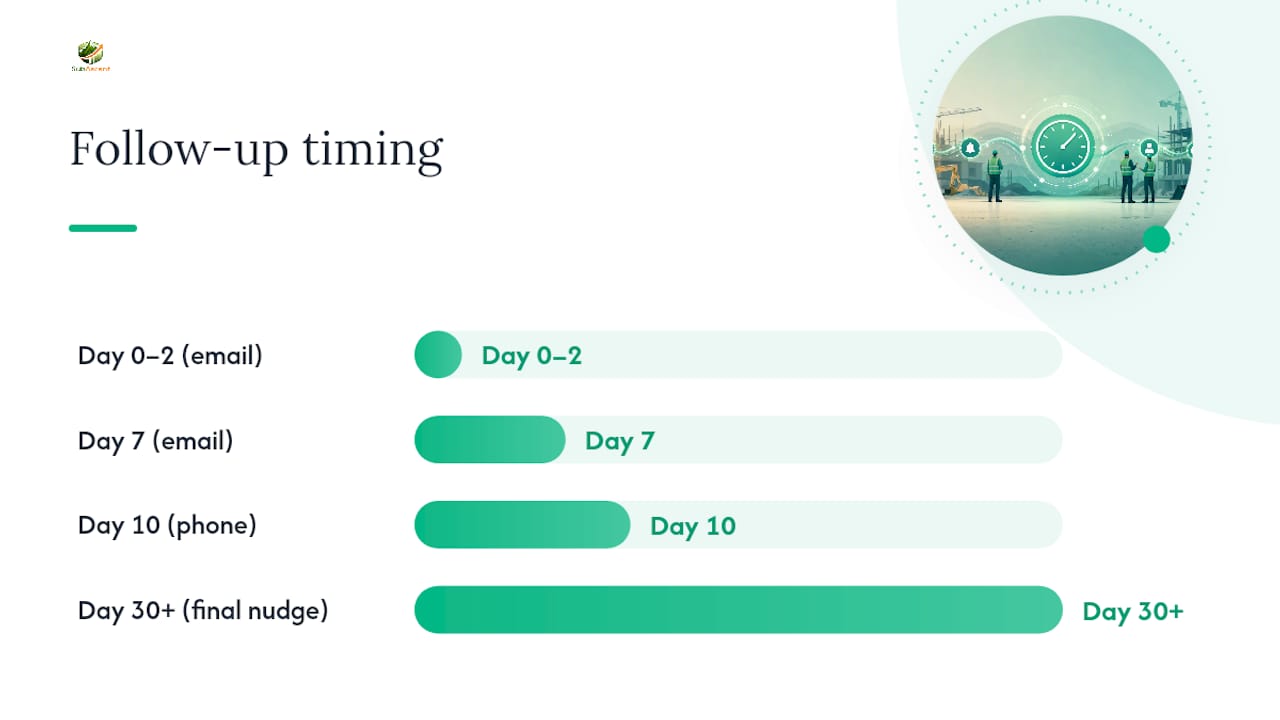
The cadence that holds up across trades: confirm receipt within 48 hours, send your first substantive follow-up at day 7, escalate to a phone call at day 10, check in again close to the GC's own payment run date, and send a final nudge if payment still hasn't landed two weeks past the due date. This mirrors the schedule laid out in construction bid follow-up research, which found that spacing touches this way, rather than clustering them, keeps response rates higher without reading as harassment.
- Day 0-2, email: "Confirming receipt of Invoice #___ for [project]. Let us know if anything's missing on our end."
- Day 7, email: "Following up on Invoice #___, due [date]. Anything you need from us to move this to approval?"
- Day 10, phone call: Ask where it sits in the approval chain. Get a name and a date.
- Pre-decision check, email or call: A short check-in timed to the GC's known pay-run schedule.
- Day 30+, final nudge: Reference the payment terms directly and set a hard follow-up date.
Some guides recommend a tighter rhythm, Day 1, 3, 7, 14, then monthly, and adding something useful at each touch rather than just repeating the ask, per contractor follow-up email guidance. Either cadence works. What matters is picking one and running it every time, not improvising per invoice.
Three to four follow-ups per invoice is a practical ceiling before you shift into formal escalation mode, based on bid and invoice follow-up patterns that show diminishing returns past that point.
Pro Tip: Keep every follow-up under five sentences with exactly one question. A wall of text gives an AP clerk an easy reason to skip it.
What Belongs on a Construction Invoice to Get Paid Faster?
An invoice that gets disputed is an invoice that doesn't get paid. Most disputes trace back to missing fields, not missing money.
Every invoice you send should include the purchase order or contract reference number, a clear breakdown of work completed this billing period, the retainage percentage held and released, and references to any signed change orders tied to the amount billed. Missing even one of these gives an AP department a reason to bounce it back into your queue, which resets your entire clock.
For work billed in stages, decide upfront whether you're using standard progress billing or an AIA payment application. Progress billing works fine for smaller, less formal jobs. AIA-format applications (G702/G703) are usually required on larger commercial jobs where the GC or owner's lender expects that specific format, and skipping it when it's contractually required is its own kind of delay.
Attach evidence, don't just claim it:
- Dated photos showing the work in place, ideally shot from the same viewpoint each period.
- Delivery receipts for material tied to the billed amount.
- Signed change orders, not just verbal approvals or email threads referencing them.
- Timesheets for labor-heavy billing periods, especially on cost-plus or T&M work.
Progress reports that pair a percent-complete figure by trade with dated, plan-located photos make claims dramatically harder to dispute, according to construction progress reporting methodology. That single practice, tying a photo to a specific spot on the plan and a date, removes most of the "prove it" friction that stalls payment approval.
How Do You Track and Age Construction Receivables?
You can't manage what you don't measure, and most subs only find out an invoice is 75 days old when the bookkeeper mentions it in passing. Aging buckets fix that.
Sort every open invoice into 0-30, 31-60, 61-90, and 90-plus days. Each bucket should trigger a specific action, not just a color on a spreadsheet.
| Aging bucket | What it means | Action it triggers |
|---|---|---|
| 0-30 days | Normal cycle | Standard follow-up cadence, no alarm |
| 31-60 days | Past typical terms | Phone call, confirm approval status |
| 61-90 days | Serious delay | Written notice, involve your PM or owner |
| 90+ days | Collections territory | Escalation letter, lien rights review |
Three numbers matter more than the rest of your AR spreadsheet combined: Days Sales Outstanding (DSO), the percentage of your total AR that's past terms, and a ranked list of your largest open invoices by dollar amount. A fourth worth tracking separately is which GCs consistently run late, since a pattern from one client is a business decision, not bad luck. Watching these numbers weekly, instead of quarterly, is what actually prevents cash flow warning signs from becoming a real crisis.
Run this as a standing 30-minute weekly meeting: pull the aging report, review anything over 30 days, assign a specific follow-up action to a specific person, and note it in the job file. That's the whole system.
What's the Right Way to Escalate an Unpaid Construction Invoice?
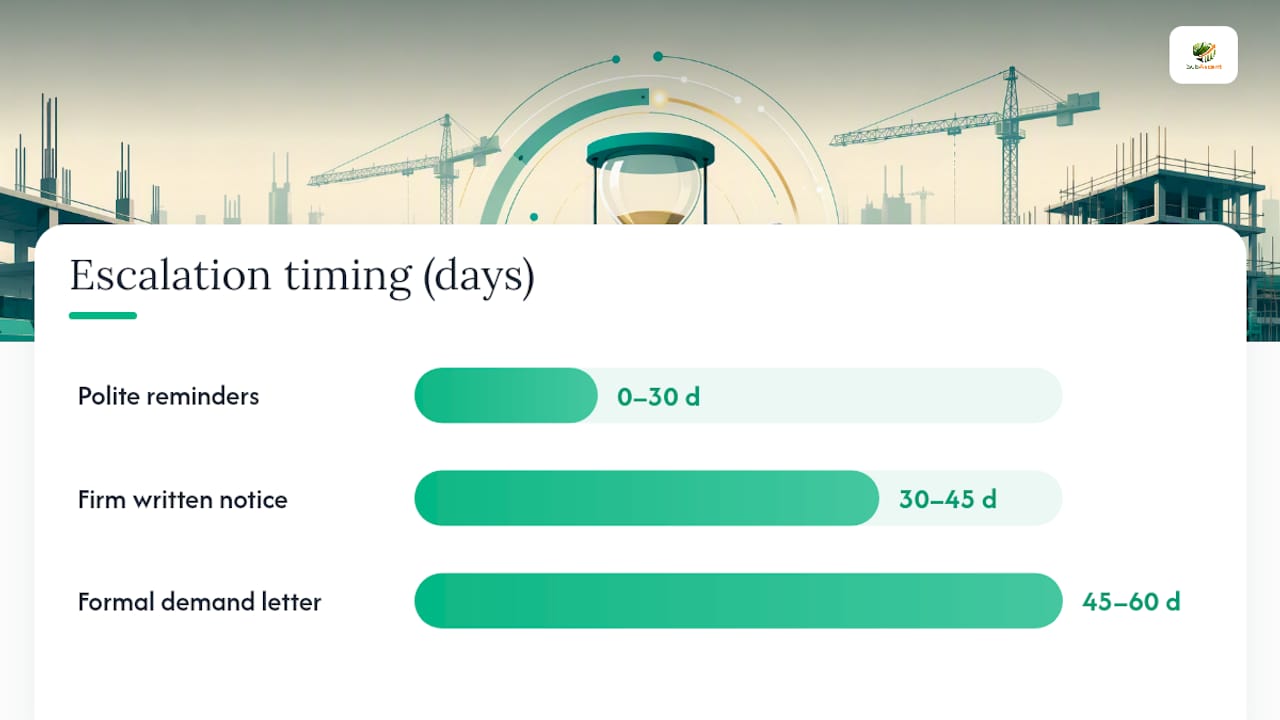
Escalation isn't a single moment, it's a ladder, and skipping rungs is what gets subs into trouble legally and financially.
- Polite reminders (days 0-30): Standard cadence, no threats, just consistent contact.
- Firm written notice (day 30-45): Reference specific contract payment terms and dollar amount owed. Copy someone above the AP contact.
- Formal demand letter (day 45-60): State the amount, the contract clause, and a specific deadline before further action.
- Lien or bond claim preservation (before your state's deadline): File a preliminary notice or notice of intent to lien, timed to your jurisdiction's requirements, which vary significantly by state.
Before you send any formal notice, assemble your documentation: the signed contract, every invoice sent with delivery confirmation, all change orders, and dated progress photos. Trade subs who can immediately produce a dated photo pinned to the plan, a signed change order, and a delivery receipt tend to win payment disputes fast, because that triad removes ambiguity at review, per progress documentation research. Waiting until day 50 to start pulling this together is how legitimate lien deadlines get missed.
For disputed invoices, get one owner assigned immediately rather than letting the dispute bounce between your office and the GC's. Build a short evidence checklist (photos, change orders, receipts, communication log) and set a 10-business-day internal deadline to resolve or escalate. This kind of clear ownership also heads off the contract disputes that turn into nonpayment fights months later.
Pro Tip: Never let a lien deadline get discovered during the escalation conversation. Calendar every state's preliminary notice and lien filing deadline the day you start a job, not the day you need it.
Which Tools Actually Reduce Manual AR Follow-Up Work?
You don't need enterprise software to fix this. You need a few consistent habits and one system that holds the paper trail.
Start with a folder naming convention that never changes: [Project]_[Invoice#]_[Date], with subfolders for photos, change orders, and delivery receipts attached to every invoice before it goes out, not scrambled together after a dispute starts. This single habit does more for time-to-payment than almost any software purchase, based on job-file evidence tracking practices.
- Reconcile your accounting system against your AR aging report weekly, not monthly, so bad data doesn't compound.
- Check that QuickBooks payment status syncs with your AIA billing format if you're running formal pay apps, since mismatches here are a common source of disputed retainage releases.
- Have crews photograph completed work at each billing cutoff, same angle, dated, tied to a plan location, and pull those images straight into the pay application rather than digging through phone galleries later.
None of this requires new hires. It requires the same three or four steps done the same way every single time.
How Do You Run a Weekly AR Meeting That Actually Works?
Call it whatever you want, "AR Power Hour" works fine, but the format matters more than the name. Thirty minutes, same day every week, no exceptions.
Who attends: the office admin or bookkeeper who owns AR, the PM for each active job, and the owner if the company is small enough that they're still involved in collections.
Prep beforehand: pull the aging report sorted by dollar amount and days past due, and flag anything that crossed a bucket threshold since last week.
- Review every invoice over 30 days past terms (10 minutes).
- Assign a specific next action and owner to each one (10 minutes).
- Check status on last week's assigned actions, did the call happen? (5 minutes).
- Flag anything approaching a lien deadline for immediate attention (5 minutes).
Log outcomes directly in the job file: who called, what was said, what happens next. A short, weekly meeting with named owners moves past-due accounts faster than chasing invoices whenever someone remembers to.
First-week rollout: pull your current aging report today, schedule the recurring 30-minute slot, and assign one owner per open invoice before the meeting even starts.
What I've Learned Watching Subs Chase Their Own Money
Every sub I've talked with who fixed their AR problem did it with process, not personality. The ones still chasing checks at 90 days are usually the ones treating each invoice as a one-off instead of running the same five steps every time.
The pattern shows up across trades. A masonry sub loses two weeks because retainage release wasn't spelled out in writing. An electrical sub sends a beautifully detailed invoice and still waits 70 days because nobody called on day 10. The invoice quality rarely causes the delay. The silence after sending it does.
Three lessons worth actually acting on: cadence beats intensity, one weekly meeting beats daily anxiety, and documentation collected during the job beats documentation assembled during a fight.
— Dave
Automate the AR Playbook Instead of Running It by Hand
Everything above works with a spreadsheet and discipline. It works faster with software that does the reminding for you. This platform supports follow-up cadence, invoice tracking, and evidence attachment as built-in workflows instead of manual habits you have to sustain forever.

The platform automates the exact steps this article walks through: scheduled follow-up reminders on your invoices, QuickBooks sync so your accounting stays reconciled without double entry, and a place to attach photos, change orders, and delivery receipts directly to each invoice so the evidence is there before a dispute ever starts. It's built for the trades listed at the top of this article, electrical through steel and rebar, not adapted from GC software that never fit subs in the first place. If chasing payments manually has become the least productive part of your week, start a free trial with Subascent and see the weekly AR review run itself.
Templates and Resources to Implement This Playbook
A few resources worth bookmarking alongside this system:
- Construction bid follow-up email templates for copy-ready wording at every stage.
- Contractor follow-up email templates with subject-line examples that improve open rates.
- Construction progress report templates for structuring photo evidence.
- Construction software terminology if you're evaluating tools by category.
Sources
- Construction Bid Follow-Up Templates for Email (2026)
- Contractor Follow-Up Email Templates (2026)
- Construction progress report: template, example and method (2026) | PhotoReport