

Every reliable invoice approval workflow for a specialty trade subcontractor runs the same five-step sequence: capture, validate, approve, submit, log. That sequence only holds together with three controls in place: a clean schedule of values (SOV), a fixed monthly billing date, and a three-way match between your pay application, field progress records, and lien waivers. Get those three right and the rest of the process almost runs itself.
This applies to three kinds of outgoing invoices:
- Progress pay applications submitted monthly against the SOV
- Final invoices closing out a completed contract
- Executed change-order bills added to the contract sum
Skip any one of the three controls and you get what most trade offices already know too well: pay apps that bounce back for arithmetic errors, change orders that sit unbilled for months, and receivables that quietly slide past 90 days.
Key Takeaways
A reliable invoice approval workflow depends on three fixed controls: a clean SOV, a monthly billing date that never slips, and a three-way match before every submission.
| Point | Details |
|---|---|
| Follow the five-step sequence | Capture documentation, validate the numbers, get approval on record, issue the invoice, then log it for follow-up. |
| Build the SOV correctly | Split labor-heavy phases into distinct lines and avoid front-loading early items to speed up cash flow. |
| Never bill unexecuted change orders | Collect field evidence first, then add signed COs to the G703 as new lines at the next draw. |
| Run a weekly AR routine | Review aging every week with 30/60/90 follow-ups and collect lien waivers continuously, not just at draw time. |
| Consolidate records in one system | Subascent ties SOV, pay applications, change orders, and QuickBooks sync to a single job record instead of scattered spreadsheets. |
Table of Contents
- Step-by-Step Invoice Approval Workflow, From Capture to Issue
- Building a Schedule of Values That Gets Approved Without a Phone Call
- How to Handle Change Orders Without Losing Weeks of Billing
- Approval Matrix: Who Signs Off, and at What Dollar Amount
- A Weekly Routine That Keeps the Payment Clock Moving
- Practical Tips From the Field, by Trade
- What an Invoice Approval Workflow Actually Does for a Trade Sub
- The Stages Every Pay Application Moves Through
- Software Tools That Support Invoice Approval
- Best Practices for Keeping the Workflow Fast and Reliable
- Staying Audit-Ready: Compliance Considerations in Invoice Approval
- Author Perspective: Own the Billing Process to Control Cash Flow
- How Subascent Runs This Workflow For Your Crew
- Sources
Step-by-Step Invoice Approval Workflow, From Capture to Issue
A pay application or change-order bill moves through five stages before it ever reaches a GC's desk. Skip a stage and you're the one fielding a callback next week.
- Intake. Collect the raw inputs: a signed change order for any extra work, photos or delivery tickets for stored materials, and time logs for anything billed time and materials (T&M).
- Validate. Check the SOV math, confirm percent complete against actual field progress, verify stored-materials backup, and confirm every change order on the bill is executed, not just requested.
- Approve. Route the pay app to whoever holds sign-off authority. A digital signature or a dated email approval both work, as long as there's a record you can pull up later.
- Issue. Generate the pay application, typically the G702/G703 AIA-style forms or a contractor-specific invoice format, attach the conditional or unconditional lien waiver the contract calls for, and send it through email or the GC's payment portal.
- Log. Record the submission date, add it to your aging report, and set the follow-up date. This step gets skipped more than any other, and it's the one that determines whether you catch a late payment in week three or week nine.
Pro Tip: Keep a single shared folder per job with subfolders for COs, stored-materials backup, and waivers. When a GC disputes a line item, you want the proof pulled up in under a minute, not dug out of three inboxes.
Stored materials deserve extra scrutiny here. If you're billing for materials sitting on-site or in a laydown yard, back it up with a current supplier invoice, dated photos, proof of insurance covering those materials, and the delivery ticket. Reviewers reject stored-materials lines faster than almost any other line item on a G703, mostly because subs skip one of those four documents.

Building a Schedule of Values That Gets Approved Without a Phone Call
A schedule of values only works as a billing tool if it's specific enough to track progress but not so granular it becomes a spreadsheet nightmare. Structure it around real phases: mobilization, materials procurement, labor by phase, and retainage held back per the contract.
The most common SOV mistake among trade subs is front-loading, packing early line items with more value than the work actually represents to get paid faster upfront. GC reviewers catch this immediately, and it's one of the fastest ways to get a pay app kicked back or flagged for review. The fix isn't to hide the imbalance better. It's to build a fair SOV in the first place.
A few structural rules worth locking in:
- Split labor-heavy phases into separate lines (rough-in vs. trim, for example) so percent-complete tracking stays honest.
- Group small material purchases into one line rather than listing every SKU.
- Reconcile each pay app row against the prior period. If a line jumped from 40% to 90% complete in one billing cycle, be ready to explain why.
- Set retainage as its own visible line, not buried inside labor.
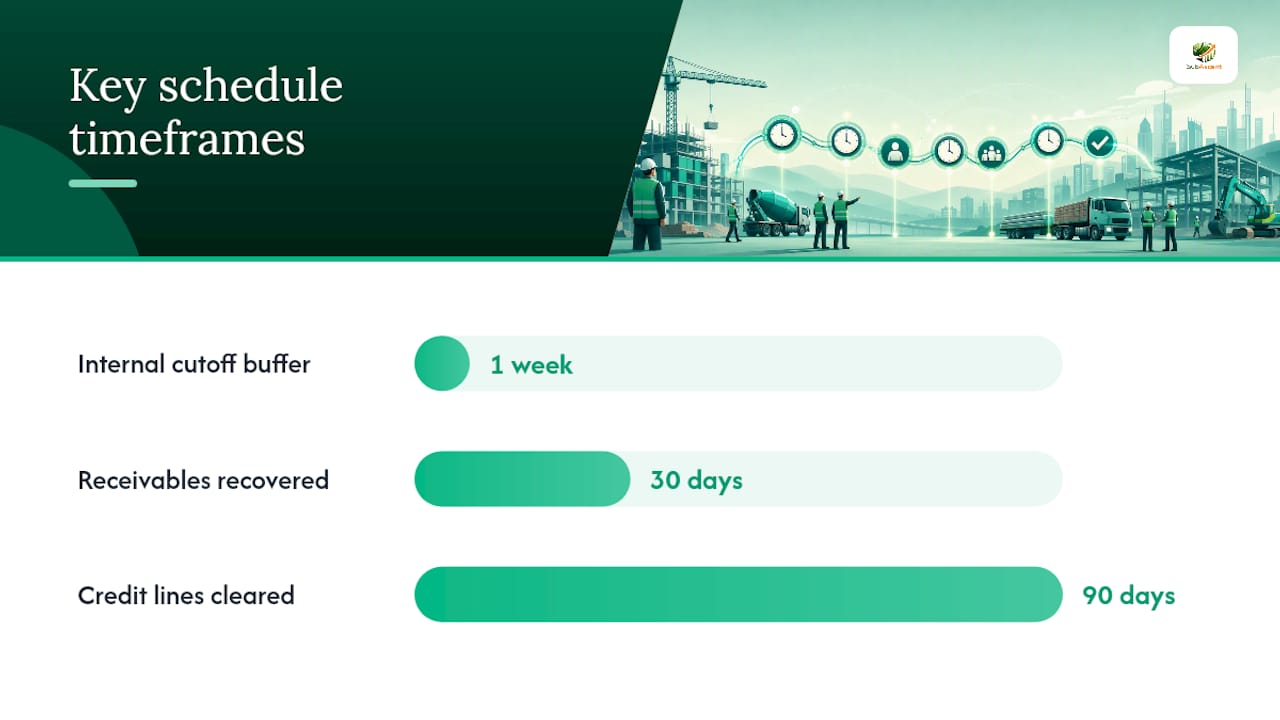
Progress billing works when three things stay fixed: a clean SOV, a monthly billing date that never moves, and a collections routine that runs on schedule regardless of how busy the field gets. One case example in that same guide describes a contractor who rebuilt exactly those three elements and recovered $310,000 in receivables within 30 days, then cleared their credit lines within 90.
Set your internal cutoff a full week before the GC's actual billing deadline. That buffer is what catches a missing signature or a math error before it becomes a rejected pay app instead of after.
How to Handle Change Orders Without Losing Weeks of Billing
The single biggest cause of unbilled change-order work is simple: the field does the work before anyone signs the paperwork. Change orders must be recorded, priced, and approved before you bill them, and that rule has to hold even when the GC's superintendent verbally told your foreman to "just get it done."
Treat every CO request as a separate item from an executed CO. A verbal directive or an emailed request is not billable yet. It becomes billable once someone with signing authority puts a signature on it.
Before you send a CO for approval, gather the field evidence that supports it:
- Dated photos of the added or changed work
- Daily log entries referencing the directive
- T&M tickets if the work is being billed hourly
Once signed, add the change order to your G703 as a new line item and update the contract sum on your G702 accordingly. Don't fold it quietly into an existing line. It needs to be traceable on its own.
If a GC sits on an executed CO and won't include it in the next draw, a change-order log shared monthly gives you leverage. It's harder to ignore a running list with dates and dollar amounts than a single email buried three weeks back.
Approval Matrix: Who Signs Off, and at What Dollar Amount
Small trade offices don't need a five-layer approval chain. They need three or four roles with clear authority and no ambiguity about who checks what.
A workable split looks like this:
- Estimator: Confirms the SOV math and percent-complete figures match field reality before anything moves forward.
- Project manager: Verifies change-order status and stored-materials documentation, since PMs are closest to daily field conditions.
- Office admin: Checks lien-waiver compliance and formatting before anything goes out the door.
- Owner or principal: Signs off on anything above a set dollar threshold, say $10,000 to $25,000 per invoice, adjusted to your typical job size.
Every approver checks the same four things regardless of role: SOV alignment, change-order execution status, lien-waiver readiness, and stored-materials backup. That redundancy is intentional. It's cheaper to catch an error twice than to have a pay app bounce back from the GC.
For genuine emergencies, allow retroactive approval but require it in writing within 24 hours. An unwritten exception has a way of becoming the new normal.
A Weekly Routine That Keeps the Payment Clock Moving
Billing discipline lives or dies on the calendar, not on good intentions. Set a fixed internal cutoff one week ahead of the GC's actual deadline and treat it as non-negotiable, even during your busiest weeks.
- Monday: pull the aging report. Flag anything crossing 30, 60, or 90 days and assign a specific follow-up action for each bucket.
- Midweek: chase lien waivers continuously, not just at draw time. A short, direct message works better than a formal demand: "Following up on the waiver for the March draw, need it to release this month's payment on our end too."
- Friday: confirm next week's submissions are on track, with all documentation already collected rather than scrambled together the morning of the deadline.
A weekly AR process with 30/60/90 follow-ups and continuous lien-waiver collection keeps invoices from drifting into the kind of aged receivables that require a lawyer instead of a phone call.
Pro Tip: Track days sales outstanding (DSO) monthly, even with a simple spreadsheet. A rising DSO trend is the earliest warning sign of a cash problem, usually visible two or three months before it actually hurts.
Practical Tips From the Field, by Trade
Block one hour a week, same day, same time, for billing review. Treat it like a job walk you can't skip.
- Electrical subs: split SOV lines by panel phase (rough-in, trim, gear set) rather than one lump "electrical" line.
- Plumbing: separate rough-in from trim-out; they happen weeks apart and reviewers expect to see that gap reflected.
- Concrete: bill by pour number, not by percentage of the whole job. It's easier to defend and easier to verify against daily logs.
- Log verbal field directives the same day they happen, then convert them into a written CO request within 48 hours, before memory of the details fades.
- Attach photos with every invoice touching physical progress. It's the single fastest way to stop a reviewer's questions before they're asked.
What an Invoice Approval Workflow Actually Does for a Trade Sub
An invoice approval workflow is the set of steps a specialty trade business follows to review, verify, and sign off on outgoing progress invoices, final invoices, and change-order bills before they reach a general contractor or client. It's the internal quality-control layer that sits between "the work happened" and "the money's requested."
Without it, invoicing turns into whoever's free that afternoon typing numbers into a form and hoping nothing's wrong. With it, every dollar billed has been checked against the contract, the field records, and the paperwork the GC requires to pay it.
The purpose isn't bureaucracy for its own sake. A workflow like this exists to solve three specific problems that hit trade subs harder than general contractors: thin cash cushions that can't absorb a 30-day billing delay, GC reviewers looking for any excuse to kick a pay app back, and the practical reality that most trade offices have one or two people handling invoicing on top of their other job responsibilities.
An invoice approval workflow also creates an audit trail. If a GC disputes a line item six months later, or a dispute over retainage lands in front of a lawyer, the paper trail from a disciplined workflow, dated approvals, signed COs, submission logs, is what settles the argument fast instead of dragging it out.
For a five-person electrical sub or a twelve-person mechanical contractor, this doesn't need to be complicated. It needs to be consistent, repeatable, and followed even during the busiest week of the season.
The Stages Every Pay Application Moves Through
Every invoice approval workflow, regardless of trade or job size, moves through the same core stages, even if the specific documents differ.
Stage one: documentation gathering. This happens continuously throughout the billing period, not just at the deadline. Daily logs, signed COs, photos, and time cards accumulate as the work happens.
Stage two: internal review. Someone, usually a PM or estimator, checks the draft pay application against the SOV and confirms percent-complete figures are defensible.
Stage three: approval sign-off. A designated approver reviews and signs, whether that's a digital signature, an email confirmation, or a physical initial on a printed form.
Stage four: submission. The pay app goes out through whatever channel the GC requires, direct email, a payment portal like Textura or GC Pay, or a physical delivery for smaller GCs still working on paper.
Stage five: tracking and follow-up. The invoice enters an aging log with a scheduled follow-up date, and stays tracked until payment clears.
Most rejected pay applications fail at stage two, not stage four. Reconciliation errors, percentages that don't add up, totals that don't match the SOV, billed COs that were never executed, get caught in review at well-run offices and slip through everywhere else.
Software Tools That Support Invoice Approval
Manual invoice approval works fine for a two-person shop billing three jobs a month. It breaks down fast once you're running six or eight active jobs with different GCs, different billing cycles, and different documentation requirements for each.
Generic accounting software like QuickBooks handles the invoice itself but has no concept of a schedule of values, percent-complete tracking, or change-order integration. It's built for issuing an invoice, not for managing the approval chain that has to happen before that invoice exists.
Job and bid management platforms built specifically for trade subcontractors close that gap. The better ones tie the SOV directly to job records, track change orders as they're requested and executed, flag stored-materials documentation gaps before submission, and sync approved invoices straight to QuickBooks instead of requiring double entry. That's the difference between an invoice management software built for general ledger accounting and one built around how subcontractors actually bill.
Workflow automation tools matter most for the repetitive parts: aging reminders, follow-up scheduling, and generating the next month's pay app off last month's template instead of rebuilding it from scratch. Automation doesn't replace the approval judgment calls, whether a CO is properly executed, whether percent-complete is honest, but it removes the transcription errors and missed follow-ups that eat hours every week.
Best Practices for Keeping the Workflow Fast and Reliable
Streamlining invoice approvals doesn't mean cutting corners on review. It means removing friction from the parts of the process that don't require judgment.
A few practices separate offices that bill on time from ones that chronically scramble:
- Standardize your SOV template across jobs so PMs and estimators aren't rebuilding structure every month.
- Run reconciliation as a checklist, not a memory exercise. A short internal reconciliation pass before submission catches most errors that would otherwise trigger a rejection.
- Centralize documentation by job, not by document type, so anyone on the team can pull a full pay-app package without hunting across five different folders.
- Automate what's repetitive, aging alerts, waiver reminders, template generation, and reserve human review for the judgment calls: percent-complete accuracy, CO execution status, and dispute risk.
One system of record for job costs, pay applications, waivers, and payment status shrinks the time it takes to get paid and cuts the rework that happens when the same data lives in three disconnected spreadsheets. That consolidation matters more for a ten-person sub than a two-hundred-person GC, because the sub doesn't have a dedicated billing department to absorb the chaos.
The goal isn't speed for its own sake. It's removing the delays that come from disorganization so the delays that remain are the GC's, not yours.
Staying Audit-Ready: Compliance Considerations in Invoice Approval
Every pay application you submit is a document someone could scrutinize later, whether that's a GC's accounting team, a bonding company, or, in a payment dispute, an attorney. Building compliance into your workflow from the start beats trying to reconstruct a defense after the fact.
The core compliance discipline is three-way matching: confirming your pay application, your field progress records, and your executed lien waivers all tell the same story.
Lien waivers deserve particular attention here. A conditional waiver protects you until payment actually clears; an unconditional waiver signs away lien rights immediately. Mixing these up, or issuing an unconditional waiver before funds are in hand, is one of the most damaging paperwork mistakes a sub can make, and it's avoidable with a documented lien waiver process baked into your approval workflow.
Keep a dated record of every approval, whether that's a digital signature timestamp or a saved email thread. If a GC later claims a change order was never approved, or a payment was authorized under different terms, the paper trail is your only real defense. Build that record-keeping into the workflow itself rather than treating it as a separate compliance task, because the version you create under deadline pressure during a dispute is never as clean as the one built in real time.
Author Perspective: Own the Billing Process to Control Cash Flow
Small trade subs don't lose money on bad jobs nearly as often as they lose it on sloppy billing. The fix isn't a bigger system. It's picking three or four rules and actually holding to them every month. Run this checklist for 30 days. Track what changes.
— Dave
How Subascent Runs This Workflow For Your Crew
Subascent keeps your SOV, pay applications, change orders, and QuickBooks sync tied to a single job record, so nobody's rebuilding the same spreadsheet three times a month. Right now, most trade offices track SOV percentages in one file, change-order status in an email chain, and lien-waiver status in someone's memory. Consolidating all three onto one job record is what cuts the reconciliation time that eats up a Friday afternoon before every draw.

When a change order gets executed, it updates the SOV automatically instead of requiring a manual line-item rebuild on the next pay app. When a pay application goes out, the aging clock starts without anyone having to remember to log it. That's the gap between a workflow that exists on paper and one that actually runs itself week after week.
If you're still piecing this together across a spreadsheet, a shared drive, and QuickBooks, start a free trial with Subascent and see how the job record, SOV, and pay-app tracking work together on your next draw.
Sources
- Construction payment management: The complete guide | Corpay
- Subcontractor progress billing guide | ConstructionCFO
- Construction progress billing (2026) | SubcontractorHub