

When a delay hits, do this first: record the exact start time, the specific cause, every worker and piece of equipment idled, the precise work area, and take GPS-tagged photos — then send a same-day written notice to the GC before you leave the site. That single habit is how foremen document delay events in a way that actually survives review.
Same-day notice template (copy and paste): "Per our conversation today at [time], [X workers / equipment] on [trade] scope at [area/grid] were idled due to [specific cause, e.g., RFI #47 pending — duct conflict at grid B3]. We are tracking standing time and will follow up with a formal daily entry. Please confirm receipt."
The CrewTrack mobile app from Subascent produces timestamped, GPS-tagged, exportable entries directly from your phone — so the record is created on site, not reconstructed at the office later.
Table of Contents
- What does a foreman need to record for every delay day?
- What is the day-of workflow from discovery to sending notice?
- Copy-paste templates and trade-specific sample entries
- How do you preserve photos and files so records stay credible?
- What does the office need to price a change order from your field notes?
- What mistakes weaken a delay record and how do you fix them?
- One-page printable checklist for your phone or truck
- Key Takeaways
- The habit that actually protects you
- CrewTrack by Subascent keeps your delay records claim-ready from day one
What does a foreman need to record for every delay day?
Daily reports that quantify standing time become the primary evidence used to calculate change order costs. Vague entries like "delayed by weather" get dismissed. Precise ones get paid.
Six non-negotiable fields for every delay entry:
- Date and exact times: Start time, end time (or "ongoing — continues from [date/time]"), and timezone.
- Cause: Specific phrasing only. "RFI #47 pending — duct conflict at grid B3" beats "coordination issue" every time.
- Impact: Which tasks were blocked, which activities on your scope were pushed, and any sequence effects on following trades.
- Standing time data: Scheduled crew count vs. actual workers on site, idle hours per worker, idle equipment (unit type and serial number if applicable).
- Location: Area, level, grid reference. GPS coordinates when possible.
- Who was present: Names and roles of the GC superintendent, owner rep, or inspector — and any verbal acknowledgements they gave you.
Evidence to collect the same day: timestamped GPS photos (before and after), delivery receipts, supplier correspondence, sub crew logs, and timecards. See how foremen track crew hours for field-level methods.
Trade-specific one-liners:
- Electrical: "Conduit pull at Panel L-3 halted 1:15 PM — ceiling grid not cleared by framing; 3 electricians idled 1.5 hrs."
- Plumbing: "Rough-in at Level 2 baths stopped 9:00 AM — concrete slab not poured per schedule; 2 plumbers idled 4 hrs."
- Concrete: "Pour at Grid C4 postponed 7:00 AM — rebar inspection not completed; 5 laborers and 1 pump truck idled 3 hrs."
- Framing: "Wall layout at Unit 14 blocked 10:30 AM — structural steel delivery delayed; 4 framers idled 2 hrs."
Document normal, productive days too. A baseline of regular entries makes delay days stand out clearly when the office builds a timeline.
What is the day-of workflow from discovery to sending notice?
Pro Tip: Use voice-to-text during your final site walkthrough. Dictate the entry while the conditions are still in front of you — it takes 90 seconds and beats trying to reconstruct details from memory at 6 PM.
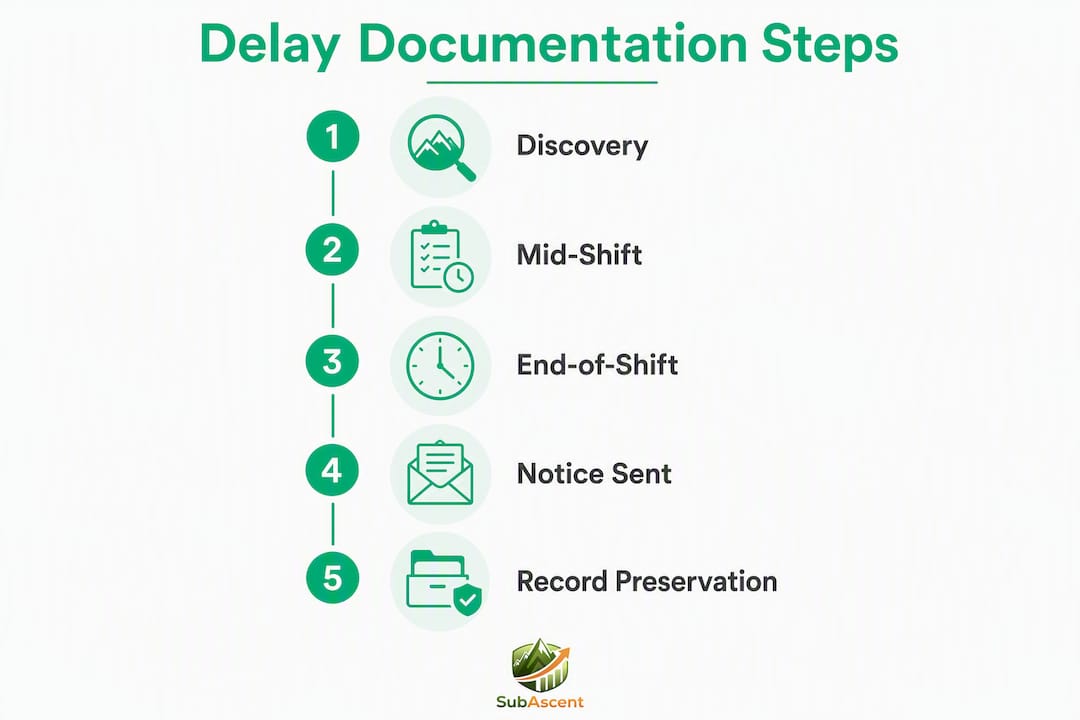
Follow this order every time a delay occurs:
Immediate actions (at discovery)
Stop the affected task. Take "as-found" photos before anything moves. Record the start time and the specific cause. Note the name and role of anyone who gave you a direction or acknowledged the condition.
Mid-shift actions
Collect crew counts and equipment logs. Capture any verbal acknowledgements in writing — even a quick text to the GC super counts. Attach supplier notes or inspection hold notices if present.

End-of-shift actions
Write the daily entry before you leave. Not tonight. Not Friday. Arbitrators prefer same-day entries; a weekly reconstruction destroys credibility in back-charge disputes. Attach photos and files, submit to the office, and send the same-day written notice (email or RFI) to the GC.
File-naming convention: PROJECTCODE_AREA_DATE_EVENTTYPE
Example: SUB123_Floor4_20260403_Delay_RFI47
Flag the entry as "claim relevant" at the time you write it. Systems that let you tag entries reduce hours of office work when assembling a delay package later.
| Step | Action | Timing |
|---|---|---|
| Discovery | Photos, start time, cause, who directed | Immediately |
| Mid-shift | Crew counts, equipment log, verbal acknowledgements | Before lunch or at break |
| End of shift | Daily entry, attach photos/files, submit to office | Before leaving site |
| Same-day notice | Email or RFI to GC with entry attached | That afternoon |
| Follow-up | Confirm GC receipt; escalate if no reply | Within 48–72 hours |
Copy-paste templates and trade-specific sample entries
Daily report snippet (copy into your log)
Date: [Date] | Time: [Start] – [End/Ongoing] Location: [Area / Level / Grid] Cause: [Specific — RFI #, inspection hold, delivery failure, etc.] Crew scheduled: [#] | Crew idle: [#] | Idle hours/worker: [hrs] Equipment idled: [Type, serial if applicable, hours] Photos attached: Yes / No | File names: [per naming convention] Verbal acknowledgement from: [Name, Role]
Three trade-specific sample entries
Electrical — RFI hold: "April 3, 2026, 1:15–4:00 PM. Panel L-3 conduit pull halted — ceiling grid conflict, RFI #47 submitted 11:00 AM, no response. 3 electricians × 2.75 hrs = 8.25 idle labor hours. Photos: SUB123_PanelL3_20260403_Delay_RFI47_01–03."
Concrete — inspection delay: "April 3, 2026, 7:00–10:30 AM. Grid C4 pour postponed — rebar inspection not completed per schedule. 5 laborers × 3.5 hrs = 17.5 idle labor hours; 1 pump truck × 3.5 hrs idle. GC super (J. Martinez) verbally acknowledged at 7:20 AM. Photos: SUB123_GridC4_20260403_Delay_Insp_01–04."
HVAC — differing site condition: "April 3, 2026, 8:00 AM–12:00 PM. Duct installation at AHU-2 blocked — existing beam not shown on drawings at elevation 12'-6". 2 HVAC mechanics × 4 hrs = 8 idle labor hours. RFI #52 submitted 8:30 AM. Photos: SUB123_AHU2_20260403_Delay_DSC_01–02."
Email/RFI templates
Confirm verbal direction: "This confirms your direction at [time] today to [action]. We are proceeding and tracking any cost impact."
Blocked task pending RFI: "Our [trade] scope at [area] is currently on hold pending RFI #[X]. Standing time is being tracked from [time]. Please advise."
Differing condition notice: "We encountered a condition at [area] not reflected in contract documents. Work is suspended pending direction. See attached photos and daily entry."
Standing time cost calculation
| Item | Value |
|---|---|
| Idle labor hours (example) | 8.25 hrs |
| Extended general conditions (prorate) | Add separately per project |
These numbers go straight to your estimator. Pair them with the field RFI submittal process to make sure the written notice is formatted correctly.
How do you preserve photos and files so records stay credible?
GPS-tagged photos attached to the daily entry are stronger than text descriptions alone. A photo sitting in your camera roll with no project tag is nearly useless in a dispute.
Photo best practices:
- Shoot before and after the condition changes.
- Include a tape measure or phone compass in at least one photo per condition for scale.
- Attach photos to the daily entry immediately — do not leave them in the camera roll.
- Name files per the convention:
PROJECTCODE_AREA_DATE_TYPE_SEQUENCE.
Sending written notice:
Send a written confirmation the same day a direction is given or a delay is discovered. Copy your PM and save a copy to the project file. If the GC does not acknowledge within 48–72 hours, follow up in writing and reference your original message.
A daily log entry plus same-day email or RFI creates a durable chain of evidence: the log proves the observation, the email proves the GC was notified. Together they close the "he-said-she-said" gap. For electronic sign-off and confirmation workflows, handling practical completion electronically shows how digital acknowledgements hold up.
Prefer systems that produce tamper-evident export hashes. Note any edits with a timestamp and reason — unexplained edits are a red flag to arbitrators.
Contemporaneous daily logs are the primary evidence arbitrators request. Document the same day to retain full credibility.
What does the office need to price a change order from your field notes?
When the office gets a well-packaged delay record, estimators can price the change order without calling you back for reconstruction. When they get a vague summary, they guess — and guesses get rejected.
Provide a structured export with a chronological timeline, GPS photos ordered by date, daily entry excerpts with timestamps, and any weather records. That package shortens dispute resolution and improves estimate accuracy.
| Evidence type | Office value |
|---|---|
| Timestamped daily entries | Establishes timeline and contemporaneous record |
| GPS-tagged photos | Proves site condition at the time of delay |
| Crew/equipment logs | Provides the math for standing time calculations |
| RFIs and emails with timestamps | Confirms GC notification and chain of custody |
| Delivery receipts / supplier correspondence | Supports material delay and differing condition claims |
| Timecards | Validates idle labor hours for change order pricing |
The numbers your estimator needs: total idle labor hours by trade, idle equipment hours, direct material rework time, and any overtime or acceleration costs. Pair the daily entries with crew productivity tracking data to give the office a complete picture.
What mistakes weaken a delay record and how do you fix them?
Most delay claims fail in the field, not in the office. The documentation was either late, vague, or missing the one piece of evidence that would have closed the argument.
- Batching reports at week's end: Same-day, specific entries only. A Friday reconstruction of Monday's delay reads as fabricated to arbitrators.
- Vague cause language: "Coordination issue" or "weather delay" without measurable detail gets dismissed. Write the specific condition, the exact time, and the exact count of workers and equipment affected.
- Missing photos or crew counts: Either one alone weakens the record. Both together are what make standing time math defensible.
- Verbal-only notices: Always follow a verbal direction with a brief written confirmation that references your daily entry. Avoiding RFI workflow mistakes keeps the written record clean.
- Inconsistent timestamps or unexplained edits: Use a system with an audit trail. Any edit without a timestamp and reason is a credibility problem.
- Only documenting problem days: Normal productive days create the baseline. Without them, there is nothing to compare the delay day against.
Quick fixes: adopt the six non-negotiable fields, use voice-to-text at sign-off, and flag "claim relevant" entries the moment you write them.
One-page printable checklist for your phone or truck
Before you leave the site, confirm all six fields are complete:
| Field | What to record |
|---|---|
| Date and time | Start time, end time or "ongoing," timezone |
| Location | Area, level, grid reference, GPS if available |
| Cause | Specific — RFI number, inspection hold, delivery failure |
| Crew scheduled vs. actual | Scheduled count, actual idle count, idle hours per worker |
| Equipment idled | Type, serial number if applicable, idle hours |
| Photos attached | Before/after, scale reference, named per convention |
File-naming reminder: PROJECTCODE_AREA_DATE_EVENTTYPE_SEQUENCE
Screenshot this table and keep it on your phone's home screen. A short, consistent form with these six fields increases adoption and cuts late, incomplete logs.
Key Takeaways
Same-day, GPS-tagged entries paired with a written notice to the GC are the minimum standard for a delay record that survives review.
| Point | Details |
|---|---|
| Document the same day | Contemporaneous entries are what arbitrators request; weekly reconstructions destroy credibility. |
| Quantify standing time | Record idle workers × hours and idle equipment hours so estimators can calculate costs directly. |
| Send written notice immediately | Email or RFI to the GC the same afternoon, copied to your PM, creates the chain of custody. |
| Preserve photo metadata | GPS-tagged, timestamped photos attached to the daily entry are stronger than text descriptions alone. |
| Use Subascent CrewTrack | The free CrewTrack mobile app produces tamper-evident, exportable entries with GPS tagging and claim-relevant flagging built in. |
The habit that actually protects you
Most foremen know they should document delays. The ones who actually get paid are the ones who made it a non-negotiable end-of-shift routine, not a task they get to when things slow down.
Tie report submission to departure time. If you are not out of the gate until the daily entry is submitted, it gets done. Some crews set it up so the PM calls if the report is not in by a set time — that social accountability closes the gap faster than any app or reminder.
The bigger mental trap is assuming the PM will remember. They will not. The GC super who verbally acknowledged your delay at 9 AM will have no recollection of it by Friday. Your written entry from that afternoon is the only thing that exists. Treat every delay entry like a legal deposition: who, what, where, and how long. That framing makes the habit feel less like paperwork and more like protection.
Document normal days too. Foremen who only log problem days hand the other side an easy argument: "They only wrote things down when they wanted money." A consistent daily log with flagged delay entries tells a completely different story.
CrewTrack by Subascent keeps your delay records claim-ready from day one
Foremen who document delays on paper or in a notes app create extra work for the office and risk losing the metadata that makes records credible. CrewTrack, Subascent's free mobile app for foremen, solves that directly.

Every entry in CrewTrack is timestamped and GPS-tagged at the moment you create it. You can flag any entry as "claim relevant" on the spot, attach photos directly to the report (not the camera roll), and export a structured delay package — chronological entries, photos, and timestamps — that your estimator can price from without a single follow-up call. File naming follows the convention automatically. Your entries belong to your subcontracting business, not the GC's platform.
CrewTrack is included with every Subascent subscription. Start a free trial at Subascent and have your first tamper-evident delay entry submitted before you leave the site today.